Showing posts with label Customer Engagement. Show all posts

Tuesday, November 17, 2020

Dynamics 365 and Power Platform monthly reading list October 2020

Technical topics (Configuration, customization and extensibility)


Topics for Dynamics 365 Business Application Platform consultants, project managers and power users

Tuesday, October 20, 2020

Dynamics 365 and Power Platform monthly reading list September 2020

Technical topics (Configuration, customization and extensibility)

Topics for Dynamics 365  Business Application Platform consultants, project managers and power users

Wednesday, September 23, 2020

Dynamics 365 and Power Platform monthly reading list August 2020

Technical topics (Configuration, customization and extensibility) 

Topics for Dynamics 365 Business Application Platform consultants, project managers and power users

Wednesday, August 26, 2020

Dynamics 365 and Power Platform monthly reading list July 2020

Technical topics (Configuration, customization and extensibility)
Topics for Dynamics 365 Business Application Platform consultants, project managers and power users

Friday, August 07, 2020

Notes on the Power Virtual Agent in a day lab

Microsoft recently also released a Power Virtual Agent in a day and I decided to give it a try. Power Virtual Agents are one of the components in the Power Platform which allow you to built intelligent chat bots without any coding or AI experience.

Since Power Virtual Agents are built on the Power Platform and the Azure Bot Framework you still have the option to extend the capabilities to suit your organisations needs.

Some notes on the Power Virtual Agent lab:
  • The creation of a virtual agent or bot is super easy and intuitive with a simple graphical interface for authoring the logic  that will drive your bots. The authoring canvas for the conversation tree has a great user experience and enables non-developers to create a powerful chatbot experience.

  • After you import the SolutionPowerVirtualAgentInADay.zip solution file, you will need to reconfigure the connections in the different Power Automate Flows - to do this you will need to use the unique name of the CDS instance - so if you have used a Dynamics CRM instance you can not use the readable name - don't forget to add the region shorthand as well.
  • If you are familiar enough with Dynamics 365 and/or Power Platform you will be able to complete the labs in a couple of hours.
  • The built-in integration with Power Automate allows you to leverage the over 250+ external services and systems so the only limit is your imagination.

References:

Tuesday, July 21, 2020

Setting up Omnichannel for Customer Service on an existing Dynamics 365 trial

Omnichannel for Customer Service is a Microsoft first party Dynamics 365 app which extends Dynamics 365 Customer Service which enables you to connect different channels (SMS, chat, Facebook, etc...) to your existing Dynamics 365 Customer Service App.

Listed below are  the different steps required to setup a demo scenario with chat integration for Omnichannel for Customer Service in a blank (no first party app selected upon trial setup) demo trial environment  which had customer service installed afterwards:

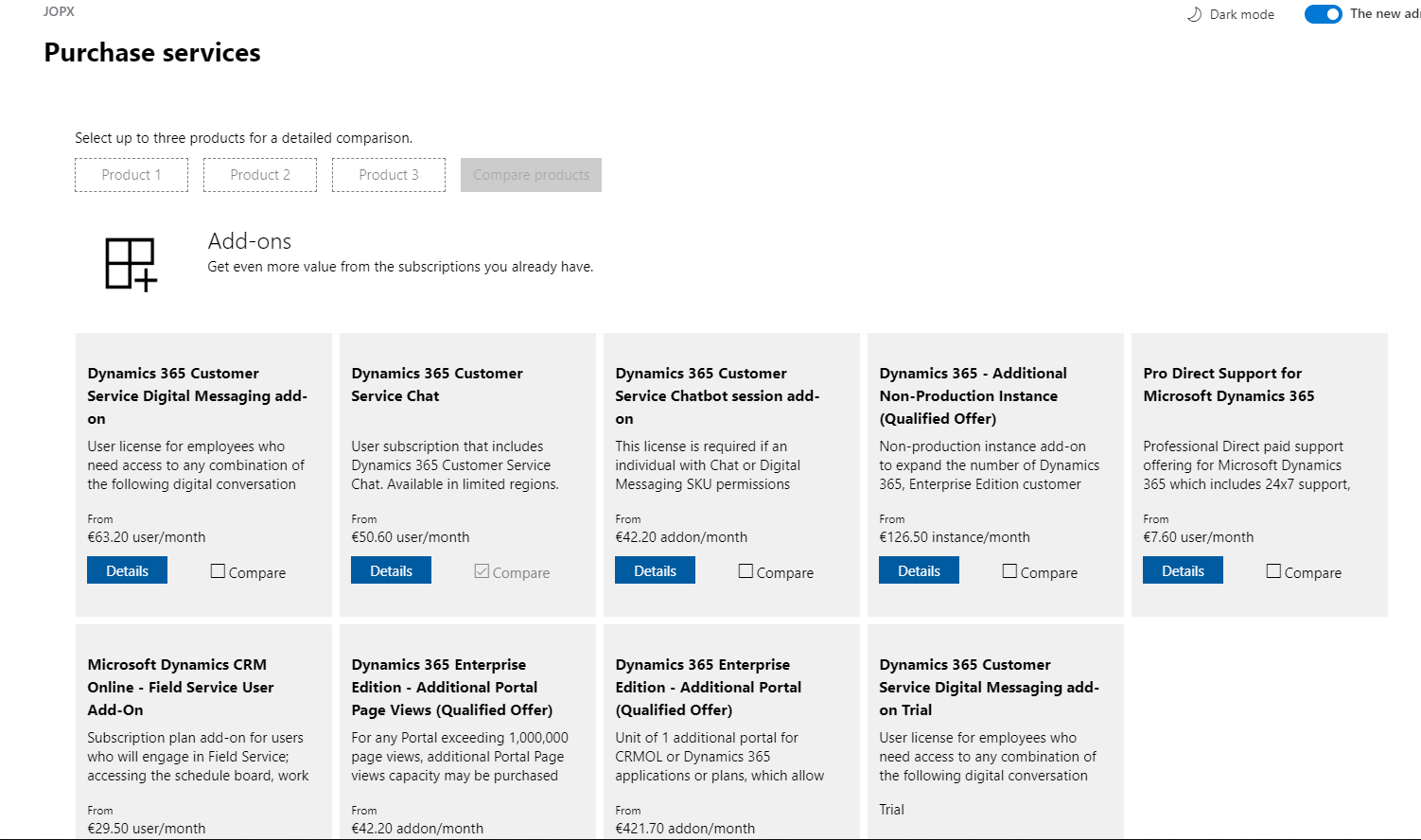
  1. Omnichannel for Customer Service is an add-on which requires a separate license so you first need to add this add-on in your tenant. Go to Billing > Purchase Services and select add-ons. Search for Dynamics 365 Customer Service Digital Messaging add-on trial and select it.
  2. After enabling the add-on you will need to provision Omnichannel for Customer Service by first providing data access consent and in a next step provisioning the Omnichannel for Customer Service application. The official Microsoft documentation still show how to to this from the legacy Dynamics 365 admin portal but you can do this from the new Power Platform Admin Portal as well - click the three dots and select manage for the Omnichannel for Customer Service
  3. In the separate Omnichannel for Customer Service screen you will be able to enable the different channels that you want to support. The initial setup might take a couple of hours to complete so check the same page for the status of the setup later on.
  4. Next you will need to assign the "Dynamics 365 Customer Service Digital Messaging add-on" license to the users who need have a  Omnichannel for Customer Service security role.
  5. To enable chat integration, you need to create a code snippet to embed the chat control on your website or portal. You can follow the steps on the Microsoft Omnichannel for Customer Service Administrator > Quickly configure a chat widget  which use a Customer Service Portal but you can add this chat widget to your own website as well.
  6. Support agents can use the Omnichannel for Customer Service app to interact with the users to follow up on their questions and complaints. When a new conversation comes in, it will be routed to available agents who can accept this incoming conversation. (Take a look at Understand unified routing and work distribution to understand how you automate work assignment across channels taking into account agent's capacity and skill sets)
  7. A customer agent will be able to interact with the customer using an inline chat window which is built on top of the Customer Service application which means that you will be able to leverage the full available context of the customer (existing contact info, open cases, etc ...)
There were lot of new features added to Omnichannel for Customer Service in the 2020 release wave 1 so definitely take a look at the Microsoft Business Applications Summit recording below or take a look at the Omnichannel for Customer Service sessions on Microsoft Learn.

References:

Saturday, June 20, 2020

Dynamics 365 and Power Platform monthly reading list May 2020

Technical topics (Configuration, customization and extensibility)

Topics for Dynamics 365 Business Application Platform consultants, project managers and power users

Wednesday, June 17, 2020

How to fix a broken Easyrepro project after upgrading Chrome

After I recently upgraded Chrome I noticed that my Easyrepro test project did not build/run anymore. (read Easyrepro - UI automation test library for Dynamics 365 and  CDS if you are not familiar to Easyrepro)

Luckily the exception pointed in the correct direction "System.InvalidOperationException: session not created. This version of ChromeDriver only supports Chrome version 79 (SessionNotCreated)".


The EasyRepro testing framework leverages Selenium ChromeDriver so you need to check the compatibility - see https://chromedriver.chromium.org/downloads 

To fix the error I just had to update the Nuget package to a version which is compatible with the installed Chrome on my machine.


Storage capacity enforcement for CDS instances

Storage capacity enforcement now seems to activated, this means that when your capacity storage is greater than the entitled capacity, admin operations like creating, copying and restore environments will be blocked.

Thursday, June 11, 2020

Farewell to the Dynamics 365 Admin Center

In 2019 Microsoft announced that they would consolidate the different admin centers for Power Platform and Dynamics 365 Sales/Customer Service/Field Service. In the meanwhile, more and more functions seem to be moving to the new Power Platform Admin Center. Although the legacy Dynamics 365 admin center deprecation is not listed (yet) on the Important changes (deprecations) coming in Power Apps, Power Automate and model-driven apps in Dynamics 365. I expect this admin portal to quickly fade away.  

Update June 28th: @jukkan just mentioned that there is an update in Message Center which officially states that the old Dynamics 365 Admin Center will go away. I like the speed of innovation in the cloud but this seems like incredibly short notice.


To be able to access the Power Platform Admin Portal you will need to assign an appropriate service admin role - see Use service admin roles to manage your tenant for more details.

Features/functionality which is now surfaced in the new Power Platform Admin Portal:
  • App management in the Applications tab of the legacy Dynamics 365 Admin center has now moved to Power Platform Admin Center - see  Manage Dynamics 365 Apps for more details. This applies to installing and managing Microsoft first party apps like Customer Service but also to other apps installed through AppSource. You first need to select your environment in the new admin center and use the Resources>Dynamics 365 apps menu to open the list of available apps to install. This same screen can be used to upgrade existing apps to newer versions. (Unfortunately there is no indication when there is a new app version available)


Tuesday, May 19, 2020

Dynamics 365 and Power Platform monthly reading list April 2020

Dynamics 365 and Power Platform -2020 Wave 1 Topics

Technical topics (Configuration, customization and extensibility)
Topics for Dynamics 365 Business Application Platform consultants, analysts, project managers and power users

Monday, May 18, 2020

Power Platform ALM process guidance published and Power Platform Build Tools general available

Microsoft just published dedicated documentation around Application Lifecycle Management (ALM) with the Power Platform and Dynamics 365. This is a great starting point for everyone who wants to mature their development and deployment practice.

At the same time Microsoft announced the general availability of their Microsoft Power Platform Build Tools for Azure DevOps .  If you have used the preview version of the Power Platform Build Tools you will need to install the new extensions and you will need to recreate your build and release pipelines. You can install the Power Platform Build Tools extension from Azure Marketplace and they are free to use within Azure DevOps Services (online) or Azure DevOps Server.


Keep in mind though that setting up a good ALM practice, is about more than just tooling being in place (For a good discussion take a look at Continuous Integration is not a tooling problem)

If you are already using tooling like the Power DevOps Tools from @waelhaemze, it might not (yet) make sense to switch over but if you are new to DevOps/ALM for Dynamics 365/Power Platform definitely take a look (for more background on this topic see My Perspective on the PowerApps Build Tools for Azure DevOps )

Friday, May 15, 2020

Quick tip: generate and integrate mock data for Dynamics 365

If you are doing demos for Dynamics 365 it might be needed to generate mock data - an interesting tool for this is Mockaroo. You can just download a dataset that you generate from the website but Mockaroo also exposes a number of APIs that you access.


An interesting example of leveraging the API is outlined in Power Automate your demo data by @dylanhaskins


Thursday, May 14, 2020

Easyrepro - UI automation test library for Dynamics 365 and CDS

With the "One version" update policy of Dynamics 365 (Sales,Customer Service, Field Service,...) it starts making more sense to include some level of test automation in your projects. If you look at the test pyramid - it however also becomes apparent that user interface testing is still quite cumbersome and I think that the majority Dynamics 365 projects do not include any form of automated UI testing.

With the release of the Easyrepro - the automated UI testing framework for Dynamics 365 on Github in June 2017, writing automated UI test has become easier although it still requires basic developer skills and access to Visual Studio tooling.


The purpose of the Easyrepro library is to provide Dynamics customers the ability to facilitate automated UI testing for their projects. The Easyrepo API's provide an easy to use set of commands that make setting up UI testing quick and easy. The functionality provided covers the core CRM commands that end users would perform on a typical workday and developers area able to extend that coverage to more functionality.

If you want to quickly explore what is possible with the EasyRepro framework, clone the repo on Github and take a look at Microsoft.Dynamics365.UIAutomation.Sample project and see how the different test classes are implemented.


Afterwards I highly recommend you to take a look at the excellent series of blog post written by the Microsoft PFE team:


References:


Thursday, April 30, 2020

Updates to Dynamics 365 release schedule, unified interface transition and team member license enforcement

As outlined in Our commitment to customers help ensure business continuity Microsoft has delayed some of the mandatory upgrades and changes to existing Dynamics 365 environments - below a short overview:
  • Existing Dynamics 365 environments will receive the Wave 2020 update one month later starting beginning of May . See Dynamics 365 release schedule for the exact dates for your geo.
  • Deprecation of the legacy web client and the mandatory transition to the Unified Interface is postponed from October 1th to December 1th 2020.
  • Deprecation of the Dynamics 365 for Outlook (Outlook COM add-in) is scheduled for October 2020 - see The future of Outlook integration for more details
  • Technical enforcement for Dynamics 365 Team Members licenses purchased or transitioned after October 1, 2018 will come into effect on January 31, 2021 (extended from September 30, 2020 - initially planned for April 1, 2020). 

Monday, April 20, 2020

Dynamics 365 and Power Platform monthly reading list March 2020

Dynamics 365 and Power Platform - 2020 Wave 1 Topics


Topics for Dynamics 365 Business Application Platform consultants, analysts, project managers and power users

Thursday, April 02, 2020

Dynamics 365 and Power Platform monthly reading list February 2020

Dynamics 365 and Power Platform - 2020 Wave 1 Topics
Technical topics  (Configuration, customization and extensibility)

Monday, March 09, 2020

Dynamics 365 and Power Platform monthly reading list January 2020

Dynamics 365 and Power Platform - 2020 Wave 1 topics

Starting April 2020, new features in Dynamics 365 and Power Platform will be activated, but you can already try out some of the new features by enabling early access - for a full list of available features see 2020 release wave 1 features available for early access
Technical topics (Configuration, customization and extensibility)

Thursday, February 06, 2020

Quick tip: keep your Dynamics 365 development tools up to date using Nuget

I recently encountered an issue when I tried switching the view of the registered plugins & custom workflow activities in the Plugin Registration Tool.


When updating to the latest version using the PowerShell script listed on Download Dynamics 365 development tools from Nuget the error got resolved. Lessons learned: make sure that you keep your Dynamics 365 development tools up to date.

Monday, February 03, 2020

Lessons learned about Dynamics 365 solution layering - Part 1


This is the first in a series of blog posts on Dynamics 365 solutions and solution layering in which I will cover the basics about Dynamics 365 solutions and gradually delve deeper into the mysterious world of the inner workings of Dynamics 365 solutions.

In my opinion,  based on how managed solutions and solution layering work - I think that in the majority of cases you should only use a single managed solution to avoid issues down the line. Read on to see why...


This blog post assumes that you are using managed solutions to deploy to all environments and only have unmanaged solutions in your development environment.

Dynamics 365 solutions fundamentals

If you work with Dynamics 365/CDS solutions, you should be aware of the concept of solution layering. Solution layering occurs on import of solutions when a specific component is affected by a change within one or more solution. Solution layering will determine the kind of behavior that a user will see in Dynamics 365.

The figure above shows how layering works: at the bottom, you have the standard CDS solutions on top of which you might have some first party apps installed like Dynamics 365 Sales/Customer Service etc... If you deploy custom managed solutions, they will go on top based on the order in which they are installed. Direct customizations and unmanaged solutions are always at the top but there is no real layering of unmanaged solutions - they all end up directly modifying the base behavior.

Solution layers describe the dependency chain of component from the root solution introducing it, through each solution that extends or changes the component’s behavior. Solution layers are created through extension of an existing component (taking a dependency on it) or through creation of a new component or version of a solution. So it is very important to understand that layers should be considered on a per component basis.

In April 2019, Microsoft introduced a new user interface component which visualizes the different solution layers which are impacting the behavior of a specific component - View solution layers for a component. Below is an example of the solution layers of the case form which was quite an interesting example.


Going beyond the basics

But what happens if two or more solutions define solution components differently? This article  - Introduction to solutions - conflict resolution explains the two conflict resolution strategies - Merge and Top Wins. The article is also valid for online according to Microsoft support - even though it was written for Dynamics 365 on premise and last updated in December 2017.


When importing a managed solution with the overwrite customization option, it is possible to override the "top wins" conflict resolution  but this does not apply to components which apply a “merge strategy” - for more details see Understand how managed solutions are merged

So you need to be very careful when adding components which apply a merge strategy in multiple solutions with different publishers since the merge behavior might cause unexpected side effect such as creating a separate active layer on top which would block your customization to appear to the user.

An active layer can emerge in two scenarios - a direct customization was done in the instance but it seems that it is also possible that a managed active layer is created when using only managed solutions without direct customizations in the system. This happens when managed solutions in one system, with different publishers (the Microsoft solutions count as a different publisher) are trying to update the same component. It is a defense mechanism that Microsoft has built in when there are object inconsistencies across managed solutions.

The general recommendation is that you keep the number of managed solutions with common components (e.g. forms with a different form layout) to a minimum. This will avoid merging issues across the layers.

Single solution to rule them all?


Taking into account all of the above it seems that you would opt to use a single managed solution to deploy to other environments.

Single solution approach
Pros:

  • Easier to version control
  • Avoid solution layering issues
  • Less environments needed
  • Easier to promote across environments
Cons:

  • Longer duration of solution import
  • Long list of components


I do think that a single solution might make sense in the majority of cases but there are of course exceptions to this rule.  I would recommend you to take a look at the Solution Lifecycle Management: Dynamics 365 for Customer Engagement Apps whitepaper and especially the section on solution boundaries which outlines some of other valid scenarios for having multiple solutions e.g.  the scenario where you need to deploy to multiple regional production instances with small variations with a core solution approach and on top local solutions  or the scenario where you need to release subsets of applications on different cadence/timeline.