Showing posts with label Flow. Show all posts

Monday, May 02, 2022

Documenting Power Automate Flows with Flow to Visio XrmToolBox Add-on

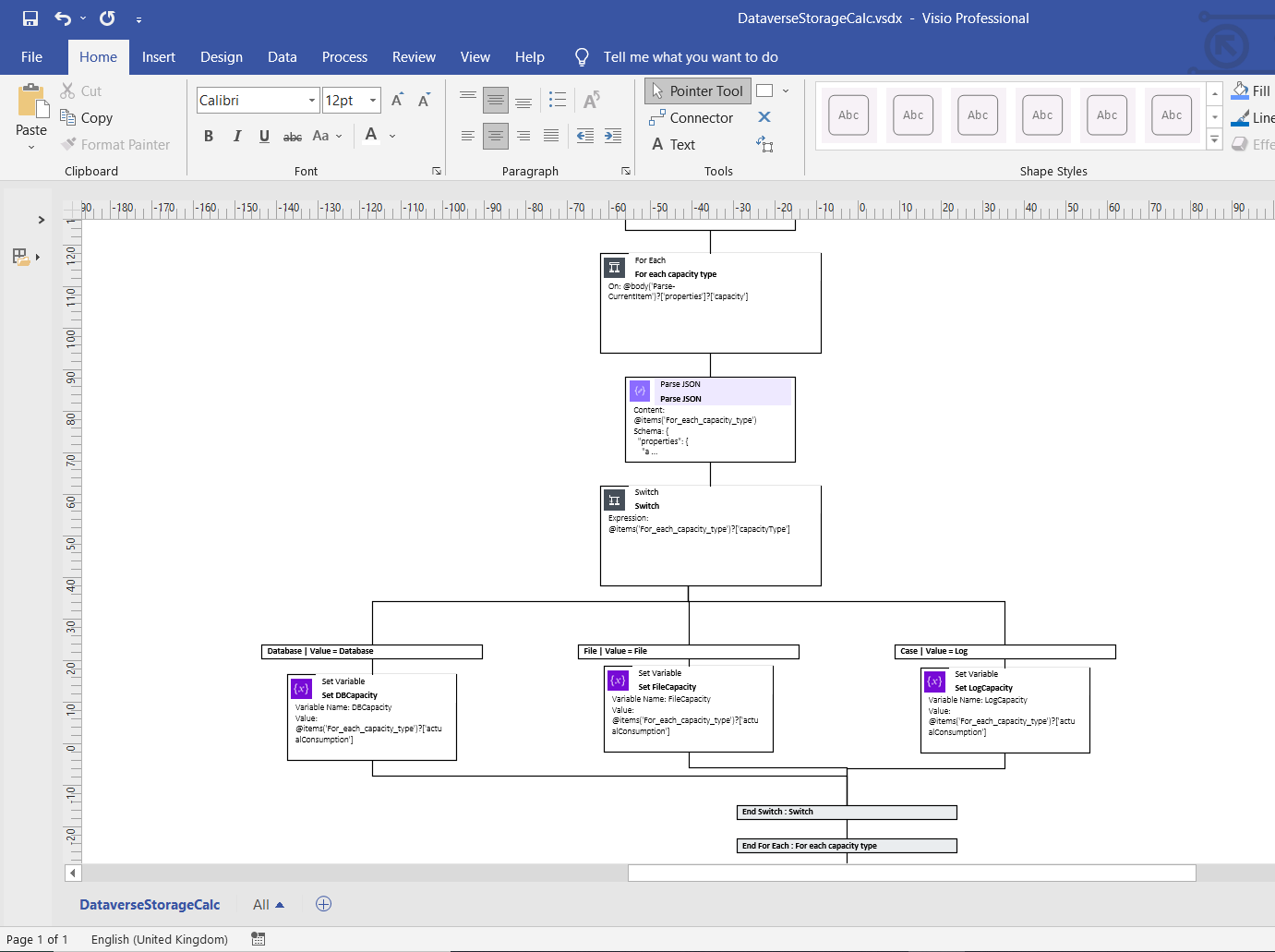
Last year I needed to document some rather complex Power Automate cloud flows and that's when I stumbled upon this great tool from Carl Cookson (aka @LinkeD365): the Flow to Visio XrmToolBox add-on. This XrmToolBox addon - XrmToolBox is the Swiss army knife for CRM  and Power Platform) consultants, check out https://www.xrmtoolbox.com/ for more info -  allows you to generate a Visio diagram for Power Automate Flows and Azure Logic Apps. Being able to generate Visio documents for Power Automate Flows is a great way to automatically generate a starting point for documentation. 

When you connect to a Dataverse instance, it will show you all of the different cloud flows. You can select one or more flows and simply click "Create Visio".


What I especially like about this tool that since the documentation is generated in Visio you can still clean up the output or remove parts of the flow in the Visio document which don't require explanation.


Note: You also might want to take a look at PowerDocu which contains 2 console apps you can use to document Power Automate Flows as well as Power Apps Canvas Apps

References:


Saturday, August 01, 2020

Quick tip : how to check if a Microsoft Teams channel exists in a Power Automate Flow

The new Microsoft Teams connector (Preview) in Microsoft Power Automate Flow makes Microsoft Teams automation scenarios a lot easier. The List channels action will return you a list of one or more channels for a Team. If you want to check if a channel with a specific name already exists you can  use the contains function. (For a good overview see Reference guide to using functions in expressions for Azure Logic Apps and Power Automate)


Tuesday, April 28, 2020

Using Power Automate Flows to sent daily RSS digest e-mails of Power Platform documentation updates

It is quite a challenge to keep up with the rapid updates of the Microsoft documentation on Power Platform but did you know that you can use a RSS feed based on a search in the Microsoft documentation? https://docs.microsoft.com/api/search/rss?search=powerapps&locale=en will return a RSS feed with all recently updated pages on https://docs.microsoft.com about the Power Platform.

Power Automate contains a RSS feed to send e-mail template but this flow will sent out an e-mail every time a page is updated which will flood your mailbox. So I built my own flow to receive a daily digest e-mail using Power Automate.


Here are some of the things I learned on the way (to be honest I don't use Power Automate flows that often):

  • I trigger the Power Automate Flow on a daily basis so I am using the List All RSS feed items actions to RSS feed items since a specific date (use the formatDateTime function for the expected format)

  • Some days no new RSS feed items will be published, so you need to check if the RSS body is not empty, otherwise you will sent out empty e-mails.

DM me on Twitter (@jopxtwits ) if you are interested in receiving an export of the Power Automate Flow.


Monday, April 20, 2020

Dynamics 365 and Power Platform monthly reading list March 2020

Dynamics 365 and Power Platform - 2020 Wave 1 Topics


Topics for Dynamics 365 Business Application Platform consultants, analysts, project managers and power users

Monday, March 09, 2020

Dynamics 365 and Power Platform monthly reading list January 2020

Dynamics 365 and Power Platform - 2020 Wave 1 topics

Starting April 2020, new features in Dynamics 365 and Power Platform will be activated, but you can already try out some of the new features by enabling early access - for a full list of available features see 2020 release wave 1 features available for early access
Technical topics (Configuration, customization and extensibility)

Friday, January 31, 2020

Dynamics 365 and Power Platform monthly reading list December 2019

Technical topics (Configuration, customization and extensibility)

Topics for Dynamics 365 Business Application Platform analysts, project managers and power users

Tuesday, December 31, 2019

Dynamics 365 and Power Platform monthly reading list November 2019

Technical topics (Configuration, customization and extensibility)

Topics for Dynamics 365 Business Application Platform analysts, project managers and power users

Thursday, November 28, 2019

Dynamics 365 and Power Platform monthly reading list October 2019


Dynamics 365 – 2019 Wave 2 topics

Technical topics (Configuration, customization and extensibility)

Topics for Dynamics 365 Business Application Platform analysts, project managers and power users

Tuesday, October 08, 2019

Dynamics 365 monthly reading list September 2019

Preview 2019 Wave 2 release topics

Technical topics (Configuration, customization and extensiblity)

Topics for Dynamics 365 Business Application Platform analysts, project managers and power users

Wednesday, June 19, 2019

Dynamics 365 monthly reading list May 2019

Technical topics (Configuration, customization and extensibility)

Topics for Dynamics 365 Business Application Platform analysts, project managers and power users

Monday, May 13, 2019

Dynamics 365 monthly reading list April 2019

Technical topics (Configuration, customization and extensibility)

Topics for Dynamics 365 Business Application Platform analysts, project managers and power users

Monday, March 25, 2019

Dynamics 365 monthly reading list March 2019

Technical topics (Configuration, customization and extensibility)

Topics for Dynamics 365 CE business analysts, project managers and power users

Tuesday, March 19, 2019

Dynamics 365 certifications and course material update March 2019

Warning: I will update this blog post on a regular basis as new material becomes available or changes on certification are made by Microsoft
Updated March 31th: Added information on new roles (field service functional consultant and marketing functional consultant) and exams

For consultants wanting to certify on Dynamics 365, quite a few changes have been announced the last couple of months. In December 2018, Microsoft announced that they were retiring a whole set of Dynamics 365 exams (see Exam and Certification Retirement Roundup, December 2018).  Microsoft stated that many of the upcoming changes are part of the evolution to focus more on role-based certifications – for Dynamics 365 CE there are following roles defined but some content is not there yet (these roles were announced on Introducing New Certifications for Microsoft Dynamics 365 Customer Engagement Functional Consultants )

Meanwhile Microsoft also started retiring the content on the Dynamics Learning Portal (the traditional source for training content on Dynamics 365) and decided to made new content available as shorter learning paths on Microsoft Learn. The applicable learning paths are listed on the exam requirements pages listed below. But there are also a number of self-paced trainings available on https://openedx.microsoft.com . Big thanks to @Jukkan and @nz365guy for providing the direct links to these hidden treasure. The retirement dates below have already shifted a few times (initially the first retirement of Dynamics 365 exams was planned for March 31th)


Exam Number Exam Name Retirement Date Replace Exam Course material
MB2-715 Microsoft Dynamics 365 customer engagement Online Deployment June 30, 2019 MB2-200  Dynamics 365: Power Platform applications (8 hrs)
Dynamics 365: Power Platform automation (8 hrs)
Dynamics 365: Power Platform integrations (8 hrs)
Dynamics 365: Power Platform test and deploy (8 hrs)
Dynamics 365 core exam study guide created by @JonasWauters1
Revision guide for MB2-200
MB2-717Microsoft Dynamics 365 for Sales June 30, 2019 MB-210  Dynamics 365 for customer engagement for sales (8hrs)
Dynamics 365 for sales exam study guide  created by @JonasWauters1
MB2-877 Microsoft Dynamics 365 for Field ServiceJune 30, 2019 MB2-240 (Beta – published March 31th)
MB2-718 Microsoft Dynamics 365 for Customer ServiceAugust 31, 2019 MB2-230 (Beta) Dynamics 365 for customer engagement for customer service (8 hrs)
Dynamics 365 for customer service exam study guide created by @JonasWauters1

Study guide for MB230 by @BenHosk
MB2-719 Microsoft Dynamics 365 for MarketingAugust 31, 2019 MB-220 (Beta – published March 31th)

A new exam which has been introduced is Exam MB-900 Microsoft Dynamics 365: Fundamentals

References:

Friday, February 22, 2019

Making sense of XRM, PowerApps and some other acronyms (CDS, CDM, …)

With the July 2018 update of Dynamics 365 (9.0), Microsoft released an interesting architecture update to Dynamics 365 Customer Engagement where they separated the “core” features of the platform and the various business modules (Sales, Customer Service, Marketing, Field Service, etc…). This separation of the “core” platform features allows not only Microsoft Business Applications to leverage the platform capability but also third party providers and ISVs.

The term XRM  was used in the past to describe the ability to built business applications with minimal development effort (relying on configuration and customization) on top of the Dynamics CRM platform. These applications allowed you to model business entities and their relationships (xRM or any Relationship Management) and keep track of this information in a database without having to develop everything yourself. With the platform separation, we can now finally think about XRM and CDS in the same way (check out Yes, XRM is the new Common Data Service (2.0) by @Jukkan for more information).


From a solution architecture perspective we can see a number of main building blocks in the schema above:
  • Common Data Service (CDS)
  • Power Platform
    • Power BI -  interactive data visualization platform 
    • PowerApps – allows you to build canvas driven apps and model driven apps. Canvas driven apps  are apps that you can build using  a drag and drop design interface without requiring a developer - especially very productive to built mobile/tablet applications. Model driven apps also allow you built business applications without requiring a developer but unlike canvas apps you don’t have full control on the user interface but with additional functionality such as process support, full extensibility, etc … This was previously referred to as the xRM capability – sometimes also referred to as CDS for Apps. Initially PowerApps was a completely separate platform but with the Spring 2018 update Microsoft decided to merge the two different platforms. Read PowerApps Spring Update – if you want to get your heads around the new CDS for Apps and to understand how everything seems to finally come together. Definitely also subscribe to the PowerApp blog to keep up to date on the fast pace at which this platform is evolving. Microsoft is on a weekly release schedule for PowerApps which is also visible in the Released versions of Microsoft PowerApps
    • Flow  - an easy to use workflow and integration platform. A power-user can use this platform. Programming skills are not mandatory  https://flow.microsoft.com/en-us/ . With over 250+ connectors and a huge number of templates, Microsoft Flow allows you to automate your daily work.
  • Azure – Microsoft’s cloud platform powering all of the above. The Power Platform as well CDS for Apps also have built-in capabilities to integrate with a lot of Azure building blocks – an interesting read on this topic is https://powerapps.microsoft.com/en-us/blog/create-business-apps-using-powerapps-and-azure-functions/

I had a number of interesting conversations with Microsoft about the Microsoft Power Platform when attending the Microsoft Fasttrack bootcamp for solution architect in January 2019 which convinced me that this is not something that you can dismiss as a Microsoft Dynamics partner. The future toolkit for customization and extending Dynamics 365 CE will be PowerApps and Flow. But it seems that non-Dynamics partners are amongst the first movers to take a large part of this new market opportunity. As a Dynamics 365 partner (or consultant) take a look at Why Microsofts Power Platform is one of its biggest bets for 2019 which explains where Microsoft is moving to and how they plan to leverage the data captured in the Power Platform/CDS to provide more actionable insight - see https://aka.ms/allaboutbase

"The true value of Microsoft Business Applications platform is the ecosystem it resides in, the 
AI signals (internal and external) that enrich it, and the overall 
outcomes it creates for your business."


Background information: