Showing posts with label Power Automate. Show all posts

Sunday, April 21, 2024

Power Automate license enforcement - looking at it from a Dynamics 365 CE perspective

Mid May 2023, a warning popped up in Microsoft Message Center regarding "Non-Compliant Power Automate Flows" -  soon after the message however disappeared so this got probably missed by the majority of Dataverse and Dynamics 365 admins.

This however raised some concerns in the broader Microsoft community ( see Will Power Automate enforcement licensing kill your flows?  and Upcoming licensing enforcement in Power Automate explained ). 

To be honest I did not pay a lot of attention since the message apparently vanished in thin air and after consultation with Microsoft support they said that this message was sent prematurely. But then, end of October another warning popped up.


So it seems that Microsoft is finally cracking down on Power Automate flows which are not associated with a properly licensed user for premium connectors or Power Automate flows not directly linked to a Power App. When you built your own model-driven app on top of Dynamics 365 Customer Engagement (CE) which uses Power Automate flows, you will need to associate the Power Automate Flow with with your new app.

There is a PowerShell script to identify the flows which at risk to be turned off  across your tenant - see I have many environments - how can I get the flows that need my attention across tenants in the Power Automate Licensing FAQ - which uses the Get-AdminFlowAtRiskOfSuspension cmdlet

The Get-AdminFlowAtRiskOfSuspension cmdlet is part of a separate PowerShell module which you can install using Install-Module -Name Microsoft.PowerApps.Administration.PowerShell. It will run a scan of your environments and outline


Check out Associate flows with apps - Power Automate | Microsoft Learn on how you need to link up a flow with an app (see below screenshot on where to do this in the Power Automate flow detail screen). If you make this change on a flow which is a part of a solution, then the associations will be part of the solution file and can be transported cross environments.


Related articles/blog posts:

Thursday, January 05, 2023

Dynamics 365 and Power Platform monthly reading list December 2022

First post of 2023 - so let's close with last month's  suggested reading list. If you want to catch up on previous reading lists for 2022 - here is the list:

 Technical topics (Configuration, customization and extensibility)

Topics for Dynamics 365 Business Applications Platform consultants, project managers and power users

Monday, May 02, 2022

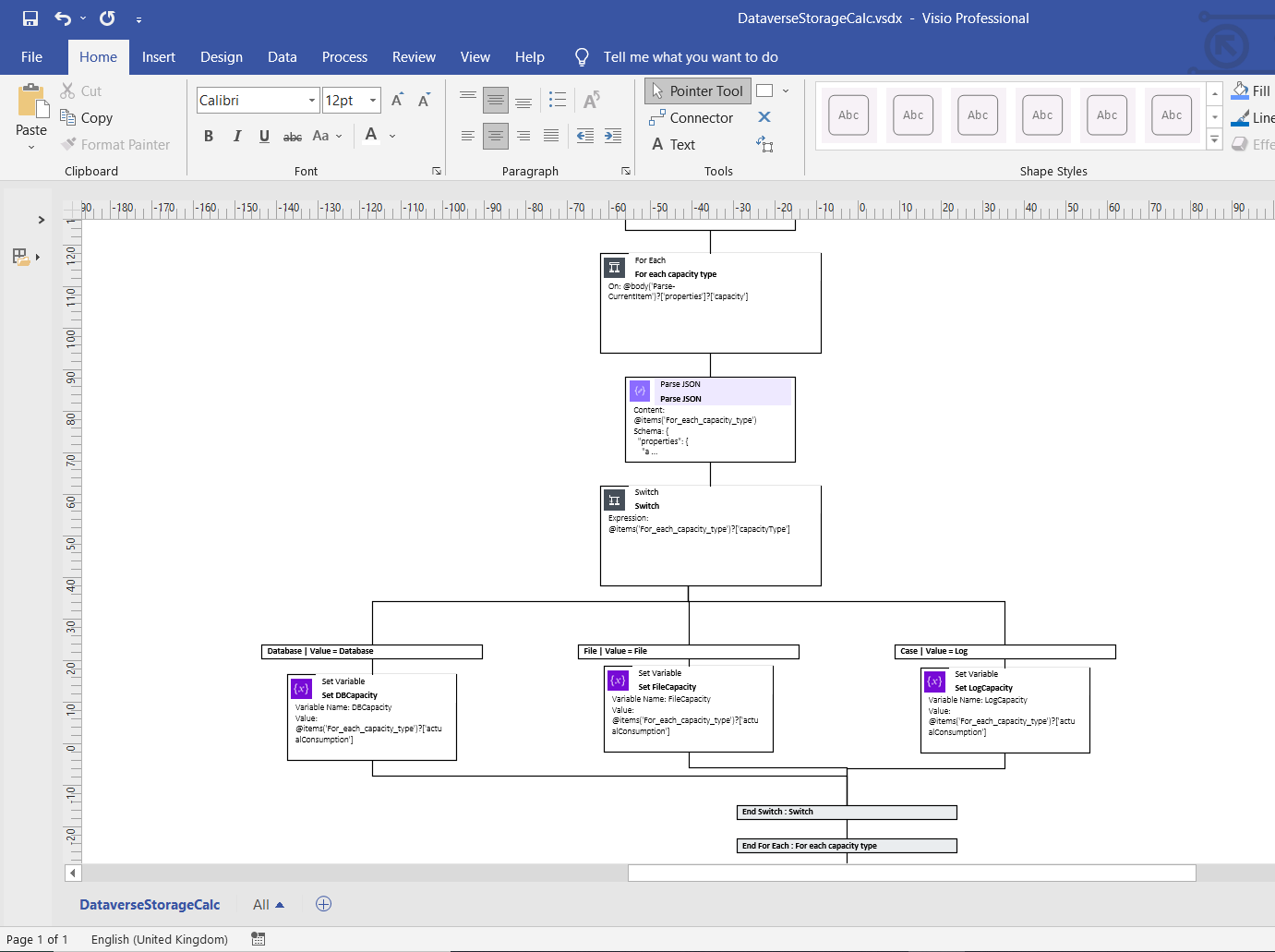
Documenting Power Automate Flows with Flow to Visio XrmToolBox Add-on

Last year I needed to document some rather complex Power Automate cloud flows and that's when I stumbled upon this great tool from Carl Cookson (aka @LinkeD365): the Flow to Visio XrmToolBox add-on. This XrmToolBox addon - XrmToolBox is the Swiss army knife for CRM  and Power Platform) consultants, check out https://www.xrmtoolbox.com/ for more info -  allows you to generate a Visio diagram for Power Automate Flows and Azure Logic Apps. Being able to generate Visio documents for Power Automate Flows is a great way to automatically generate a starting point for documentation. 

When you connect to a Dataverse instance, it will show you all of the different cloud flows. You can select one or more flows and simply click "Create Visio".


What I especially like about this tool that since the documentation is generated in Visio you can still clean up the output or remove parts of the flow in the Visio document which don't require explanation.


Note: You also might want to take a look at PowerDocu which contains 2 console apps you can use to document Power Automate Flows as well as Power Apps Canvas Apps

References:


Wednesday, March 09, 2022

Dynamics 365 and Power Platform monthly reading list February 2022

2022 Release Wave 1

Technical topics (Configuration, customization and extensibility)

Topics for Dynamics 365 Business Applications Platform consultants, project managers and power users

Friday, January 14, 2022

Dynamics 365 and Power Platform monthly reading list January 2022

2021 Retrospective

Technical topics (Configuration, customization and extensibility)

Topics for Dynamics 365 Business Applications Platform consultants, project managers and power users

Tuesday, November 17, 2020

Dynamics 365 and Power Platform monthly reading list October 2020

Technical topics (Configuration, customization and extensibility)


Topics for Dynamics 365 Business Application Platform consultants, project managers and power users

Tuesday, October 27, 2020

Improve your quality assurance using the Power Platform webinar

On November 3th, the Realdolmen Power Platform team organizes a free webinar on how you can leverage Power Apps, Power Automate and Power  BI to support quality assurance processes.

Improve your quality assurance using the Power Platform webinar registration link (November 4th  - 14:00-15:15 CET) .

Session description: With low-code platforms being a trendy topic of 2020, chances are that this isn’t your first invite for a webinar on this topic. But how about a real use-case in action? Let us show you a practical approach on how to combine the ease of use of the Power Platform with common Quality Assurance tasks. We take you through the process of digitizing a paper process for quality assurance, automating manual tasks to optimize efficiency and displaying interactive overviews for audit purpose.

Tuesday, October 20, 2020

Dynamics 365 and Power Platform monthly reading list September 2020

Technical topics (Configuration, customization and extensibility)

Topics for Dynamics 365  Business Application Platform consultants, project managers and power users

Wednesday, September 23, 2020

Dynamics 365 and Power Platform monthly reading list August 2020

Technical topics (Configuration, customization and extensibility) 

Topics for Dynamics 365 Business Application Platform consultants, project managers and power users

Wednesday, August 26, 2020

Dynamics 365 and Power Platform monthly reading list July 2020

Technical topics (Configuration, customization and extensibility)
Topics for Dynamics 365 Business Application Platform consultants, project managers and power users

Friday, August 07, 2020

Notes on the Power Virtual Agent in a day lab

Microsoft recently also released a Power Virtual Agent in a day and I decided to give it a try. Power Virtual Agents are one of the components in the Power Platform which allow you to built intelligent chat bots without any coding or AI experience.

Since Power Virtual Agents are built on the Power Platform and the Azure Bot Framework you still have the option to extend the capabilities to suit your organisations needs.

Some notes on the Power Virtual Agent lab:
  • The creation of a virtual agent or bot is super easy and intuitive with a simple graphical interface for authoring the logic  that will drive your bots. The authoring canvas for the conversation tree has a great user experience and enables non-developers to create a powerful chatbot experience.

  • After you import the SolutionPowerVirtualAgentInADay.zip solution file, you will need to reconfigure the connections in the different Power Automate Flows - to do this you will need to use the unique name of the CDS instance - so if you have used a Dynamics CRM instance you can not use the readable name - don't forget to add the region shorthand as well.
  • If you are familiar enough with Dynamics 365 and/or Power Platform you will be able to complete the labs in a couple of hours.
  • The built-in integration with Power Automate allows you to leverage the over 250+ external services and systems so the only limit is your imagination.

References:

Saturday, August 01, 2020

Quick tip : how to check if a Microsoft Teams channel exists in a Power Automate Flow

The new Microsoft Teams connector (Preview) in Microsoft Power Automate Flow makes Microsoft Teams automation scenarios a lot easier. The List channels action will return you a list of one or more channels for a Team. If you want to check if a channel with a specific name already exists you can  use the contains function. (For a good overview see Reference guide to using functions in expressions for Azure Logic Apps and Power Automate)


Saturday, June 20, 2020

Dynamics 365 and Power Platform monthly reading list May 2020

Technical topics (Configuration, customization and extensibility)

Topics for Dynamics 365 Business Application Platform consultants, project managers and power users

Friday, May 15, 2020

Quick tip: generate and integrate mock data for Dynamics 365

If you are doing demos for Dynamics 365 it might be needed to generate mock data - an interesting tool for this is Mockaroo. You can just download a dataset that you generate from the website but Mockaroo also exposes a number of APIs that you access.


An interesting example of leveraging the API is outlined in Power Automate your demo data by @dylanhaskins


Tuesday, April 28, 2020

Using Power Automate Flows to sent daily RSS digest e-mails of Power Platform documentation updates

It is quite a challenge to keep up with the rapid updates of the Microsoft documentation on Power Platform but did you know that you can use a RSS feed based on a search in the Microsoft documentation? https://docs.microsoft.com/api/search/rss?search=powerapps&locale=en will return a RSS feed with all recently updated pages on https://docs.microsoft.com about the Power Platform.

Power Automate contains a RSS feed to send e-mail template but this flow will sent out an e-mail every time a page is updated which will flood your mailbox. So I built my own flow to receive a daily digest e-mail using Power Automate.


Here are some of the things I learned on the way (to be honest I don't use Power Automate flows that often):

  • I trigger the Power Automate Flow on a daily basis so I am using the List All RSS feed items actions to RSS feed items since a specific date (use the formatDateTime function for the expected format)

  • Some days no new RSS feed items will be published, so you need to check if the RSS body is not empty, otherwise you will sent out empty e-mails.

DM me on Twitter (@jopxtwits ) if you are interested in receiving an export of the Power Automate Flow.


Monday, April 20, 2020

Dynamics 365 and Power Platform monthly reading list March 2020

Dynamics 365 and Power Platform - 2020 Wave 1 Topics


Topics for Dynamics 365 Business Application Platform consultants, analysts, project managers and power users

Thursday, April 02, 2020

Dynamics 365 and Power Platform monthly reading list February 2020

Dynamics 365 and Power Platform - 2020 Wave 1 Topics
Technical topics  (Configuration, customization and extensibility)

Monday, March 09, 2020

Dynamics 365 and Power Platform monthly reading list January 2020

Dynamics 365 and Power Platform - 2020 Wave 1 topics

Starting April 2020, new features in Dynamics 365 and Power Platform will be activated, but you can already try out some of the new features by enabling early access - for a full list of available features see 2020 release wave 1 features available for early access
Technical topics (Configuration, customization and extensibility)

Friday, January 31, 2020

Dynamics 365 and Power Platform monthly reading list December 2019

Technical topics (Configuration, customization and extensibility)

Topics for Dynamics 365 Business Application Platform analysts, project managers and power users