Just downloaded it - XML Notepad 2007 - handy little utility
tags: xml
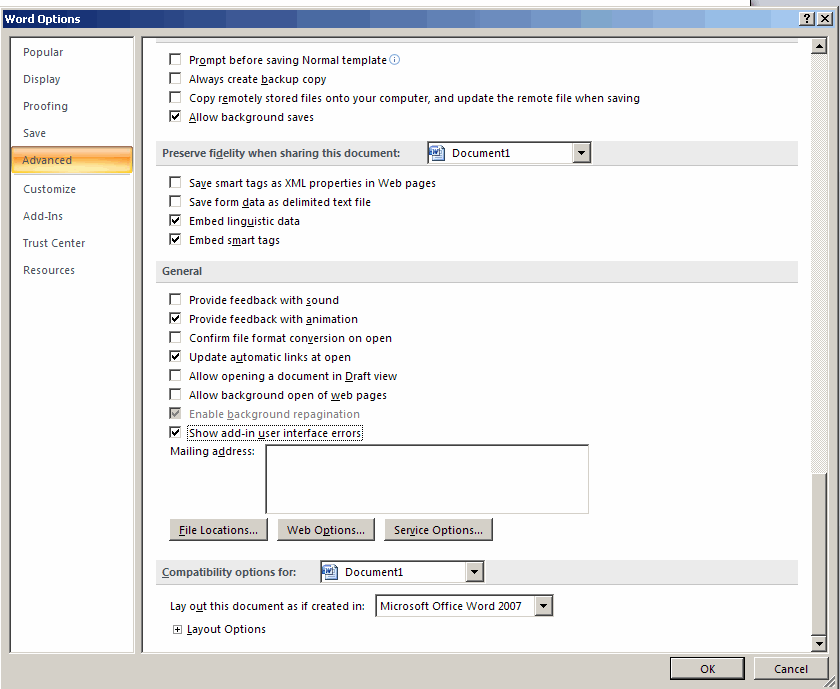
If you are doing VSTO development with Office 2007 - there is a very easy way to get some insight into your Ribbon XML syntax errors. Open you Word 2007, go to Word Options >Advanced - scroll all the way down untill you reach the General section and check the Show Add-in user interface errors checkbox.
Eric published another nice tip on his blog - Getting Ribbon XML intellisense in VSTO 2005 SE
tags: vsto, office2007, ribbonxml, office
The ability to couple an e-mail adress to a SharePoint list in both Microsoft Office SharePoint Server 2007 and WSS 3.0 is a very interesting feature and it seems there are a number of posts out there which describe how to do this. Recently a Screen cast about how to configure a SharePoint Server 2007 site to receive e-mail appeared but the best explanation still remains the white paper which Steve wrote - you can find it http://www.combined-knowledge.com/Downloads%202007.htm , he recently updated it to reflect the changes for RTM.
It is however also possible to use e-mail enabled lists with a simple SMTP server setup on a standalone server - listed below are the different steps required:
1. Install SMTP Server and configure it to relay mail
a. Open the IIS MMC snapin
b. Right click on Properties of Default SMTP Virtual Server
c. Click the Access Tab, Relay. Add the IP address of the SharePoint server to the computers that can relay through this virtual server.
d. Click the Delivery tab, Advanced. For Masquerade Domain enter the netbios name of your web server, for Smart Host enter the netbios name of your server that you are using.
2. Configure the incoming e-mail settings in WSS/MOSS
a. Open the SharePoint Central Administration and navigate to the Operations tab
b. Underneath the Topologies and Services categories - you will find a link to Incoming e-mail settings
c. Enable incoming e-mail and use the advanced settings mode.
d. Leave the Directory Management Services defaults as they are (No)
e. Fill in the e-mail server display address
f. For the drop folder put c:\inetpub\mailroot\drop - if you are not using the default settings you will need to change this
3. Configure the e-mail settings for a specific list/library.
a. Click on list settings for a specif list/library
b. Under Communication settings, click Email settings
c. Check the Enable this list to receive e-mails.
d. Fill in an e-mail address for the list/library
tags: sharepoint+2007, sharepoint, moss, wss, wss3
When doing an Office 2007 installation - I noticed an installation folder with the mysterious name - Rosebud (I was pretty sure, it had nothing to do with Citizen Kane ...). After looking around a little bit I found some interesting comments on a posting by Scott Hanselman . Here is a quick rundown of the info about Rosebud:
Rosebud isn't new, actually I remember coding Exchange 2000 and SharePoint 2001 customisations using it around 6 years ago. As you correctly pointed out, it is the "codename" for the MSDAIPP component (Microsoft Data Access Internet Publishing Provider) an OLEDB provider for WebDAV, and it is used for client access to SharePoint. If you are really bored, this KB article talks about it all in more detail (2003 flavour of products) http://support.microsoft.com/?id=838028, things may have changed with the 2007 flavour.
And here is another one:
Rosebud (the ms data access internet publishing provider - msdaipp.dll) is not new - I wrote it in 1998 at MS. It is in fact an OLEDB provider that makes the Internet look like an OLE DB rowset. A row is an URL that represents a web resource (such as an html page), the columns of the row represent various properties of the resource such as size, mod date, etc. This page in turn may itself be viewed as a rowset which will be filled with all of the links on that page. In this way you can navigate the web by tunneling through rowsets. It supports FTP and HTTP protocols. It's smart about DAV if the server talks DAV. It even works with the local offline cache and will return resources from the cache if they exist there. Rosebud is the primary way that Office Web Folders and My Network Places get to the Internet, while being smart about offline files.
To use it just instantiate a provider with provider name = msdaipp.dso, data source=an url. More info at http://support.microsoft.com/kb/248501/.
tags: office, office+2007
It seems that Jeroen started blogging again - check out these postings:
Bob Mixon just published list of SharePoint bloggers .
tags: sharepoint, sharepoint+2007, blogs
By installing the Compatibility Pack in addition to Microsoft Office 2000, Office XP, or Office 2003, you will be able open, edit, and save files using the file formats new to Word, Excel, and PowerPoint 2007. The Compatibility Pack can also be used in conjunction with the Microsoft Office Word Viewer 2003, Excel Viewer 2003, and PowerPoint Viewer 2003 to view files saved in these new formats. For more information about the Compatibility Pack, see Knowledge Base article 923505.
Supported versions:
tags: office, office2007
I'm also giving a SharePoint 2007 for Administrators training and one of the things I talk about are the different backup/restore options available in Microsoft Office SharePoint Server 2007. One of the new features here is support for Volume Shadow Copy - VSS allows you to take snapshots of files while they're in use - for more info check out How Volume Shadow Copy Service works. This will allow third party vendors to build backup solutions for SharePoint with less effort.
For some more new stuff - take a look at What's new for IT Professionals in Office SharePoint Server 2007
tags: moss, moss2007, sharepoint+2007, sharepoint, moss+2007
The ability to change a master page with out-of-the-box features is only available with MOSS as it is part of the WCM layer. WSS alone doesn’t provide any of these capabilitie.
The “Master Page” link in Site Settings is added when the Publishing Features are activated. It’s not an issue, it’s by design.
If you want the user to be able to change the master page through the WSS UI you will need to create a custom solution for that using an application page and a feature to add menuing options to that application page.
Check out Renaud’s master page switcher on codeplex.
http://www.codeplex.com/Wiki/View.aspx?ProjectName=SPMasterPicker
tags: sharepoint, sharepoint+2007, wss, wss3
Some random IT Pro related SharePoint stuff
General documentation
Capacity planning
Within these docs you'll find data on servers, server topologies, system sizing, figuring out requests per second, understanding performance characteristics and guidance around features, etc ...
Security Best Practices - great posting
Upgrade documentation
tags: sharepoint, sharepoint+2007, moss+2007, moss2007, wss, wss3
I saw the first mention about DOD 5015.2 certification for MOSS - in a comment on a posting about Content Types and I must say that I was pleasantly surprised. A little bit later an official post arrived about DOD 5015.2 certification for Office SharePoint Server 2007 . Apparently Microsoft will release a Records Center addon to provide the additional functionality - the certification test is scheduled for may 2007.
tags: MOSS, sharepoint+2007, sharepoint, MOSS2007, MOSS+2007
I have given a course about .Net 3.0 this week and I was quite impressed when going through the labs about what XAML actually can accomplish.
XAML is basically an XML-based markup “language” that allows you to build up objects using a declarative syntax. When looking for more info I suddenly stumbled upon this article by Joe Stegman which demonstrates something similar called Windows Forms Markup Language (WFML - a 2005 article). Which again led me to this blogpost which talks about Glade and the GTK# UI in Linux - and basically says that the idea of using XML markup for representing UI is not quite new. For more info about Glad - a free interface builder for GTK+ and GNOME - take a look at http://glade.gnome.org/
Again from here, you are not very far away from similar things such as MyXAML (Also a project which started in 2004) .
I guess I completely missed all these geeky little frameworks - probably serves me right for being so SharePoint focussed :) ...
Mental note - take a look at the SharePoint Utility Suite - this tool kit is currently being migrate from Microsoft.com to Codeplex . For more info about the latest release take a look at the blog from Keith Richie -
There will also be a version for WSS 3.0 and MOSS 2007.
tags: sharepoint+2007, sharepoint, moss, wss, sharepoint2007
Found this one Arno Nels blog - after seeing Bart in action at TechEd I was wondering where I could use Powershell in combination with SharePoint - well here it is :
Now this is interesting. On the "Adventures in SPWonderland" Blog, there is a series on how to use Powershell with Sharepoint. Check out these posts:
For those that dont know what Powershell is, check out these sites:
tags: powershell, sharepoint, sharepoint+2007
One of the guys on the InfoPath team pointed to the blog of one of my co-workers - Kristof De Causemaeker.
Shoutout to Kristof De Causemaeker - his blog has interesting articles on both InfoPath and SharePoint; couple particularly cool posts:
1) Great walkthrough on template parts, new InfoPath 2007 feature that allows you to modularize components of your form templates.
2) Cool trick on how to make picture buttons in InfoPath 2003 and 2007. It won't work in browser forms, but it can make your smart client forms prettier.
Alex Weinstein
Program Manager
Kristof is also teaching our InfoPath 2007 course - IFP010 - Forms solutions with InfoPath 2007(English description). If you want subscribe to this course just go to www.dolmen.be - underneath the Education tab you will find both an online calendar or one in PDF format. (The course is located underneath the Office development category).
tags: infopath, infopath+2007, sharepoint+2007, blog
I recently stumbled upon this very interesting blog from Chris Gideon - definitely check out these postings:
tags: kerberos, ntlm, sharepoint, sharepoint+2007, MOSS, WSS3
Definitely, check this one out - http://www.msdewey.com - it uses Live Search but the interface is so much better ;-) ....
PS Thanks Patrick for providing the link ...
tags: search
Take a look at the post from Joel Oleson - Announcing the RTW of WSS and Office SharePoint Server 2007 One thing you should watch out for, is that you use the eval key for the edition that you will ultimately deploy because downgrading from Enterprise to Standard Edition will not be supported.
tags: sharepoint+2007, moss2007, moss, wss3, moss+2007
2007 Microsoft Office System: Virtual Lab Express
•Virtual Lab Express: Microsoft 2007 Office System Overview
2007 Microsoft Office System
•Programmatic Manipulation of the Microsoft Office Open XML Formats
•Understanding the 2007 Microsoft Office System User Experience and Interface Design
•Office SharePoint Server 2007 Functional and Architectural Overview
•Benefits of Deploying the 2007 Office System
•Overview of the 2007 Microsoft Office System Components
Windows SharePoint Services 3.0
•Creating Workflows for Windows SharePoint Services
•Introducing Content Types for Windows SharePoint Services 3.0
•What's New in Windows SharePoint Services Feature Walkthrough
•Introduction to Windows SharePoint Services 3.0
•Microsoft Windows SharePoint Services Installation and Configuration
•Implementing and Administering Windows SharePoint Services 3.0
Office SharePoint Server 2007
•What's New in Microsoft Office SharePoint Server 2007 Feature Walkthrough
•Microsoft Office SharePoint Server 2007 Installation and Configuration
•Microsoft Office SharePoint Server 2007 Records Management Deployment and Configuration
•Microsoft Office SharePoint Server 2007 Enterprise Features Administration
•Business Solutions Using Office SharePoint Server 2007
•Enterprise Content Management with Office SharePoint Server 2007
•Organizing and Finding Resources with Office SharePoint Server 2007
tags: office2007, moss2007, sharepoint+2007, wss30

