Tuesday, January 30, 2007

TechNet Evening - Planning and deploying Microsoft Office SharePoint Server 2007

Next week wednesday february 7th /2007 I will be delivering a TechNet session for Microsoft Belux about Planning and deploying Microsoft Office SharePoint Server 2007. Topics:

  • SharePoint Server 2007 architecture
  • Administration features
  • Deployment options

Register here.

tags: , , , , ,

Monday, January 29, 2007

When to use SharePoint site collections?

Update 31/01: I got some interesting feedback about this posting so, I'm incorporating it

There are some changes in the way that site collections behave in Office SharePoint Server 2007 - one of the most important ones is that when you create a site underneath the site directory - it will belong to the portal site collection (If you keep the default settings that is). So if you want to create a new site collection you will have to do it from within SharePoint Central Administration. Open SharePoint Central Administration within your browser, navigate to the Applications Tab. Underneath the SharePoint Site Management category, you will be able to create a new site collection.  It is however also possible to allow creating site collections from the site directory as well - as shown in this posting - SharePoint 2007: Site Collections or sites ... that is the question.


Enable the creation of Site Collections in Sites Directory

  1. From the portal, use the Site Actions menu, select Modify All Site Settings. If you are not on top level site you will need to go to Top Level Site Settings.
  2. Under site collection administration, select Site Directory Settings.
  3. Select the checkbox to create new site collections from sites directory.


If you keep the standard settings, you will quickly see when a site belongs to the portal site collection - if the URL contains something like http://[yourportal]s/sitedirectory/demosite/ or when it belongs to a separate site collection - http://[yourportal]/sites/demo (Notice the sites term in the URL). 


So what are the pro's and cons of working with multiple site definitions in a SharePoint Server 2007 setup? (The next list is not exhaustive - if you have some other ideas - you are welcome to add them to the comments of this postings):

Reasons why to use a site collection with multiple divisions/departments within an organisation:

  • Ability to create sub portals using the Collaboration Portal template (or Publishing Portal template) for top level sites.
  • Navigation menus can be different accross all divisions
  • Styles can be defined separately for each division, each root master page can inherit dwn through out individual site collections
  • Security groups – Groups are shared at the site collection level so you will have one specific group of owners,members and readers for each division. When you use multiple site collections it will be easier to delegate security settings to the site collection administrator. 
  • Search scopes – Each site collection can specify relevant search scopes to appear in the search menu
  • Themes – Each site collection can have unique themes to choose from that can inherit from their patch colors
  • Features – Each site collection can deploy unique features
  • Lists – Each site collection can have different list templates (such as stamping and reusing lists that are relevant)
  • Lookup fields – Each site collection can use individual lookup field types into other lists for unique bindings
  • Workflow – Each site collection can have individual batch deployed workflows (those through Visual Studio)
  • Content types – Each site collection can have individual content types (an object that is stored within MOSS that defines several elements of a piece of content,such as a document library that will specify multiple types during newcreation)

There are however also a couple of downsides to creating lots of site collections:

  • More administration necessary, site groups, site quota's, content types (and also site columns) are all defined at site collection level.
  • The Content By Query web part does not work accross site collections.
  • Site aggregator and Table of Contents web part don't work accross site collections
  • When you don't create sites underneath the site directory, you will need to add them manually to a central site directory if you want to get a global overview accross all site collections. Update: Apparently MOSS 2007 also supports the notion of a master site directory - you can activate this from within SharePoint Central Admin. Go to the Operations tab and take a look at Master Site Directory settings.

 tags: , , , , , , , ,

Tuesday, January 23, 2007

Architect Journal on Workflow

I noticed that the April 2006 issue of Microsoft Architect Journal has some interesting articles about workflow - here's an overview:


Building Applications on a Workflow Platform
A workflow is important for resolving business problems. Examine a range of applications that demonstrate the decisions and reasoning architects face when building a workflow platform.

The Amazing Race Metaphor
Today's enterprises realize the potential of automating their business processes. Find out about managing high-level business processes through an analogy to a reality-based television game show.

Exploring Human Workflow Architectures
There are two components of human workflow systems and representative patterns of human-to-business processes interactions. Discover how to apply these components to implement these processes.

Workflow in Application Integration
The integration of applications is one of the greatest challenges architects face today. Take a look at a framework for application integration through the use of tools such as workflow technologies.

Simplifying Design of Complex Workflows
Solid workflow design requires many skills that make workflow a challenge to even experienced architects. Learn an approach for simplifying the design process of complex systems using a new kind of diagram.

Enabling the Service-Oriented Enterprise
Though building lots of Web services can be difficult, managing them can be really difficult. Explore using a model that can assist you with planning capabilities for a service-enabled enterprise.

Service-Oriented Modeling for Connected Systems: Part 1
Architects want to identify artifacts correctly and at the right abstraction level. Check out an approach to model connected, service-oriented systems that promotes close alignment between IT solutions and business needs in Part 1 of a two-part series.

Enabling Aspects to Enhance Service-Oriented Architecture
One of the biggest hurdles to achieving true service orientation is separating the needs of the service from the needs of the application. While services should only be concerned with the business functionality that they are exposing, it is not unusual for application specific features to "leak" into the service layer. We can now overcome the difficulties that have prevented widespread adoption of aspects in practical implementations and enable architects to factor out cross-cutting concerns from the services they are designing.

tags: , , , ,

ECM Starter Kit and Workflow Development Starter Kit for WSS 3.0 RTM

The ECM Starter Kit and the Workflow Development starter kit are now available in the same download as the WSS 3.0 SDK and the MOSS SDK. You can get them here:

tags: , , , , ,

Tuesday, January 16, 2007

Five things you didn't know about me ...

I was already tagged last week - by Robert Bogue and Renaud Comte so here I finally go:

  1. I do not have a Computer Science degree - I actually did a Master in Economics and picked up Information Management as an option. I learned how to program in Java  on my own since they only taught us Pascal and Cobol at university. I needed to learn Java since I wrote a Java based expert system using Jess (a rule engine and scripting system) for derivatives trading. When I started working at Dolmen, I switched to Microsoft development.
  2. One of my hobbies is painting and drawing ... I did art in  evening school but dropped out in my final year since I did not have enough time. I also put some pictures and paintings online at another blog - http://jopxpaints.blogspot.com/ . I had them first on MSN Spaces but they send an advice that I had to remove them since they contained inappropriate content ....
  3. I'm still working for my current employer - Dolmen where I started 7 years ago - starting as a software engineer, afterwards technical project manager and currently as application group manager. BTW, did I mention that we are looking for Microsoft developers - do not hesitate to ping me ...
  4. I moved 5 times in the last 7 years ...
  5. This is my second year as SharePoint MVP - at the time that I got the award, I had to explain my boss what it exactly was but I'm still very proud about it ...

I'm tagging:

20% time rule

Interesting idea from another blogdiscussion:

Google's "20% time" or "distracted time" got me thinking. Every startup I have ever worked for has consumed 100% of my waking hours with total focus on making the business succeed. There was no way to carve out 20% of my time to focus on "optional" things. My response to Lloyd's question was that companies should set aside 20% of their resources and people to focus 100% of their time on disruptive innovative ideas.


tags: , ,

Thursday, January 04, 2007

First of the Fabulous 40 - GroupBoard Workspace 2007

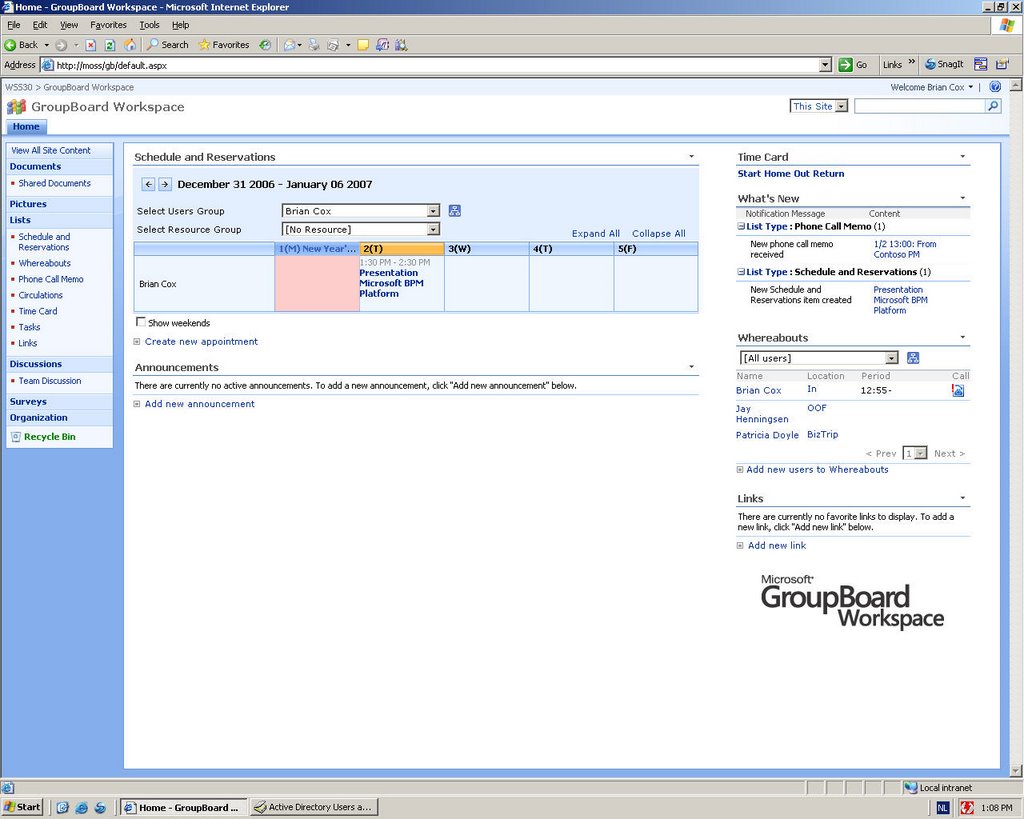
Soon you can expect a series of new application templates for Windows SharePoint Services 3.0 - commonly referred to as the Fabulous 40. It seems that you can already one of them, so download GroupBoard Workspace 2007.

Description:

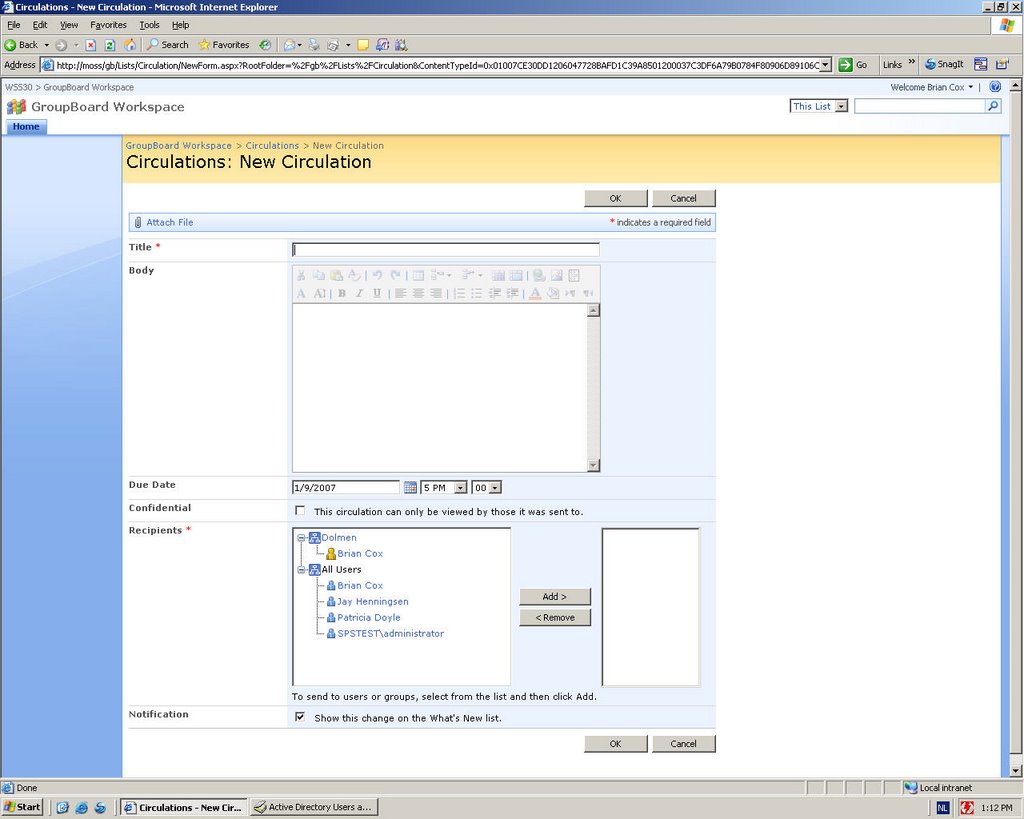
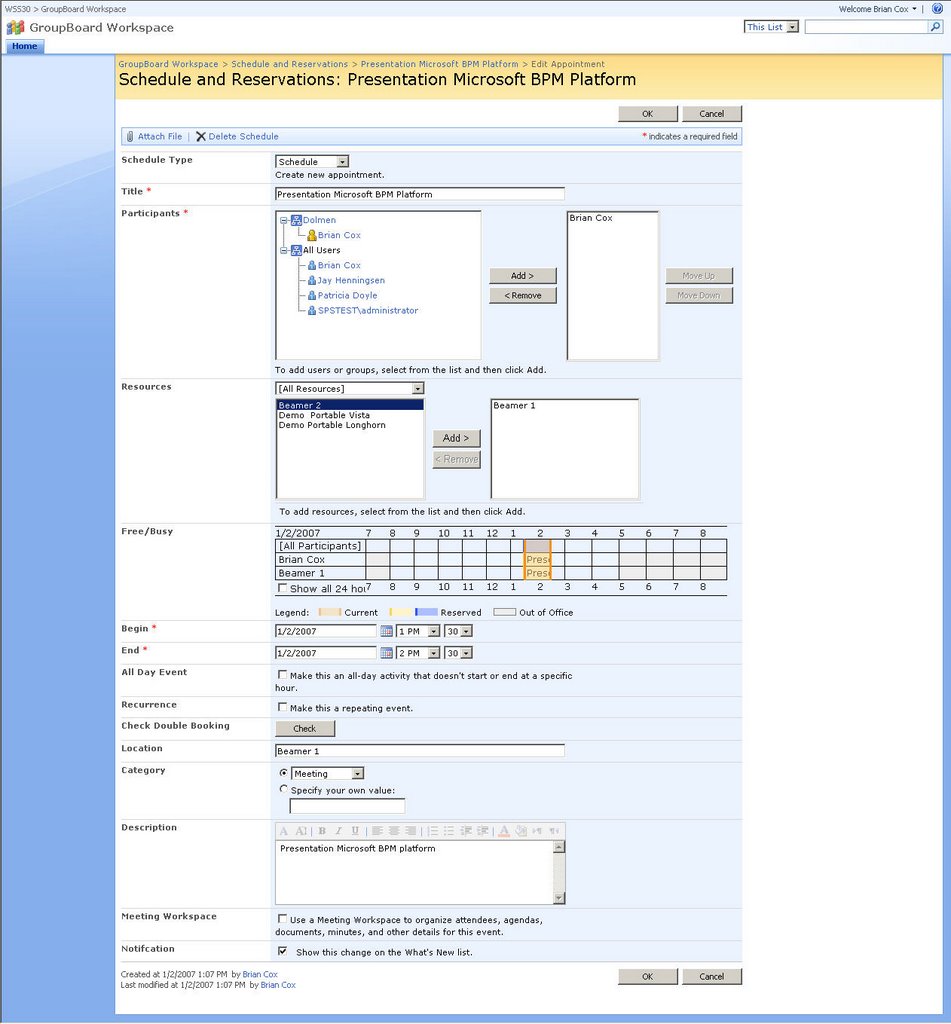
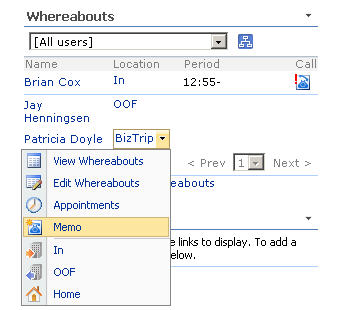
The GroupBoard Workspace template creates a space for a group or team to connect and share information in a collaborative environment to improve team efficiency and productivity. The template helps track team member whereabouts and status, and includes a built-in timecard list and organization chart. Meetings can be scheduled with attendees, and meeting rooms and other resources can be reserved. It also enables members to share phone messages and circulate memos.


tags: , , ,

SharePoint 2007 content in Technet magazine

TechNet magazine has an issue dedicated to SharePoint Server 2007 - take a look at it here.


An Overview of Microsoft Office SharePoint Server 2007

The new version of SharePoint is poised to meet all your collaboration and information management needs in a single, integrated platform. Here’s a tour of the new features and tools in MOSS that will change the way your enterprise works. (Thomas Rizzo)

7 New Features That Enhance Security in SharePoint

With SharePoint tapping into more enterprise data and becoming more integral to business workflow, security becomes far more critical. Find out how these seven new features in MOSS can quickly improve security in your organization. (Adam Robert Buenz)


Find It All with SharePoint Enterprise Search

Your company loses time and money while employees try to track down information. Enterprise search can help. MOSS offers an enterprise search tool that can find information quickly, whether it’s tucked away on an intranet site, living in a line of a business application, or even residing with a single employee.(Matt Hester)


Powerful Command Line Administration for SharePoint

Don’t get bogged down with a GUI. There’s a far more powerful and much faster way to manage SharePoint, which lets you perform administrative tasks from a command prompt and even script common procedures. (Todd Klindt)


Wiki While You Work

Wikis offer a new, more flexible way to collaborate, promoting an unstructured approach to thinking and exchanging ideas. And MOSS 2007 makes it incredibly easy to implement wikis in your organization. Here’s what you need to know to start building and using wikis in the workplace.(Mauro Cardarelli)

tags: , , , , ,

Tuesday, January 02, 2007

SharePoint document libraries or ... is the file server really dead?

Update: A couple of hours later - Joel Oleson posted
Is the File Server dead? on the SharePoint team blog - talking about a coincidence ....

I recently saw an e-mail with the next subject -  The File Server is Dead: Implementing Windows SharePoint Services document libraries  ... I shuddered in disbelief. Let me explain you why:

  • Some files just don't belong in SharePoint document libraries - things such as log files, VPC images (they won't fit anyway because of the 2 GB limit in SQL Server - and by the way, don't even go that far, trust me - really large files are not very nice to work with over http connections, ...), source code, installation software, large media files, etc ...
  • SharePoint is an extremy good collaboration system (Most of the collaboration features are already available with WSS 3.0 ) which covers about 90% of the document management features that you will need but using it will probably need a change in your way of working as well. Concentrate your effort on this instead of trying to get everything from your file shares into SharePoint.
  • If you take examine your current file shares, you will probably notice that most of it, is not actively used. Usually, only a small percentage (probably 5% at most) of existing files on file shares are being "actively" worked on.  It is exactly this part of your file shares which you should move to SharePoint since it will benefit most of SharePoint features such as version control, version history, extensibility, meta data tagging and workflow. So when you start using SharePoint, you will probably not migrate all of your files in the file shares into SharePoint. Just index them with Microsoft Office SharePoint Server and they will become discoverable as well

Joel Oleson wrote a blog post a while ago - What not to do on SharePoint, it was written for SharePoint 2003 but most of it still applies. Also take a look at this posting from Bob Mixon - Moving files from file servers to MOSS.


tags: , , , , , ,

NHibernate in .Net Magazine - Congrats Maarten

Maarten has just published his first article in the  .NET magazine Belgium/Netherlands  , #15,  ... greate article about the  basic principles and usage of NHibernate, an ORM-mapper for the .NET platform. A PDF version and example code can be downloaded on the .NET magazine #15 homepage. Don't forget to check out his blog as well ... some great stuff out there such as the Office 2007 SpreadsheetML classes in PHP.


tags: , , ,

Enjoy 2007

To all of my readers -  have a great 2007 with  lots of fun and remember to enjoy every day.

tags: ,

Wednesday, December 20, 2006

InfoPath 2007 resources

General resources

InfoPath General Overview

InfoPath team Blog

Designing Form Templates With The New Features Of InfoPath

Using InfoPath E-mail Forms

InfoPath 2007 Focuses on Developers

InfoPath Developer Portal

Creating complex infopath controls in C#

How to do cascading dropdrowns in InfoPath Forms

Template parts in InfoPath 2007

How to make picture buttons in InfoPath 2003/2007


Forms Server 2007

Hosting the InfoPath 2007 Form Editing Environment in a Custom Web Form

Hosting InfoPath 2007 Forms in WSS v3 / MOSS 2007 Pages

Creating Browser-Enabled Forms with InfoPath 2007

How to Deploy an InfoPath 2007 Form Containing Managed Code to a Browser-Enabled WSS v3 Library

Rendering an InfoPath 2007 Form in a Web Part

InfoPath 2007, Forms Server, MOSS 2007

InfoPath Forms in Office SharePoint Server 2007

Plan Forms Services

InfoPath Forms for Workflows

Enterprise Solutions: A Developers Cookbook with Practical Solutions

Information Rights Management - Protecting Forms

MOSS and InfoPath 2007 - IT Showcase - Facilitating effective employee reviews at Microsoft

The anatomy of a UDC file

Where do UDC files come from?

Data connections in Browser Forms

InfoPath attachment control and the InfoPathViewer webpart

Using CAML to filter a infopath published boolean field (from a sharepoint list)

SPListItem looses Property data type when publishing Infopath form to a sharepoint list (MOSS 2007 beta2TR)


Tools

XPATH query tool (Free - pretty handy when doing InfoPath development)

XML Notepad 2007


Training

IFP010 - Forms solutions with InfoPath 2007(English description) 


tags: , , , , , , ,

Tuesday, December 19, 2006

Automatic My Site creation with SharePoint 2007

Last week I got the question if it would be possible to automatically create the My Site for a specific user in SharePoint Server  2007. Normally the My Site gets created when the user accesses it for the first time. I got a some advice from a fellow MVP - Pierre  but when I looked at it a little more closely I noticed that some of the classes used in SharePoint Portal Server 2003 are now obsolete.

public static void CreatePersonalSite(string sAccount)
{

      //get portal site context from topology
      string strUrl = "http://moss";

      //TopologyManager Obsolete
TopologyManager tm = TopologyManager();
      PortalSite ps = tm.PortalSites[new Uri(strUrl)];
PortalContext pc = PortalApplication.GetContext(ps);

//initialize user profile config manager object

UserProfileManager upm = UserProfileManager(pc);
UserProfile u = upm.GetUserProfile(sAccount);

u.CreatePersonalSite();

}

So how does the code look like using the new SharePoint Server 2007 object model.


public static void CreatePersonalSite(string sAccount)
{
    using (SPSite site = new SPSite("http://moss"))
    {
       ServerContext context = ServerContext.GetContext(site);
       UserProfileManager profileManager = new UserProfileManager(context);
       UserProfile u = profileManager.GetUserProfile(sAccount);
       u.CreatePersonalSite();

    }
}


tags: , , , ,


Monday, December 18, 2006

WSP - SharePoint Solution Files

In a previous post I talked about Features in MOSS 2007 and WSS 3.0 - these are a very powerful framework to extend your SharePoint platform. But at a certain point you will still need to deploy these features to your SharePoint servers (be it a single server or a complete web farm).

The best way to do this, is to create a SharePoint solution file - this is basically a cabinet file with the wsp extension.  This WSP file can be used to deploy web parts, template files, assemblies, code access security policies, site definitions or features.

To create a solution file you will need to create:

  • A manifest.xml file to specify what needs to happen
  • A DDF ( data directive) file which tells makecab.exe how to structure your cabinet file. You will need to use makecab since you will need a folder structure within your cabinet file (similar to the structure you will need underneath the "12" hive.

In the previous post about features - I pointed to a nice example of how you can change the Site Actions menu with a feature - here you can download a solution which includes a wsp file. If you rename the wsp file to cab and extract the manifest.xml file you get the contents listed below.

<?xml version="1.0" encoding="utf-8" ?>
<Solution SolutionId="{5DA74A52-818A-4bba-B268-AD5E29361489}"
          xmlns="http://schemas.microsoft.com/sharepoint/">
  <FeatureManifests>
    <FeatureManifest Location="SiteActionsSubMenuDemo\Feature.xml"/>
  </FeatureManifests>
  <Assemblies>
    <Assembly DeploymentTarget="GlobalAssemblyCache"
              Location="SiteActionsSubMenuDemo.dll">
      <SafeControls>
        <SafeControl  Assembly="SiteActionsSubMenuDemo, Version=1.0.0.0, Culture=neutral, PublicKeyToken=e9db3057acd9c0f6"
                      Namespace="SiteActionsSubMenuDemo"
                      TypeName="*"
                      Safe="True" />
      </SafeControls>
    </Assembly>
  </Assemblies>
 </Solution>

After you have created the solution, you will need to deploy it  to the solution store which is a central location for all solution files. After you have deployed the solution to a single server, the SPTimer service will  synchronise/deploy  the solution automatically to the other servers in the farm.


Required steps:

  • Add solution: stsadm.exe -o addsolution -filename "solutionname.wsp"
  • Deploy solution - either from SharePoint Central Administration > Go to the Operations Tab - underneath the Global Configuration category you will see Solutions Management.


After you have deployed a solution you can still remove it - this action is called retracting. You can start retraction from the command line through stsadm.exe, from within SharePoint Central Admin or with the object model (Microsoft.SharePoint.Administration.SPSolution.Retract)

tags: , , , ,

Bringing Web 2.0 to the Enterprise with the 2007 Office System

Just stumbled upon this new white paper - Bringing Web 2.0 to the Enterprise with the 2007 Office System . Summary: This white paper explores how the 2007 Office system allows enterprises to adopt Web 2.0 ideas and technologies to create high-value, user-driven applications for the Internet and intranet.

tags: , ,

Sunday, December 17, 2006

Excel 2007 generator with PHP

A colleague of mine - Maarten - has been working on  Office 2007 SpreadsheetML classes in PHP  - definitely check it out :


In my evening hours, I've been working on a set of PHP classes to create Offixe 2007 SpreasheetML documents (.xlsx files). I finished my first goals (some basic XLSX writing), and I want to share this set of classes to the community.

Features

Currently, the following features are supported:

  • Create a Spreadsheet object
  • Add one or more Worksheet objects
  • Add cells to Worksheet objects
  • Export Spreadsheet object to Excel 2007 OpenXML format

Each cell supports the following data formats: string, number, formula, boolean.

Visual formatting is not implemented, but I'll get to that later.

tags: , , ,

Visual Studio 2005 SP1 released

Visual Studio 2005 SP1 has been released - check out MSDN for more info - there's also a great blogpost from Heath Stewart about slipstreaming Visual Studio Service Pack 1 . For  developers using Windows Vista - they also released a beta of the Visual Studio 2005 SP1 update for Windows Vista

tags: , , ,

Wednesday, December 13, 2006

Features in MOSS 2007 and WSS 3.0

The Features framework is something completely new in both MOSS 2007 and WSS 3.0. This framework enables you to package SharePoint functionality (be it a SharePoint list definition, a site definition, some web parts, UI components, or a combination of the previously mentionned ...) and to deploy it in a flexible way on a SharePoint server. It provides a more granular approach for adding functionality since you don't need to wrap your new functionality anymore in a site definition. For a detailed description take a look at Working with Features

What is interesting to now is that the SharePoint team has actually used this feature framework itself to built WSS 3.0 and MOSS. E.g. all the standard built-in list types are created as separate features. You will find them underneath c:\program files\common files\microsoft shared\web server extensions\12\templates\features\  - for an overview of which of these features are linked to MOSS and which to WSS - take a look at What's a MOSS vs WSS feature.

So if you navigate to  C:\Program Files\Common Files\Microsoft Shared\web server extensions\12\TEMPLATE\FEATURES\AnnouncementsList you will see the feature.xml for the announcements list.

<?xml version="1.0" encoding="utf-8"?>
<Feature Id="00BFEA71-D1CE-42de-9C63-A44004CE0104"
Title="$Resources:core,announcementslistFeatureTitle;"
Description="$Resources:core,announcementslistFeatureDesc;"
Version="1.0.0.0"
Scope="Web"
Hidden="TRUE"
DefaultResourceFile="core"
xmlns="http://schemas.microsoft.com/sharepoint/">
<ElementManifests>
<ElementManifest Location="ListTemplates\Announcements.xml"/>
</ElementManifests>
</Feature>

If you look at it from a developers stand point a feature is actually nothing more then a couple of XML files and their associated resources. Which are the most interesting "features of features":


  • Possible to extend existing sites "Light up"
  • Activation and deactivation of features

Every features is scoped at a certain level:


  • Farm
  • Web application
  • Site Collection
  • Web

So if you need to deploy a certain component for a specific type of site (so actually a specific site defintion) you can actually use a feature for it - for a complete discussion of how to do this take a look at the post about Feature stapling


So what do you need when you create a new Feature - a very simple feature will just require to simple files:


  • MyFeatureName.xml : defines the feature itself and the different components linked to this feature
  • Elements.xml :  definition of the separate components - the feature.xml actually references Elements.xml

 It is also possible to hook up your own event handlers with activation and deactivation event of features. Take a look at  Feature Events - these feature provisioning callouts allow you to write code that handle specific events that occur in the lifecycle of a Feature.


The easiest way to learn more about features is to take a look at the OOTB features available as well as to the resources listed below.


Some interesting uses of features:


Creating ContentTypes in SharePoint 2007 by using a feature
Activating Features in a site definition in SharePoint 2007


Making development easier with the SharePoint Feature Manager
Feature Explorer


Adding site colums to Office SharePoint Server by using Features


Adding sub menus to site actions in SharePoint


tags: , , , ,

Tuesday, December 12, 2006

SharePoint 2007 upgrade - Technical and Business?

Mauro recently wrote down some random thoughts on WSS 3.0/MOSS 2007 - I'm going to quote a piece which I think was very important :

Speaking of upgrade, I think there are two types: Technical and Business.  I've seen a lot written already about the various options for upgrading (in-place, side-by-side, etc.).  These are all METHODS of the Technical Upgrade.  The goal is to simply stand a V3 instance of a V2 portal.  This is very different than a Business Upgrade.  Here we focus on leveraging new features, redesigning outdated taxonomies, etc.  When I present, I explain these (I'm a visual person) as two steps: (1) Lateral (my hands move left to right) to explain a technical upgrade and (2) Upward (my hands my up) to explain a business upgrade.  Both are different; each requires its own planning.

tags: , , , ,

New blog on SharePoint 2007 Search

Lawrence pointed today to a new blog on SharePoint 2007 search from Mike - some interesting posts:

tags: , , , ,