Wednesday, July 09, 2008

Writing performant code in SharePoint

This is an excerpt from SharePoint 2007: The definitive Guide,

Note that the SharePoint object model contains a number of managed objects – most importantly in this instance are SPWeb and SPSite - which use unmanaged code and memory to do the heavy lifting. If you create one of these objects yourself with the constructor method, you should make sure that you add in the necessary code to explicitly dispose of the object when you have finished using it. You can do this by explicitly calling the Dispose method or through the use of the C# using construct (as shown in the previous code listing). Failure to dispose of the object can result in unusual behavior such as high memory usage, frequent recycling of the SharePoint application pool, etc … It is recommended to use the Dispose method instead of simply calling the object’s Close method. 

For more info take a look at these must reads for every SharePoint developer:

Thursday, July 03, 2008

Recording - Exchange Public Folders vs SharePoint - the battle (Community Day 2008)

Ilse Van Crieckinge and I did a session about how SharePoint can be a substitute for Exchange public folders.

Related links:

When SharePoint projects go bad ...

Some interesting background info on why IT projects fail - and trust me, SharePoint projects are no worse then other IT projects - but there are some complications as you will notice once you get through the next blog series:

What is Enterprise 2.0 - Meet Charlie

Check out the presentation on Slideshare - What is Enterprise 2.0 - Meet Charlie

Related posts:

Tags van Technorati: ,,

Wednesday, June 18, 2008

[FUN] Site down - hilarious error message

Definitely an interesting error message:

My host, being satan incarnate, messed up the database. Im in Orlando still, so i shall be diligent and fix it when I return.

Tags van Technorati: ,

Thursday, June 12, 2008

Musings about Microsoft Dynamics AX 2009

I did a practice session about integrating Microsoft Office SharePoint Server 2007, Microsoft Dynamics AX 2009 and the Business Intelligence capabilities of Microsoft SQL Server a couple of weeks ago.

I'm mostly a SharePoint guy but I  was pretty impressed with the capabilities of Microsoft Dynamics AX 2009. Since Dynamics AX 2009 finally RTM'ed (Download on partnersource - https://mbs.microsoft.com/partnersource/support/selfsupport/productreleases/DynamicsAX2009release.htm

For more info check out these links:

The coolest thing for SharePoint developers is probably the ASP.NET based Enterprise Portal - everything is basically an ASP.NET web part which makes it a lot easier to develop a light-weight web access for your Dynamics AX back-end.

Something which still strikes me as odd though is the fact that almost all of the documentation is partner-access only - so you will need a Partnersource logon to take a look at the most interesting bits of info. I truly believe that the key to the success of a platform is the community which drives it  ... and it seems as if the Dynamics AX platform solely relies on its partner platform. Too bad ... [This is my personal opinion and not necessarily this of my employer]

Wednesday, June 11, 2008

Interactive Media Manager (IMM) and SharePoint Server 2007

Interactive Media Manager is a Digital Asset Management (DAM) system built on top of SharePoint Server 2007. Some interesting features:

  • Media (MPG,WMV, ...) is not stored in a SharePoint list, the media asset storage is completely separate which allows you to store in a SAN or leverage 3d party solutions such as Aspera and Telestream through a web services layer
  • Provides an extensive metadata management layer which supports W3C Resource Description Language (RDF) as well as the Web Ontology Language (OWL)
  • Web parts to handle rich media such as IMM import web part, a media viewer web part with support for annotations/comments, Silverlight based Rough Cut editor and the Media Library
  • Adds extra IMM specific workflow activity blocks

For a great demo of the capabilities - check out IMM@NAB 2008 (Video)

Related links:

Tuesday, June 10, 2008

Enterprise 2.0 and organizational culture

Enterprise 2.0 is probably one of these buzz words you have heard a lot lately. It is also a term which is surrounded by confusion. The simplest definition of Enterprise 2.0 would probably be "...the application of Web 2.0 technologies in the enterprise." . This is similar to the definition which has been put forward by AIIM in one of their studies recently.

Enterprise 2.0: A system of web-based technologies that provide rapid and agile collaboration, sharing, emergence and integration capabilities in the extended enterprise.

Another cool one - probably my favourite:

Enterprise 2.0 is about empowering your end users to connect and collaborate.

Now let's talk about the key thoughts in the presentation.  The red line in the presentation is the link between organizational culture and Enterprise 2.0. But  what is not clear is whether your organizaiton needs a "culture of collaboration" to successfully use wikis and other Enterprise 2.0 tools or that these tools can enable your organization to embrace a "culture of collaboration".

This might seem like the chicken-and-the-egg problem ... 

I think that you will first need to create a mindset within your company which is ready to embrace collaboration and knowledge sharing before you can start thinking about Enterprise 2.0 - a view which is confirmed by this guy  - Enterprise 2.0 - Culture required?  But on the other hand for those people in your company who get it, you want to provide the necessary tools - so you might want to take a look at a platform which might already be present in your company - guess which one? SharePoint offcourse  ... LOL.

Related links:

Monday, June 09, 2008

Getting started with SharePoint and Silverlight - Part IIb

Silverlight 2 beta 2 has been released - so time to install the required tools fo finish my series about Getting started with SharePoint and Silverlight.

First uninstall Expression Blend 2.5 March preview, Silverlight 2 Beta 1 and Microsoft Silverlight Tools Beta 1 for Visual Studio 2008. Next install all of the new components:

Interesting about Silverlight 2 Beta2 is the fact that it has a go-live license that allows you to start using and deploying Silverlight 2 for commercial applications.

Interesting links:

Silverlight 2 Beta 2- annonying popup and the Silverlight XBOX Gamercard

I noticed this really annoying popup today on my blog  -

"The evaluation period for Silverlight 2 Beta 1 has ended. You can visit the Silverlight web site to download the latest version. Do you want to go there now?"


So I uninstalled Silverlight and saw this  "Install Microsoft Silverlight to view My XBox Gamercard". But when I clicked this - it redirected me again to the Silverlight Beta 1 download. Therefore I remove the XBox Gamercard silverlight app untill it has been upgraded. Too bad, I hoped that upgrades would be seamless from an end-users perspective.

Tags van Technorati: ,,

Thursday, May 29, 2008

Number 12 on Top 100 SharePoint blogs Spring 2008

Joel Oleson compiled a Top 100 of SharePoint blogs using Technorati ranks, Google ranking, etc ... I made it  on number 12 - thanks a lot ....

Wednesday, May 28, 2008

Getting started with SharePoint and Silverlight - Part II

In the first part I talked about how to get your first Silverlight app up and running. Now let's see how to get this into SharePoint. Patrick has created an excellent checklist about How to configure your SharePoint extended IIS Web app for working with Silverlight 2 applications. 

For step 4 - if you need to add System.Web.Silverlight.dll to the GAC - you will find this file underneath C:\Program Files\Microsoft SDKs\Silverlight\v2.0\Libraries\Server (default installation folder for the Silverlight SDK).

For step 6 - I used  the 3.5 Config feature from Codeplex - http://www.codeplex.com/features  which works pretty good.
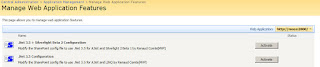


To test everything out - let's start of with one of the samples in the  Silverlight BluePrint for SharePoint - which contains six sample applications:

  • A simple “hello, world” sample showing Silverlight in a Web part.
  • A Silverlight slider control as a SharePoint custom field type.
  • A navigation control.
  • A Colleague Viewer
  • A Silverlight picture viewer for a SharePoint picture library.
  • A visual how-to center, created in Silverlight and based on a SharePoint list, for viewing videos.

Let's start off with the Silverlight "Hello world" example. Steps that I took:

  1. Extracted the setup project and ran the installation - after this I could see the HelloSilverlight appear but it would not load the Silverlight app
  2. Next I recompiled the Silverlight app using Visual Studio 2008 and copied the XAP file in the clientbin directory over the existing XAP file.

Another interesting webpart which is packaged together with the "Hello world" sample is the SilverlightPart which is basically a webpart which can host a Silverlight application (1.0 or 2.0). You can select the Silverlight app to host by selecting it using the webpart properties.
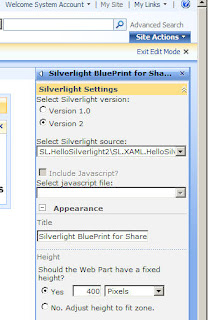


When I started fiddling around with these Silverlight apps - I regularly noticed this error message "Internet explorer has encountered a problem with an add-on and needs to close. The following add-on was running when this problem occurred
npctrl.dll" - luckily I found this post - IE crashing with Silverlight 2 - Part II - It was not fixed ! But it's now! and this did the trick - apparently Silverlight tried to go online to get an update but my VPC had no networkconnection.

That's it for today, in a next posting I will try to explain what the code in the HelloSilverlight webpart does.

Tuesday, May 27, 2008

SharePoint CustomAction feature - overview of CustomAction identifiers

Today I needed to create a SharePoint feature which would add a link on the Site Settings page within the Site Administration section - in SharePoint this is done by defining a CustomAction feature. A colleague of mine pointed me to two invaluable resources if you need to build a CustomAction feature:

Sunday, May 25, 2008

ODF support in Office 2007 SP2


This is the most interesting part of the press release - Microsoft Expands list of formats supported in Office

With the release of Microsoft Office 2007 Service Pack 2 (SP2) scheduled for the first half of 2009, the list will grow to include support for XML Paper Specification (XPS), Portable Document Format (PDF) 1.5, PDF/A and Open Document Format (ODF) v1.1.

When using SP2, customers will be able to open, edit and save documents using ODF and save documents into the XPS and PDF fixed formats from directly within the application without having to install any other code. It will also allow customers to set ODF as the default file format for Office 2007. To also provide ODF support for users of earlier versions of Microsoft Office (Office XP and Office 2003), Microsoft will continue to collaborate with the open source community in the ongoing development of the Open XML-ODF translator project on SourceForge.net.

As I stated before (Microsoft support ODF through Sourceforge project - ODF addin for Word 2007) - this is quite important here in Belgium where the Belgian government decided to standardize on ODF starting on September 2008 (text in Dutch).

Tags van Technorati: ,,,

Tuesday, May 20, 2008

The Document Information Panel and InfoPath - the devil is in the details

I recently took a look at the Document Information Panel functionality in Word 2007 which allows you to provide a custom form to enable metadata editing for documents stored in SharePoint and encountered something unexpected.

You can actually customize this Document Information Panel by plugging in your own Document Information Panel (DIP). A Document Information Panel is actually nothing more then an InfoPath form - see InfoPath 2007: Customizing the default Document Information Panel.

SharePoint autobuilds a DIP for your document metadata and seems to work without an installation of InfoPath on the client. But what if you want to build your custom Document Information Panel using InfoPath? This where things get ugly - like this guy noticed as well - All about the Document Information Panel and InfoPath issues. Whenever you are going to use a custom Document Information Panel - you will need to have InfoPath installed on all the clients.

This is actually explained on this page - Microsoft Office Professional Plus 2007 Suite Comparison - all the way to the bottom - there is a footnote which contains some very important information.

Features and Benefits
Office Standard 2007 Office Professional Plus 2007 Office Enterprise 2007
Complete, collect, and organize Office InfoPath e-mail forms in Office Outlook 2007.2  
Host embedded, fully customizable InfoPath forms in Office Word 2007, Office Excel 2007, and Office PowerPoint 2007.2
 
Complete forms in Programmable Task Panes. 2  
Complete custom fields and execute custom business logic in Document Information Panel forms.2  


2 These capabilities require that Office InfoPath 2007 be installed on the client computer. Office Professional Plus 2007 and Office Enterprise 2007 include Office InfoPath 2007. Organizations that acquire other suites can purchase and install Office InfoPath 2007 separately.

As I stated in the title - the devil is in the details ... sometimes even in a footnote.