Wednesday, November 25, 2009

Installation order for SharePoint Service Packs and Language packs

To get up to speed with the latest version of SharePoint Server 2007 (English version) including the Dutch language pack you should follow this installation order:

  1. Start with MOSS 2007 including SP1
  2. Install Service Pack 2 for WSS 3.0(English)
  3. Install Service Pack 2 for MOSS 2007(English)
  4. Install Language Pack Dutch for WSS 3.0
  5. Install Language Pack Dutch for MOSS 2007
  6. Install Language Pack Service Pack 2 for WSS
  7. Install Language Pack Service Pack 2 for MOSS 2007

Afterwards you need to start the SharePoint Configuration Wizard. It will probably ask you to run the Wizard a couple of times but you can cancel this and run the wizard after installing all the binaries.

PS I recommend going 64-bit for fresh installs of SharePoint Server 2007 given the fact that SharePoint Server 2010 will be  x64 only …

Wednesday, November 18, 2009

Office 2010 beta publicly available

Yep, Office 2010, SharePoint Server 2010, Project 2010, Visio 2010, Office Web Apps for businesses and Office Mobile 2010 – are all available for download from this start location - microsoft.com/2010 – for direct downloads:

MSDN subscribers already got their hands on the downloads a couple of days ago.

Troubleshooting .NET Framework 3.5 installation failure

When trying to install Visual Studio 2008 on a development SharePoint box yesterday, I got an error stating that the .NET 3.5 framework could not be installed - "Microsoft .NET Framework 3.0a: [2] Error: Installation failed for component Microsoft .NET Framework 3.0a. MSI returned error code 1603". But apparently this seems to be a very general error message - luckily I found out this post from Aaron Stebner - How to locate the cause of error 1603 in a verbose MSI log file - which showed me that there was an error when trying to install .Net 3.0 SP1 - apparently .NET 3.5 will install this first.

Next, I needed to check if there were some problems with .NET 3.0 - again Aaron Stebner to the rescue who has built a .NET framework Setup Verification Tool. Unfortunately this did not provide a lot of extra information - everything seemed OK.

Next my quest lead me to this post - Steps I use to diagnose .NET Framework 3.0 installation failures related to the ServiceModelReg.exe custom action and indeed in the application event logs there was an error regarding WCF. The suggested workaround about disabling the IISAdmin service(uninstalling IIS was not an option - since this is a complete sharepoint dev box and I did not want to rebuild it) did not work.

But the last tip did work - installing .NET 3.5 SP1 instead of .NET 3.5. : "The .NET Framework 3.5 SP1 installs the .NET Framework 3.0 SP2 as a prerequisite behind the scenes. The .NET Framework 3.0 SP2 setup is configured to allow installation to complete even if the ServiceModelReg custom action fails. That means that you won't see the errors described in this blog post if you install the .NET Framework 3.5 SP1 on your system."


Monday, November 16, 2009

Solving the “Microsoft.TeamFoundation.WorkItemTracking.Client.WorkItemTypeDeniedOrNotExitsException” error

A while ago – I got this interesting error when trying to add workitems in Visual Studio 2008 - “Could not load type Microsoft.TeamFoundation.WorkItemTracking.Client.WorkItemTypeDeniedOrNotExist"Exception from assembly Microsoft.TeamFoundation.WorkItemTracking.Client …”

Apparently I broke my Visual Studio 2008 by installing Team Explorer and Visual Studio 2008 SP1 in the wrong order – see Visual Studio 2008 with TFS Explorer broken with SP1 – reinstalling SP1 did the trick.

InfoPath Forms and attachments

In InfoPath, you can use a control called “File attachments” – this might be interesting to use when you want to allow a user to add files to a filled in InfoPath form. But beware when you store these file within an InfoPath form they will be stored as Base64 encoded strings within the  InfoPath form. This causes the included files not to be crawled by standard SharePoint search.

Here’s some sample code to extract these attachments and make them crawleable – InfoPath 2007 – Extracting those pesky binary attachments

Wednesday, November 11, 2009

Enterprise Content Types in SharePoint 2010

SharePoint Server 2010 supports the notion of Enterprise Content Types and Content Type syndication.

This concept allows for consistent content type schema’s across SharePoint over multiple site collections. Enterprise Content Types are basically content types which are published from a central Site Content Type gallery -called the Content Type Hub - to content type galleries on other site collections (even on other web applications or across farms).

This is implemented using a Managed Metadata Service Application. If you are new to the concept of Service Applications in SharePoint 2010 - take a look at these articles - SharePoint 2010: Service Applications Part One: Model Overview and The New Service Application Architecture in SharePoint 2010.

In the configuration options for the Managed Metadata Service you can specify a certain site collection to act as a central repository of content types. This central repository is called the Content Type hub. Other site collection can then consume the content types from this content type hub.  There is a maximum of 1 hub per Managed Metadata Application Service but it is possible to create multiple Managed Metadata Applications each with a corresponding site collection hub.

For content types which you define on the site collection content type hub - you get an extra configuration option - Manage publishing for this content type.
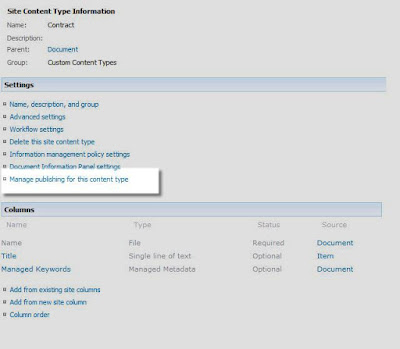


Here you can publish this content type to other site collections. You can also decide to unpublish a content type or republish it if you have made changes to the content type.


In the background this is actually accomplished using the Content Type Subscriber SharePoint Timer Job.

If you go to Site Settings on a top level site of a site collection level which does not act as a content type hub - you will notice an entry called Content Type Publishing where you get an overview of Enterprise Content Types you can consume as well as the Managed Metadata Service Application from which you consume them. The consumed content types will be marked as read-only. You will see in the screenshot that it is possible to define multiple managed metadata service applications and thus also multiple content type hubs.


Make sure that you design this carefully since it is not possible to change the content type hub location afterwards on the Managed Metadata Service application


Document Management features in SharePoint 2010 – the series

I will be publishing a number of postings about Document Management improvements in SharePoint 2010 in the coming weeks – here’s an outline – to get your appetite going:

  • Enterprise Content Types – central management of content types of  content types across multiple site collections.
  • Using Document Sets for multi-document work products
  • Enhanced metadata support with managed keywords and taxonomies
  • Creating unique DocumentIds using the DocID service

Tuesday, November 10, 2009

SharePoint List Features Framework

The SharePoint List Features Framework is an open source project driven by RealDolmen which will allow you to create features at SharePoint list level. Those familiar to SharePoint probably know that the SharePoint features framework provides a pluggable mechanism for adding or modifying functionality at site level, site collection level, web application or farm level.  The SharePoint List Features Framework extends this functionality by providing a mechanism to add features for one specific document library or list within a SharePoint site. For more information check out the new Codeplex site - http://listfeatures.codeplex.com/ .

The current build is targeted at SharePoint 2007 but we will be providing an update shortly after the release of the 2010 beta release.

Again congrats to Tom for building this great extension …

BIWUG 19th of november cancelled

Due to circumstances the BIWUG session of the 19th of november is cancelled – the next BIWUG session will be on the 17th of december.

SharePoint – Quick links reminder

With all the buzz about SharePoint 2010, you might forget that there are still are quite a lot SharePoint 2007 deployments out there. Here are some interesting links I recently picked up with regards to SharePoint 2007:

Thursday, November 05, 2009

SharePoint 2010 – Adding new buttons to the SharePoint 2010 ribbon

Update: I just found this excellent training video – Module 10: Creating Dialogs and Ribbon Controls for SharePoint 2010. Would have saved us some trouble if we saw it beforehand.

We had a blast today at the SharePoint Ignite training as Koen already blogged in– Howto: Add a button to the ribbon in SharePoint. Fortunately Wouter (the trainer at the Ignite training) provided excellent background info and put us on the right track to get a working button.

I’m not going to elaborate about the exact syntax for adding buttons to the Ribbon – since this might change from Tech Preview to Beta2 but would like to provide some additional background info about how the new Ribbon works in SharePoint 2010:

  • The ribbon is actually rendered by a http handler which you find at C:\Program Files\Common Files\Microsoft Shared\Web Server Extensions\14\TEMPLATE\LAYOUTS\commandui.ashx
  • This http handler picks up the C:\Program Files\Common Files\Microsoft Shared\Web Server Extensions\14\TEMPLATE\GLOBAL\XML\CMDUI.XML file up and merges it with the different features which define additional customactions.
  • The different portions of the ribbon are cached in your temporary internet files – so you will some files in there which look like this commandui.ashx?ver=881443720&id=Ribbon.DocLibListForm.Edit&lcid=1033&qt=ribbonvisibletabdeep. Especially the id is important to identify the relevant parts in CMDUI.xml to take a look at. If you are deploying new customactions it might be safe to delete your tempfiles…
  • The ribbon is divided in Tabs which contains Groups of controls. A Group is rendered using a GroupTemplate. A Group can contain a number of controls such as Buttons, ToggleButtons, etc … it is easiest to just take a look at CMDUI.xml
  • You will not be able to modify the Ribbon arbitrarily – some groups in the ribbon have fixed controls which you should not modify (and to which you will not be able to add additional controls)– other groups can be modified.  You can add controls to groups which are using a so called flexible layout – such as Ribbon.Templates.Flexible. It is also possible to add additional groups.
  • The logic for the Ribbon can be found in the Microsoft.Web.CommandUI dll within the GAC (notice that there is no SharePoint in the naming…it might be possible that we see this dll appearing in other platforms as well). It can be quite interesting to take a closer look at this assembly using Reflector.
  • You will probably also notice a Scaling section within CMDUI.xml for each tab – this defines how the tab will render when you resize your browser…

Interview Andrew Connell about SharePoint 2010

Tuesday, November 03, 2009

SharePoint Server 2010 – Getting Started link guide for developers

Updated 5/11/2009 – added some addditional links

SharePoint Developer – General info


SharePoint Developer – Specific topics

  • Web Content Management in SharePoint Server 2010
  • Part 1 - Improvements to the Core SharePoint Platform & How the Benefit SharePoint 2010 Web Content Management
  • Part 2 – What’s Improved with SharePoint Server 2010 Web Content Management
  • Part 3 – What’s New with SharePoint Server 2010 Web Content Management
  • SharePoint 2010 Sandboxed solutions

    Background info

  • Tuesday, October 20, 2009

    Random tweets on SharePoint 2010

    Some thinks I just picked up from Twitter:

    • SharePoint Online 2010 will allow Anonymous Access, so can be used for Internet solutions! Thats great! #spc09
    • Anyone planning a #SharePoint deployment for DM and RM should seriously consider going to Server 2008 R2 http://tinyurl.com/yghje9c #SPC09
    • SPC09 One key takeaway is that the "2,000" item limit is simply gone. We shall never speak of it again.
    • Resources & Links slide from Word Automation OpenXML session. #SPC09 SPC349 http://twitpic.com/m9kye
    • They just clarified. SharePoint Online Dedicated will be april 2010, Shared will be 2nd half of 2010
    • New content query web part finally allows choosing columns you want 2 display. (via @ToniFrankola) #spc09 --> woo hoo!
    • Word Automation services has built in conversion outputs including PDF. I wonder if Adobe had to license this
    • #SPC09 Speaker says (more or less), "Powershell is the future of SharePoint administration."
    • VERY cool 'employee morale' example data visualization #inetium #spc09 http://twitpic.com/m92kz
    • Viso Services: sales org chart/status report. COOL! #inetium #spc09 http://twitpic.com/m927n
    • @andrewconnell: If u're into ECM and u missed Ryan's "ECM for the Masses" session @SPConf, make sure u watch recording. GREAT overview
    • woutervugt First SharePoint 2010 developer session outside #sp09 is starting in one hour #sdc2009
    • Creating Custom SharePoint 2010 Cmdlets using Visua.. http://bit.ly/R9tyY
    • SharePoint 2010: STSADM and PowerShell: Tags: share.. http://bit.ly/3UtKjk
    • Part 1 - Improvements to the Core SharePoint Platform & How the Benefit Sh.. http://bit.ly/2A599Z
    • Part 2 – What’s Improved with SharePoint Server 2010 Web Content Managemen.. http://bit.ly/19MLri
    Technorati Tags: ,,

    BIWUG - Interview user groups TechDays Belux 2009

    Something which got stuck in my mailbox – BIWUG – Interview user groups TechDays Belux 2009.

    Monday, October 05, 2009

    Moving PageFile.Sys to other drive in Windows Server 2008

    Open command prompt and use the following commands

  • wmic computersystem where name=”MyCoreServer” set AutomaticManagedPagefile=False
  • wmic pagefileset where name=”d:\\pagefile.sys” set InitialSize=2500,MaximumSize=10240
  • The second command creates a new pagefile.sys on d: drive with an initial size of 2,5 GB and a maximumsize of 10,24 GB

    Afterwards – reboot.

    Source: http://blog.mpecsinc.ca/2008/04/server-core-move-that-swappage-file-wmi.html

    [MVP] Congratulations ! You have received the Microsoft MVP Award

    5 in a row… yes my title as MVP Windows SharePoint Services is renewed again. Thanks to everyone who in one way or another contributed to my (re)nomination.

    Things you can expect in the coming months:

    • Lots of posts about SharePoint 2010 once the NDA gets lifted
    • A number of BIWUG sessions about SharePoint 2010
    • Information about integration scenario’s – the next coming months I will focus on integrating Microsoft CRM and SharePoint
    • Some more Codeplex goodies for SharePoint – both 2007 and 2010.

    Thanks again for all the support.

    Saturday, October 03, 2009

    BIWUG is back – SharePoint workflow and OCS.

    Update: description added for the OCS session

    BIWUG (Belux Information Worker User Group) is back with another series of sessions about information worker productivity. Our next session is on the 15th of october.

    • 18:00 – Welcome
    • 18:30-18:45: Introduction [Joris Poelmans]
    • 18:45-19:45: Demo Session - Enhanced productivity with Microsoft Office Communication Server (OCS) and  Polycom CX200/CX700[Orbit One] - See for yourself how Office Communicator 2007 R2 can replace your office phone system, and help you collaborate more effectively with your colleagues and customers. We will demo telephony, Instant Messaging, presence, conferencing, desktop sharing, call forwarding, videoconference, team-call groups, voicemail, Outlook integration, iPhone client, …
      You will have the opportunity to see different phones and devices optimized for OCS: Polycom CX series, Plantronics Savi Go.   
    • 19:45-20:00: Break
    • 20:00-21:00: Developing flexible workflows in SharePoint Server 2007 [Peter Plessers] - Besides adding custom workflows through SharePoint Designer, Microsoft Office SharePoint Server 2007 offers the possibility to host custom-developed workflows based on Windows Workflow Foundation to support a company’s business processes. It might however be a challenge to develop these workflows in such a way that they can be easily adapted to the evolving business processes it supports. This session presents a number of techniques to develop workflows that are easy to adapt. We start off with a simple workflow example and let it evolve into a flexible workflow that can even be changed at runtime.

    Please register on the BIWUG site. I would also like to thanks Combell for providing the location - Combell - Skaldenstraat 121 - 9042 Gent.

    You should also bookmark these dates in your calendar – the 19th of november and the 17th of december. You can expect some SharePoint 2010 sessions on the agenda by then …

    Wednesday, September 23, 2009

    Recovering files from blue screened Windows XP

    Today my Windows XP showed me a very unwelcome BSOD… booting in safe mode, last known configuration, nothing helped. Unfortunately I still had some files on the machine which I definitely needed to recover – Hirens Boot CD to the rescue – amazing tool… definitely a lifesaver.