Wednesday, August 26, 2020

Dynamics 365 and Power Platform monthly reading list July 2020

Technical topics (Configuration, customization and extensibility)
Topics for Dynamics 365 Business Application Platform consultants, project managers and power users

Friday, August 21, 2020

Notes on learning to work with the Microsoft Graph API

Microsoft Graph is a REST API which allows you to access Microsoft Cloud services (e.g. Office 365 service like Microsoft Teams, OneDrive,Planner, SharePoint, etc.. but also enterprise mobility and security services like Azure AD, Identity Manager, etc..) resources using a single endpoint. You can use it for example for querying data in Outlook/Exchange and OneDrive but in the past couple of weeks I mainly used it for Microsoft Teams. The easiest way to get started with the Microsoft Graph API is the Microsoft Graph Explorer.


I learned quite a lot from the 30 days of Microsoft Graph blog series - a highly recommended starting point - for other resources take a look at the references section below.


References:

Friday, August 14, 2020

Don't forget to update older client applications for Dynamics 365 to the correct .NET Framework version

I lost 30 minutes this morning when trying to troubleshoot an older console app (written in 2017) which refused to connect to Dynamics 365 Customer Engagement. It was only after updating the Nuget packages for Microsoft.CrmSdk.CoreAssemblies  that I noticed that I was still building against .NET Framework 4.5.2 which is not supported anymore.


Reference:


Thursday, August 13, 2020

Quick tip: SQL access to Common Data Service using Tabular Data Stream (TDS)

Recently Microsoft announced Power BI DirectQuery support (in preview) to the Common Data Service (CDS)  using Tabular Data Stream. You can also leverage this  CDS TDS endpoint within SQL Server Management Studio to write SQL queries against the CDS database. You can connect using the base url of your CDS instance and add the port 5558. To authenticate you will need to use Azure Active Directory - Password.


By default this functionality is not enabled, so you if you try to use SQL Server Management Studio you will get below exception.

As outlined on http://aka.ms/enablesqlforcds, you will need to to go the Power Platform Admin Center to switch on the TDS support.

References:


Tuesday, August 11, 2020

Quick tip: find duplicate records in Dynamics 365 with Deduplicator plugin for XrmToolBox

 If you want to quickly scan your Dynamics 365 or CDS instance for duplicate records, take a look at the Deduplicator plugin for XrmToolbox. It provides you with the option to specify one or more fields for a specific entity as matching criteria (with option to ignore blank values, leading and trailing white space and taking into account casing) and choose which additional fields to display for the duplicate results. 


Friday, August 07, 2020

Notes on the Power Virtual Agent in a day lab

Microsoft recently also released a Power Virtual Agent in a day and I decided to give it a try. Power Virtual Agents are one of the components in the Power Platform which allow you to built intelligent chat bots without any coding or AI experience.

Since Power Virtual Agents are built on the Power Platform and the Azure Bot Framework you still have the option to extend the capabilities to suit your organisations needs.

Some notes on the Power Virtual Agent lab:
  • The creation of a virtual agent or bot is super easy and intuitive with a simple graphical interface for authoring the logic  that will drive your bots. The authoring canvas for the conversation tree has a great user experience and enables non-developers to create a powerful chatbot experience.

  • After you import the SolutionPowerVirtualAgentInADay.zip solution file, you will need to reconfigure the connections in the different Power Automate Flows - to do this you will need to use the unique name of the CDS instance - so if you have used a Dynamics CRM instance you can not use the readable name - don't forget to add the region shorthand as well.
  • If you are familiar enough with Dynamics 365 and/or Power Platform you will be able to complete the labs in a couple of hours.
  • The built-in integration with Power Automate allows you to leverage the over 250+ external services and systems so the only limit is your imagination.

References:

Saturday, August 01, 2020

Quick tip : how to check if a Microsoft Teams channel exists in a Power Automate Flow

The new Microsoft Teams connector (Preview) in Microsoft Power Automate Flow makes Microsoft Teams automation scenarios a lot easier. The List channels action will return you a list of one or more channels for a Team. If you want to check if a channel with a specific name already exists you can  use the contains function. (For a good overview see Reference guide to using functions in expressions for Azure Logic Apps and Power Automate)


Tuesday, July 21, 2020

Setting up Omnichannel for Customer Service on an existing Dynamics 365 trial

Omnichannel for Customer Service is a Microsoft first party Dynamics 365 app which extends Dynamics 365 Customer Service which enables you to connect different channels (SMS, chat, Facebook, etc...) to your existing Dynamics 365 Customer Service App.

Listed below are  the different steps required to setup a demo scenario with chat integration for Omnichannel for Customer Service in a blank (no first party app selected upon trial setup) demo trial environment  which had customer service installed afterwards:

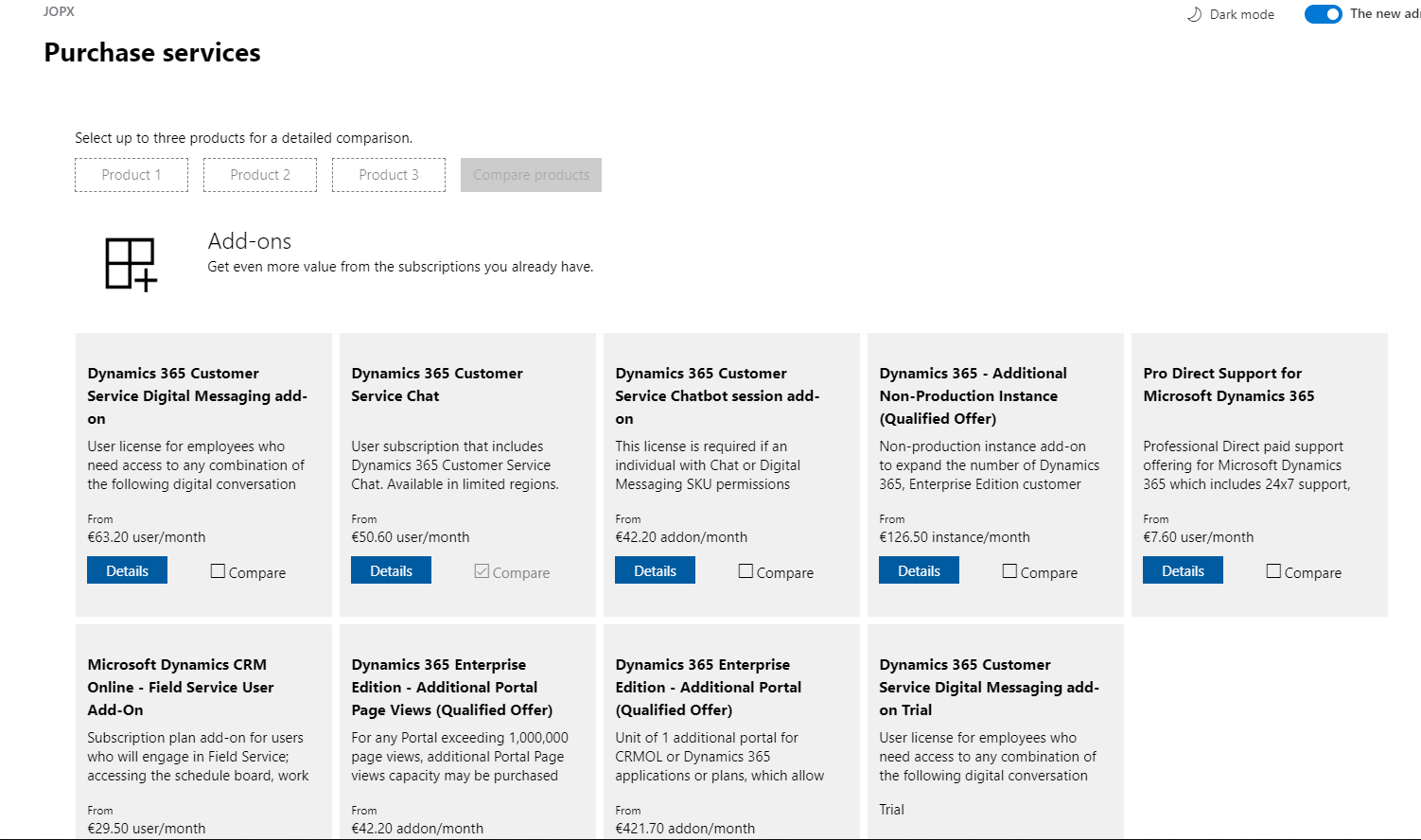
  1. Omnichannel for Customer Service is an add-on which requires a separate license so you first need to add this add-on in your tenant. Go to Billing > Purchase Services and select add-ons. Search for Dynamics 365 Customer Service Digital Messaging add-on trial and select it.
  2. After enabling the add-on you will need to provision Omnichannel for Customer Service by first providing data access consent and in a next step provisioning the Omnichannel for Customer Service application. The official Microsoft documentation still show how to to this from the legacy Dynamics 365 admin portal but you can do this from the new Power Platform Admin Portal as well - click the three dots and select manage for the Omnichannel for Customer Service
  3. In the separate Omnichannel for Customer Service screen you will be able to enable the different channels that you want to support. The initial setup might take a couple of hours to complete so check the same page for the status of the setup later on.
  4. Next you will need to assign the "Dynamics 365 Customer Service Digital Messaging add-on" license to the users who need have a  Omnichannel for Customer Service security role.
  5. To enable chat integration, you need to create a code snippet to embed the chat control on your website or portal. You can follow the steps on the Microsoft Omnichannel for Customer Service Administrator > Quickly configure a chat widget  which use a Customer Service Portal but you can add this chat widget to your own website as well.
  6. Support agents can use the Omnichannel for Customer Service app to interact with the users to follow up on their questions and complaints. When a new conversation comes in, it will be routed to available agents who can accept this incoming conversation. (Take a look at Understand unified routing and work distribution to understand how you automate work assignment across channels taking into account agent's capacity and skill sets)
  7. A customer agent will be able to interact with the customer using an inline chat window which is built on top of the Customer Service application which means that you will be able to leverage the full available context of the customer (existing contact info, open cases, etc ...)
There were lot of new features added to Omnichannel for Customer Service in the 2020 release wave 1 so definitely take a look at the Microsoft Business Applications Summit recording below or take a look at the Omnichannel for Customer Service sessions on Microsoft Learn.

References:

Thursday, July 16, 2020

How to use secrets in Jupyter Notebooks with python-dotenv

It is not a good idea to embed the the secrets (credentials, keys, etc..) that you need in your Python code directly in your Jupyter Notebooks. You can store these secrets in environment variables but an alternative is using the python-dotenv library. Python-dotenv is a library that reads key-value pairs from  a .env file and adds them to environment variables.

To get started you need to install the latest version of python-dotevn and then you will need to create a .env file in the same folder as your .ipynb files.


Tip: You may not be able to create .env file directly in Windows Explorer - use the command prompt and the echo command to create this file.


You can read a key-value pair in just one line of code after you loaded the extension and the os module which provides functions to interact with the operating system.


Source code is available on https://github.com/jorisp/tradingnotebooks/blob/master/dotenv.ipynb

References:

Wednesday, June 24, 2020

Using a personal access token in Postman to query the Azure DevOps Services REST API

If you want to query the Azure DevOps Services Rest API you first need to be authenticated. The easiest way to do this is to generate a Personal Access Token. If you want to use this token in Postman to authenticate you will need to use Basic authentication, leave the username blank and copy the token in the password input box.

Saturday, June 20, 2020

Dynamics 365 and Power Platform monthly reading list May 2020

Technical topics (Configuration, customization and extensibility)

Topics for Dynamics 365 Business Application Platform consultants, project managers and power users

Wednesday, June 17, 2020

How to fix a broken Easyrepro project after upgrading Chrome

After I recently upgraded Chrome I noticed that my Easyrepro test project did not build/run anymore. (read Easyrepro - UI automation test library for Dynamics 365 and  CDS if you are not familiar to Easyrepro)

Luckily the exception pointed in the correct direction "System.InvalidOperationException: session not created. This version of ChromeDriver only supports Chrome version 79 (SessionNotCreated)".


The EasyRepro testing framework leverages Selenium ChromeDriver so you need to check the compatibility - see https://chromedriver.chromium.org/downloads 

To fix the error I just had to update the Nuget package to a version which is compatible with the installed Chrome on my machine.


Storage capacity enforcement for CDS instances

Storage capacity enforcement now seems to activated, this means that when your capacity storage is greater than the entitled capacity, admin operations like creating, copying and restore environments will be blocked.

Thursday, June 11, 2020

Farewell to the Dynamics 365 Admin Center

In 2019 Microsoft announced that they would consolidate the different admin centers for Power Platform and Dynamics 365 Sales/Customer Service/Field Service. In the meanwhile, more and more functions seem to be moving to the new Power Platform Admin Center. Although the legacy Dynamics 365 admin center deprecation is not listed (yet) on the Important changes (deprecations) coming in Power Apps, Power Automate and model-driven apps in Dynamics 365. I expect this admin portal to quickly fade away.  

Update June 28th: @jukkan just mentioned that there is an update in Message Center which officially states that the old Dynamics 365 Admin Center will go away. I like the speed of innovation in the cloud but this seems like incredibly short notice.


To be able to access the Power Platform Admin Portal you will need to assign an appropriate service admin role - see Use service admin roles to manage your tenant for more details.

Features/functionality which is now surfaced in the new Power Platform Admin Portal:
  • App management in the Applications tab of the legacy Dynamics 365 Admin center has now moved to Power Platform Admin Center - see  Manage Dynamics 365 Apps for more details. This applies to installing and managing Microsoft first party apps like Customer Service but also to other apps installed through AppSource. You first need to select your environment in the new admin center and use the Resources>Dynamics 365 apps menu to open the list of available apps to install. This same screen can be used to upgrade existing apps to newer versions. (Unfortunately there is no indication when there is a new app version available)


Friday, June 05, 2020

Quick tip: exporting all nuget packages used in Visual Studio solution to text file with PowerShell

Although it is possible to manage Nuget packages at solution level in Visual Studio with the possibility to even consolidate the Nuget packages it might be useful as well to have an overview of all of the packages that you use in another format. 


The below PowerShell code snippet allows you to export all used Nuget packages to a text file (you can ignore the exceptions thrown because of  projects without Nuget packages).

Get-Content .\[yoursolutionname].sln 
| where { $_ -match "Project.+, ""(.+)\\([^\\]+).csproj"", " }
| foreach { "$($matches[1])\packages.config" } | % { Get-Content $_ | Find "<package id" } | Sort-Object -Unique | Out-File -FilePath c:\temp\packages_demo


Tuesday, May 19, 2020

Dynamics 365 and Power Platform monthly reading list April 2020

Dynamics 365 and Power Platform -2020 Wave 1 Topics

Technical topics (Configuration, customization and extensibility)
Topics for Dynamics 365 Business Application Platform consultants, analysts, project managers and power users

Monday, May 18, 2020

Power Platform ALM process guidance published and Power Platform Build Tools general available

Microsoft just published dedicated documentation around Application Lifecycle Management (ALM) with the Power Platform and Dynamics 365. This is a great starting point for everyone who wants to mature their development and deployment practice.

At the same time Microsoft announced the general availability of their Microsoft Power Platform Build Tools for Azure DevOps .  If you have used the preview version of the Power Platform Build Tools you will need to install the new extensions and you will need to recreate your build and release pipelines. You can install the Power Platform Build Tools extension from Azure Marketplace and they are free to use within Azure DevOps Services (online) or Azure DevOps Server.


Keep in mind though that setting up a good ALM practice, is about more than just tooling being in place (For a good discussion take a look at Continuous Integration is not a tooling problem)

If you are already using tooling like the Power DevOps Tools from @waelhaemze, it might not (yet) make sense to switch over but if you are new to DevOps/ALM for Dynamics 365/Power Platform definitely take a look (for more background on this topic see My Perspective on the PowerApps Build Tools for Azure DevOps )

Friday, May 15, 2020

Quick tip: generate and integrate mock data for Dynamics 365

If you are doing demos for Dynamics 365 it might be needed to generate mock data - an interesting tool for this is Mockaroo. You can just download a dataset that you generate from the website but Mockaroo also exposes a number of APIs that you access.


An interesting example of leveraging the API is outlined in Power Automate your demo data by @dylanhaskins


Thursday, May 14, 2020

Easyrepro - UI automation test library for Dynamics 365 and CDS

With the "One version" update policy of Dynamics 365 (Sales,Customer Service, Field Service,...) it starts making more sense to include some level of test automation in your projects. If you look at the test pyramid - it however also becomes apparent that user interface testing is still quite cumbersome and I think that the majority Dynamics 365 projects do not include any form of automated UI testing.

With the release of the Easyrepro - the automated UI testing framework for Dynamics 365 on Github in June 2017, writing automated UI test has become easier although it still requires basic developer skills and access to Visual Studio tooling.


The purpose of the Easyrepro library is to provide Dynamics customers the ability to facilitate automated UI testing for their projects. The Easyrepo API's provide an easy to use set of commands that make setting up UI testing quick and easy. The functionality provided covers the core CRM commands that end users would perform on a typical workday and developers area able to extend that coverage to more functionality.

If you want to quickly explore what is possible with the EasyRepro framework, clone the repo on Github and take a look at Microsoft.Dynamics365.UIAutomation.Sample project and see how the different test classes are implemented.


Afterwards I highly recommend you to take a look at the excellent series of blog post written by the Microsoft PFE team:


References:


Wednesday, May 13, 2020

Resolving xauth: timeout in locking authority file /home/pi/.Xauthority on Raspberry Pi

A couple of weeks ago when I tried to start the Raspberry Pi desktop it threw an error " xauth: timeout in locking authority file /home/pi/.Xauthority" -  luckily I found a solution on this page  please help -startx fails/hangs, finally returns error message “xauth: timeout in locking authority file /home/pi/.Xauthority ”  - running xauth -b did the trick for me.