Notepad++ is one of my favorite tools but it is not always easy to remember which plugin you need to install again after moving to a new laptop. So quick reminder: if you want to format XML files in Notepad++ the easiest thing to do is installing XML Tools using the Notepad++ plugins manager. Next you can use the Plugins>XML Tools>Pretty print
Friday, November 20, 2020
Tuesday, November 17, 2020
Dynamics 365 and Power Platform monthly reading list October 2020
Technical topics (Configuration, customization and extensibility)
- ARC and SLA migration tool (Preview) in Dynamics 365 - 2020 release wave 2
- Email experience now available in Dynamics 365 mobile apps - 2020 release wave 2
- How to do sales forecast projection in Dynamics 365 CRM using trend charts and flow snapshots
- Next generation field service mobile app available
- Power Apps Teams Integration
- Get Flow run by using Dynamics 365/CDS record ID as parameter in Power Automate
- Trigger flows from any message in Microsoft Teams
- Power Apps Portals Community Bootcamp recordings (Sept 2020)
- Email messages sent from Dynamics 365 through Server-side synchronization will now save to Exchange "Sent items" folder
- Monitoring the Power Platform - blog post series from Microsoft PFE
- Use Monitor to troubleshoot forms in the model-driven app (preview) by @nishantranaCRM
- Impersonation within Azure Function or custom connector when using AAD authentication by @inogic
- Power Automate - avoid initialize variables action and workaround
- Using environment variables as parameters for Power Automate Deployments (ALM) by @FlowAltDelete
- Pets vs cattle - how to manage your Power App environments by @scottdurow
- Learn how to convert your ideas to solutions with Power Platform
- Close deals by leveraging relationship analytics in Dynamics 365 Sales
- Redefining what it means to understand customer sentiment
- Automatically capture contacts from e-mail with Dynamics 365 Sales Insights
- Dynamics 365 Customer Insights: Power Apps pocket demo | Professional Services (Youtube 00:02:53) by @MSFTDynamics365
Thursday, November 12, 2020
CRMUG Belux Webinar - Accelerate your Power Platform journey using Power Accelerate
Join CRMUG Belux on November 20th at 12:00 CET for a free webinar to learn about the Power Accelerate ISV solution (https://www.poweraccelerate.com) which accelerates your Microsoft Power Platform journey and makes modernization onto the Microsoft Power Platform fast and seamless.
No preregistration required - join us by clicking this Power Accelerate webinar link on Friday November 20th or download the Outlook calendar reminder for the Power Accelerate webinar.
Agenda:
- Introduction
- Power Accelerate solution overview
- Power Accelerate solution demo
- Learn about the free private preview program
Speaker: Bert Wijns, Co-founder of the Power Accelerate ISV solution - Experienced subject matter expert guiding enterprise customers, implementation teams and partners through implementations of the Microsoft Power Platform.
Wednesday, November 04, 2020
Automate your PowerApps Canvas apps test in your DevOps Pipeline
Some of you are already using automated UI testing for PowerApps model-driven apps (or for Dynamics 365 App extensions) using Easyrepro - the UI automation test library for Dynamics 365 and CDS but it is also possible to Automate your canvas app tests in your DevOps Pipeline.
The PowerAppsTestAutomation project on Github abstracts the complexity of writing code to login the canvas apps, add application logging and executing a test case or a test suite.
References:
Wednesday, October 28, 2020
Access token endpoint versions in Azure AD
You might have noticed that there are two different urls that you can use for retrieving an access token in Azure AD:
- https://login.microsoftonline.com/<tenantid>/oauth2/token
- https://login.microsoftonline.com/<tenantid>/oauth2/v2.0/token
References:
- OAuth with Azure - the just make it work edition
- Microsoft identity platform and the OAuth 2.0 client credentials flow
- Get auth tokens - get access without a user (client credential flow) walkthrough with examples for Microsoft Graph API
- Azure AD Endpoint v1 vs v2 - notes - older article so not sure if everything is still up to date but still contains some valuable links
Tuesday, October 27, 2020
Improve your quality assurance using the Power Platform webinar
On November 3th, the Realdolmen Power Platform team organizes a free webinar on how you can leverage Power Apps, Power Automate and Power BI to support quality assurance processes.
Improve your quality assurance using the Power Platform webinar registration link (November 4th - 14:00-15:15 CET) .
Session description: With low-code platforms being a trendy topic of 2020, chances are that this isn’t your first invite for a webinar on this topic. But how about a real use-case in action? Let us show you a practical approach on how to combine the ease of use of the Power Platform with common Quality Assurance tasks. We take you through the process of digitizing a paper process for quality assurance, automating manual tasks to optimize efficiency and displaying interactive overviews for audit purpose.
Friday, October 23, 2020
Understanding Dynamics 365 Power BI Template Apps vs Power BI Content Packs
Content packs were used in the past to package and share Power BI objects like datasets, reports and dashboards. Microsoft initially also used content packs to build their own Dynamics 365 solution templates, these solution templates were made available on Microsoft AppSource.
But in 2019, Microsoft introduced the concept of Power BI template apps (See Announcing Power BI template apps general availability) - this also meant that all previous content packs/solution templates became deprecated and some of them got replaced by the template app experience.
Microsoft indeed converted some of the Dynamics 365 content packs into modern Power BI apps and published the updated Power BI apps for Dynamics 365 platform to the Microsoft AppSource. Some of these Power BI apps are tied to a specific Microsoft first party app like Sales Analytics for Dynamics 365 Sales, others can be used by multiple first party apps like Process Analytics for Dynamics 365.
Microsoft partners also build their own Power BI apps for the Dynamics 365 platform and published these to Microsoft AppSource e.g. Microsoft Customer Engagement - Sales Analytics from FuturIT
It is important to understand that you can not modify the Power BI Template Apps easily - the pbix files which drive these Power BI Apps are not downloadable so you can not change the standard reports delivered with these Power BI Apps. Users can however change some parameters in the web view - see Let users personalize visuals in a report - this is however on a per user basis. I however was looking for a way to modify the reports in a similar way which was possible with the content packs.
The workarounds that my colleague @bennidejagere suggested for exporting the underlying model using the XMLA endpoint in Power BI is a little bit out of my comfort zone and does not allow me to get at the report files so I looked at little further.
However the existing solution templates from Microsoft were moved to open source end 2018 (See Power BI solution templates moving to open source) and added to the BusinessPlatformApps github repo. Microsoft however stopped maintaining the original reports but you can still find the original Power BI reports which were part of these packs.
Important: The Power BI template apps for Dynamics 365 Sales and the Process Analytics for Dynamics 365 are also available for download from the Microsoft site on Customize Power BI template apps for Dynamics 365
References:
Tuesday, October 20, 2020
Dynamics 365 and Power Platform monthly reading list September 2020
- Improve FetchXML request performance using the LateMaterialize option
- Introducing action analytics in Power Automate
- Receive a weekly summary email of new Dynamics 365 opportunities by @D365Goddess
- Gartner Magic Quadrant names Microsoft Power Apps a leader for low code application platforms
- Exploring the Common Data Service (current environment) Connector by @MagnetismXrm
- How to get rid of More information required screen after spinning up a new trial - by default new trial instances have MFA enabled by default - follow this post from @inogic to change this behavior
- For a select Microsoft Teams message - new trigger in Power Automate by @TomaszPoszytek
- Load data from SQL on-premise to CDS (Common Data Service) using Power Platform dataflows by @nishantranaCRM
- Append and merge to combine data from multiple data sources in Power Platform dataflows
- Mailbox alerts hide/show behavior in Dynamics 365 (CRM)
- Insights on building robust process orchestrations using Power Automate, Logic Apps and Azure Functions
- 2020 Release Wave 2 - Let's look at CDM and data integration highlights
- How to do sales forecast projection in Dynamics 365 CRM using Trend charts and Flow snapshots
- Configure display activities in UCI with the card form
- Power Apps and Automate Architecture series
- Timeline control enhancements in Dynamics 365 - 2020 release wave 2
- Dynamics 365 task completion reminder using Flow bot in Microsoft Teams Power Automate by @D365Goddess
- Dynamics 365: this new feature could help bring an end to another big business headache - Dynamics 365 is getting a true omnichannel system, thanks to a voice channel built on Azure Communication Services
- Innovation on the service suite of Dynamics 365 applications
- Digital selling and customer engagement with Dynamics 365 Sales updates
- Announcing new innovations in the Microsoft Customer Data Platform
Quick fix: SQL Server Management Studio 18.0 not installing
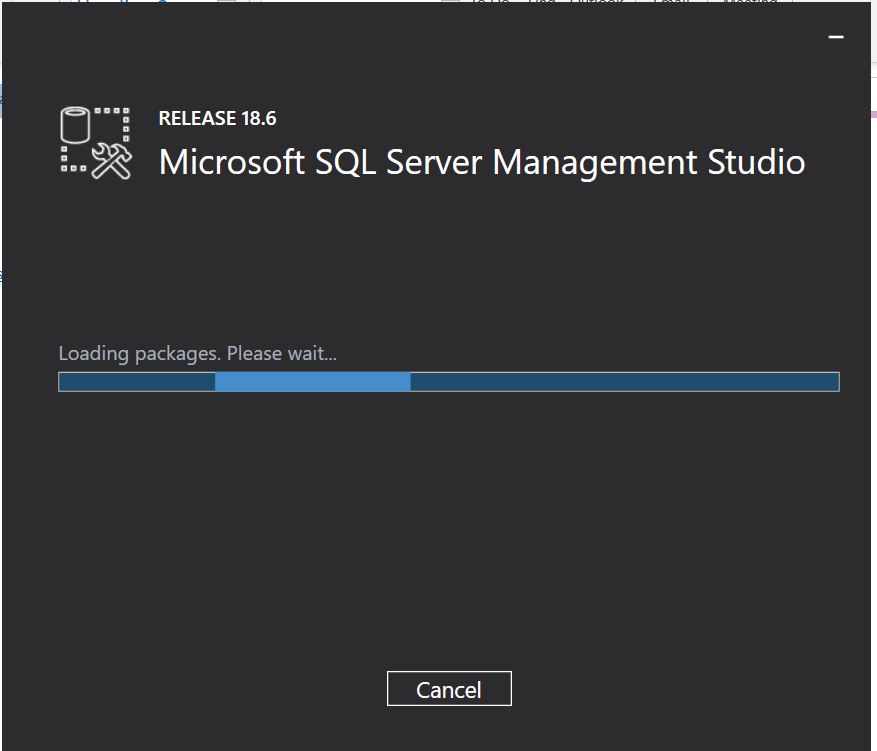
My installation of SQL Server Management Studio 18.0 last week always got stuck on the initial "Loading packages. Please wait..." screen. The solution which worked for me was deleting the registry key underneath "HKLM\SOFTWARE\WOW6432Node\Microsoft\Microsoft SQL Server Management Studio" as outlined in Installing SSMS 18 won't go past loading packages phase.
Wednesday, October 14, 2020
Project Oakdale - the product formerly known as DataFlex
- Now in Preview: customize Teams with built-in Power Platform Capabilities - Project Oakdale went in public preview with the ability for everyone to try it out.

- Public preview of Power Virtual Agents within Microsoft Teams - the ability to build bots using Power Virtual Agents with the bot creation experience embedded within Teams itself. The most exciting part of this announcement is that PVA for Teams is included with your existing Teams licenses. If you are new to PVA, check out the PVA webinars and video gallery

- Azure API Management connector on the Power Platform - interesting note here "Citizen developers can use these API Management backed connectors in Power Apps hosted in Teams through the existing Teams licensing" ... Watch the session Build Power Apps within Microsoft Teams and get to the next level with Azure APIs and the Power Platform for more details
- Build custom apps to drive productivity in the remote work world with PowerApps and Teams session at Microsoft Ignite about Project Oakdale - must watch and great intro
- Why should I consider using Project Oakdale in Teams (Youtube)
- Power Apps and Microsoft Teams (Microsoft documentation)
- Announcing Microsoft Power Platform and Dynamics 365 updates at Microsoft Ignite
- Microsoft Teams as platform
- Overview of Project Oakdale (Microsoft docs)
- How are Project Oakdale and Common Data Service different? (Microsoft docs)
- How Power Platform now empowers all Teams users
- Build and customize your first Teams App with Power Apps - Full training (Youtube 00:43:04)
- Introducing Project Oakdale, a low code data platform for Microsoft Teams
- A closer look at Data Platform Capabilities in Project Oakdale
- Microsoft Dataflex questions and answers
- What is Microsoft Dataflex
- Dataflex is more (and less) than CDS
- Dataflex for Teams: limitations and opportunities
- Four things to know and five things to do following the big Microsoft Dataflex + teams announcement
Wednesday, September 23, 2020
Dynamics 365 and Power Platform monthly reading list August 2020
Technical topics (Configuration, customization and extensibility)
- Dynamics 365 - the cost of manual deployments
- Power Apps with Azure Application Insights (Youtube 00:39:52)
- Power Automate Dynamics 365 connector deprecation
- Power Platform Developer Saturday recordings
- The power of Dual Write (Youtube 00:52:35)
- Querying date intervals in the Common Data Service by @rappen
- Creating a flow which triggers where regarding field = lead by @benhosk
- Dynamics 365 - Problems with managed solutions out of sync versions
- Enable send direct email button in Unified Interface
- Find Created On date of solution components in solution layers
- Configure display activites in UCI with the card form by @inogic
- BPF Flow step as a trigger in CDS (current environment) connector
- Securing your HTTP triggered flow in Power Automate
- Access flow run history within a record in Dynamics 365/CDS by @LinnZawWin
- PowerApps Collections Cookbook
- Load data from SQL on premise to CDS using Power Platform dataflows
Topics for Dynamics 365 Business Application Platform consultants, project managers and power users
- Power Apps Licensing explained (Youtube) by @LisaMCrosbie
- Planning a Power Apps project
- Improve sales productivity and remote selling with sales accelerator
- T-Mobile manages company wide initiatives and more with Power Platform
- Imagine, build and deploy solutions with Microsoft Power Platform
- PowerApps the truth about $10 by @stevemordue
- Enrich customer data with brand and interest affinities with Dynamics 365 Customer Insights
- Modernizing the non-conformity management tool with Microsoft Power Platform
- Telstra citizen developers automate processes with Power Apps in Microsoft Teams, giving millions of minutes back to the business
Wednesday, September 09, 2020
Fixing current .NET SDK does not support targeting .Net Core 2.2 in Visual Studio 2017
I encountered below exception when building a ASP.NET Core project in Visual Studio - "The current .NET SDK does not support targeting .NET Core 2.2. Either target .NET Core 2.1 or use a version of the .NET SDK that supports .NET Core 2.2".
Luckily this forum post pointed in the correct direction - first check the installed version of the .NET Core SDK on your machine.
If you are using Visual Studio 2017, you will need to install 2.2.1xx of the SDK to support targetting .NET Core 2.2. You can download the different versions of the .NET Core 2.2 SDK on https://dotnet.microsoft.com/download/dotnet-core/2.2
Thursday, September 03, 2020
Palm oil price vs SIPEF stock price in Jupyter notebooks with Quandl
Quandl also offers free commodity price data for almost 100 commodities ( See API for commodity data) so I decided to create a Jupyter notebook comparing SIPEF's stock price with the price of palm oil. Take a look at the full notebook I shared on github if you want to learn why - https://github.com/jorisp/tradingnotebooks/blob/master/Quandl_API_Euronext_SIPEFPalmOil.ipynb
Remarks:
- Be careful when embedding images in a Jupyter notebook that you want to publish on Github (see Images in Markdown not showing when uploaded to Git for a discussion on this) - filenames are case sensitive - I got it working using the url syntax
- To store the quandl key I used the approach outlined on how to use secrets in Jupyter Notebooks with python-dotenv
- I really like Matplotlib and its versatility in rendering capabilities in this notebook I used the ability to visualize multiple time series (see code preview below) with different axes. (see code below)
sipcolor = 'tab:red' fig,ax1 = plt.subplots() ax1.plot(data['SIP'],color=sipcolor) ax1.set_ylabel('SIPEF',color=sipcolor) #Instantiate a second axes that shares the same x-axis ax2 = ax1.twinx() ax2.plot(data['PPOIL']) ax2.set_ylabel('PALM OIL USD') plt.gcf().set_size_inches(15,8) plt.show()
Related posts:
Tuesday, September 01, 2020
Quick tip: workaround kernelspec module not installed with jupyter notebooks in Visual Studio Code
This weekend I tried out working with Jupyter Notebooks in Visual Studio Code. Since I already have Jupyter up and running as part of the Anaconda distro I thought this would be easy but it took me longer than expected.
First step is to install the Python extension for VS Code and then you can start working with existing Jupyter Notebooks by just double clicking an existing notebook. Unfortunately this immediately threw an exception "Error: Jupyter cannot be started. Error attempting to locate jupyter: 'Kernelspec' module not installed in the selected interpreter." The workaround suggested on StackOverflow Python/Jupyter notebook in VSCode does not use the right environment did not resolve the issue and also the fixes described on Github - New version tries to install kernelspec were not working.
The workaround which seems to be working for me is starting VS Code from the Anaconda Prompt in the Jupyter workspace directory by typing "code ."
Wednesday, August 26, 2020
Dynamics 365 and Power Platform monthly reading list July 2020
- SLA's in the Unified Interface
- Use SQL to query data (Common Data Service)
- Tabular Data Stream (TDS) Protocol endpoint for Common Data Service
- DirectQuery CDS from Power BI by @crmchartguy
- XrmToolBox school (Youtube playlist)
- How to convert an unmanaged solution into a managed solution in Dynamics 365
- Power Platform DevOps: Part 5 - Deconstructing the framework: solutions project
- Create engaging messages with Adaptive Cards (Youtube 001:12:05)
- Power Automate Saturday Playlist (Youtube)
- Power Apps Checker now analyses modern web syntax (up to ES9)
- Monitor now supports model driven apps
- Setting sub-grid filterxml in the unified interface and other naughty things by @ddlabar
- Overcoming 5 top challenges with embedded canvas apps
- Collaborate and debug an app together in real time with monitor
- Get a users last logon time in Dynamics 365 by @nishantranaCRM
- How to restrict users from executing on demand workflows
- Enhanced integrated calendar experience in Dynamics 365 Sales
- How to use enhanced reference panels in UCI for rendering multiple subgrids
- How to merge solutions in Power Apps and Dynamics 365 with XrmToolBox Solution Mover
- Power Platform - Talking about the underdog
- Send a Power App push notification using flow to open a record in a canvas app
- How to power up Teams using Power Virtual Agents with Luise Freese (#LessCodeMorePower youtube video) with @LuisFreese and the associated blog post https://m365princess.com/how-to-use-power-virtual-agents-to-simplify-it-and-unfck-user-experience/
- Announcing Power Platform and Teams updates to help customers adapt to remote work
- Go with what you know: the value of long term customers
- Omnichannel Engagement Hub: configuring outbound messaging by @tassya
- Forms Pro is now Customer Voice by @juliandynamics
- Are you an app person or a flow person?
- Gartner positions Dynamics 365 Field Service Magic Quadrant Leader
- Telstra citizen developers automate processes with Power Apps in Microsoft Teams, giving million of minutes back to the business
Friday, August 21, 2020
Notes on learning to work with the Microsoft Graph API
Microsoft Graph is a REST API which allows you to access Microsoft Cloud services (e.g. Office 365 service like Microsoft Teams, OneDrive,Planner, SharePoint, etc.. but also enterprise mobility and security services like Azure AD, Identity Manager, etc..) resources using a single endpoint. You can use it for example for querying data in Outlook/Exchange and OneDrive but in the past couple of weeks I mainly used it for Microsoft Teams. The easiest way to get started with the Microsoft Graph API is the Microsoft Graph Explorer.
I learned quite a lot from the 30 days of Microsoft Graph blog series - a highly recommended starting point - for other resources take a look at the references section below.
References:
- Overview of Microsoft Graph
- Getting started with Microsoft Graph (Youtube 00:04:46)
- Graph explorer - https://aka.ms/ge
- Microsoft Graph tutorials
- A lap around the Microsoft Graph Toolkit - https://aka.ms/mgtlap
- Build apps with Microsoft Graph - Associate (Microsoft Learn)
- Getting started with Microsoft Graph API for developers
Friday, August 14, 2020
Don't forget to update older client applications for Dynamics 365 to the correct .NET Framework version
I lost 30 minutes this morning when trying to troubleshoot an older console app (written in 2017) which refused to connect to Dynamics 365 Customer Engagement. It was only after updating the Nuget packages for Microsoft.CrmSdk.CoreAssemblies that I noticed that I was still building against .NET Framework 4.5.2 which is not supported anymore.
Thursday, August 13, 2020
Quick tip: SQL access to Common Data Service using Tabular Data Stream (TDS)
Recently Microsoft announced Power BI DirectQuery support (in preview) to the Common Data Service (CDS) using Tabular Data Stream. You can also leverage this CDS TDS endpoint within SQL Server Management Studio to write SQL queries against the CDS database. You can connect using the base url of your CDS instance and add the port 5558. To authenticate you will need to use Azure Active Directory - Password.
By default this functionality is not enabled, so you if you try to use SQL Server Management Studio you will get below exception.
As outlined on http://aka.ms/enablesqlforcds, you will need to to go the Power Platform Admin Center to switch on the TDS support.
References:
- DirectQuery CDS for Power BI
- Tabular Data Stream (TDS) Protocol endpoint for Common Data Service (CDS)
Tuesday, August 11, 2020
Quick tip: find duplicate records in Dynamics 365 with Deduplicator plugin for XrmToolBox
If you want to quickly scan your Dynamics 365 or CDS instance for duplicate records, take a look at the Deduplicator plugin for XrmToolbox. It provides you with the option to specify one or more fields for a specific entity as matching criteria (with option to ignore blank values, leading and trailing white space and taking into account casing) and choose which additional fields to display for the duplicate results.
Friday, August 07, 2020
Notes on the Power Virtual Agent in a day lab
Since Power Virtual Agents are built on the Power Platform and the Azure Bot Framework you still have the option to extend the capabilities to suit your organisations needs.
Some notes on the Power Virtual Agent lab:
- The creation of a virtual agent or bot is super easy and intuitive with a simple graphical interface for authoring the logic that will drive your bots. The authoring canvas for the conversation tree has a great user experience and enables non-developers to create a powerful chatbot experience.
- After you import the SolutionPowerVirtualAgentInADay.zip solution file, you will need to reconfigure the connections in the different Power Automate Flows - to do this you will need to use the unique name of the CDS instance - so if you have used a Dynamics CRM instance you can not use the readable name - don't forget to add the region shorthand as well.
- If you are familiar enough with Dynamics 365 and/or Power Platform you will be able to complete the labs in a couple of hours.
- The built-in integration with Power Automate allows you to leverage the over 250+ external services and systems so the only limit is your imagination.
- To try out transferring a chat bot session to a human agent, the easiest option is to use Omnichannel for Customer Service (See Setting up Omnichannel for Customer Service on an existing Dynamics 365 trial for how to try this out). After you have completed t Only limited documentation is available on how to write logic for escalating to an agent if you are not using Omnichannel for Customer service - see Configure hand-off to any generic engagement hub and code on Github
- Introduction to Power Virtual Agents (Youtube 00:52:17)
- Create, test and deploy your bot with Virtual Agent for Customer Service (Youtube 00:10:48)
- PVA Series - real QnA chatbot with QnA maker
- Building proactive bot with Power Virtual Agent
- Create chatbot using Dynamics 365 Virtual Agent for your customers
- Dynamics 365 Virtual Agent for Customer Service (Youtube 00:08:13)
- Create, test and deploy your bot with Virtual Agent for Customer Service (Youtube 00:10:08)
- Power Virtual Agents Solution packaging (Youtube)