Friday, January 22, 2021

Getting started with Azure Synapse Analytics on demand webinars

 Mid December 2020, Microsoft organized some webinars to get Microsoft partners up to speed with Azure Synapse Analytics. All these webinars are now available on demand on the Microsoft events page - just search for synapse and add the filters "category: on demand" and "events for: Partners"


On demand webinars for Microsoft Partners - Introduction to Azure Synapse Analytics

  • Session1: Introduction to Azure Synapse Analytics: Studio and orchestration
  • Session 2: Introduction to Azure Synapse Analytics: Azure Synapse Analytics - Synapse and SQL Serverless
  • Session 3: Introduction to Azure Synapse Analytics: Apache Spark and Synapse Workspace security
  • Session4: Introduction to Azure Synapse Analytics: Azure Synapse Analytics Security, Metastore and Synapse link for Cosmos DB
  • Session 5: Introduction to Azure Synapse Analytics: Azure Synapse Analytics -  Power BI and Azure Synapse Analytics Integration


Thursday, January 14, 2021

MB-600 Dynamics 365 and Power Platform solution architect exam prep and beyond

The last couple of weeks of 2020 I have been prepping for Exam  MB-600: Microsoft Dynamics 365 + Power Platform Solution Architect which I passed end of December 2020. In this blog post I will share some resources I used to study for the exam. I will also share some thoughts on what you can expect on the exam (without breaching the confidentiality - so I can't give specific questions). 

It was the first time I took a Microsoft exam online  due to the exam centers being closed in Belgium due to Covid.  The online proctored exam went quite smoothly but it did make me a little more nervous  especially given some of the horror stories I had heart about these type of exams.

For any Microsoft exam you start by looking at the detailed skills outline document. The MB-600 exam skills outline document  contains an overview of the different topics, you can find this document on the exam details page. Make sure to always look for the latest version since the exam requirements might get updated a couple of times every year - which is logical given the rapid evolution of the platform.


As part of the preparation I started with the MB-600: Microsoft Power Apps + Dynamics 365 Solution Architect Virtual Training Series (May 2020) for Microsoft partners - a 3 part on-demand webinar series  of about 2 hours per topic:

There is an overlap of this training with the Microsoft Learn learning paths which are also outlined on the MB-600 exam details page - Architect solutions for Dynamics 365 and Power Platform

I also started following a number of sessions from the MB-600 virtual study group initiative where a number of consultants share their thoughts on the exam - they will cover all content in 10 different sessions/webinar sessions. The content of the study group is largely based MB 600: Microsoft Dynamics 365 + Power Platform Solution Architect - Revision Guide (Recording are only accessible for CRMUG members)

In hindsight (after passing the exam) all of these resources provide a lot of information about the role of solution architect, the type of activities he/she engages in during the different phases of a customer engagement (Initiate & design, Implement, Support and evolve) but they are not enough for passing the exam. The exam contains quite a few technical questions that you should be prepared for on some of the topics on integration patterns using Azure, Dynamics 365 security model, ALM for Power Platform and Dynamics 365, basic understanding of the capabilities of all of the different products in both Power Platform (Canvas and model driven apps, Power BI, Power Automate Flow, Power Virtual Agents, PowerApps Portals) and Dynamics 365 (Sales, Customer Service, Field Service, etc...), ALM for Power Platform and Dynamics 365, ... 

There are the standard multiple choice questions which you also encounter but what was new for me in this exam was the use of fictional customers case studies which will serve as input for a set of questions afterwards. Normally the MB-600 exam is the culmination in a series of exams for attaining the title of but I only took this last exam up until now. So probably there is an overlap in the technical content covered as part of the other exams.

Alternatives to Azure Notebooks preview

Azure Notebooks Preview will be retired on January 15th, 2021 and all user data will be destroyed - don't forget to download your user data before then.  Microsoft alternatives to use are listed on Quickstart: Export a Jupyter Notebook project in Azure Notebooks Preview 


Friday, December 18, 2020

Team member license enforcement coming up - deadline 31th of January 2021

Technical enforcement for Dynamics 365 Team Members licenses purchased or transitioned after October 1, 2018 will come into effect on January 31, 2021 (extended from the original date of April 1, 2020) for customers with online environments.

This means that user with Team member license will not be able to access custom model-driven apps or some of the standard first party modules they now have access such as the Customer Service Hub or Sales Hub. (for more details check out  Dynamics 365 Team member licenses (Microsoft Docs).


Team member users will only be able to use specific designated app modules:

You can extend the existing apps and add  both CDS core entities or your own custom entities into the app but you are restricted to 15 entities. There is a Team Member conformance report available for download in the Power Platform Admin Center. Go to the Common Data Service area in the Analytics section, and then select Download to access the report,  use the Change filters link to filter the report by Environment and Date.


References:


Wednesday, December 16, 2020

Dynamics 365 and Power Platform Wave 2 2020 updates - learn to surf the waves

All Dataverse (the new name for Common Data Service) and Dynamics 365 online environments hosted in EMEA region recently received over 200 new updates and features as part of the wave 2 2020 release. This release cadence is a part of Microsoft's one version vision for the  Dynamics 365 platform (take a look at Dynamics 365 Customer Engagement release version transparency for more details)

Update: Just noticed that Microsoft announced the dates for the next release wave 1 for 2021 - release plan will be available on January 27 and early access will be available on February 2021


It is quite challenge to keep track of the fast pace of innovation/change on both Power Platform and Dynamics 365 so I just made this small recap of things I want to check out in the coming weeks. Luckily there are bloggers like Nishant Rana who do a lot of the hard work for you and already dive into the new releases quite early  - he delivered a whole set of blog posts on Dynamics 365 Release 2020 Wave 2
The new/updated relevance search feature is definitely something I will look into as I think it will provide a lot of value for customers:
Covid-19 has turned B2B sales into an overwhelming digital experience, so the new sales accelerator, relationship intelligence and the advanced forecasting functionality - all part of the Dynamics 365 Sales Insights module -  are  capabilities to take a look at as they will support the new reality of B2B buyers preferring a digital buying experience.

Other blog posts and pages:

Welcome to Azure PowerShell Az module, goodbye to AzureRM

As outlined on Overview of Azure PowerShell (AzureRM) - Microsoft new recommends you to use the Az PowerShell module (released in October 2018) to interact with Azure.

The Azure Az PowerShell module  introduces a number of benefits such as shorter commands, cross-platform support and increased stability.  From a supportability perspective, the AzureRM module is still officially maintained and will receive critical fixes through February 2021. I recommend keeping tabs on the supportability section of the Azure Az PowerShell module documentation page as this date has already shifted.

When you first start to use the connect-AzAccount - you might receive a warning that you still have the old AzureRm modules installed. If you have installed the AzureRM PowerShell modules using a MSI package, you must uninstall it through the Windows system rather than using PowerShell


A nice enhancement is the warning around having multiple Azure subscription linked to the account that you use to login  (something quite common for cloud consultants)  - as outlined in the warning  you can use  Set-AzContext to select another subscription.


References:

Tuesday, December 15, 2020

Provisioning Azure Automation using Az.Automation module

Azure automation is a cloud based service which allows you to automate, configure and install updates across hybrid environments. Azure Automation focuses on an infrastructure perspective and allows you to  build/deploy resources, handling updates and configuring all type of resources (not only in Azure but also on premise). 

Coming from a development background and using mostly Azure PAAS components (Azure Functions, Web Apps, Web Jobs, etc..) I had not used it until recently when I got a request from the DBA team for setting up jobs to resolve index fragmentation by reorganizing and rebuilding index for which they suggested to use Azure Automation.


The core component in Azure Automation are runbooks which contain the automation code that you want to use to perform the automation task at hand.  There are a number of runbook types:  (textual) PowerShell runbook, graphical runbook, PowerShell workflow runbook and Python runbook

You can use the Azure Az PowerShell module to create an Azure runbook using the following steps:

References:


Wednesday, December 02, 2020

Notes on getting started with GraphQL - working with Eurex data

Although I had heard the term GraphQL (www.graphql.org) before I never took a look at it. As outlined on https://graphql.org/ , GraphQL is a query language and specification for your APIs which was initially developed by Facebook as a more flexible and efficient alternative to REST (See GraphQL: a data query language for some background). 

I started looking at the GraphQL to explore the Eurex T7 Reference Data APIEurex is the largest European futures and options market and primary deals in Europe-based derivatives (interest-rate derivatives, equity index and equity derivatives and even more exotic derivatives like volatility derivatives, FX derivatives, etc...)

To learn which queries are supported you can use GraphQL introspection to get information about all available requests, filters and response - below is an example of a Postman request


Another easy way to explore the API which is also outlined on the Eurex Reference data API start page is using the GraphQL Playground for Chrome extension


You can also use graphql-voyager to visually explore GraphQL API as an interactive graph - a live demo environment is available as well where you add your own APIs - GraphQL Voyager (apis.guru)

Friday, November 20, 2020

Reminder: quickly format XML files with Notepad++

Notepad++ is one of my favorite tools but it is not always easy to remember which plugin you need to install again after moving to a new laptop. So quick reminder: if you want to format XML files in Notepad++ the easiest thing to do is installing XML Tools using the Notepad++ plugins manager. Next you can use the Plugins>XML Tools>Pretty  print


Related posts:

Tuesday, November 17, 2020

Dynamics 365 and Power Platform monthly reading list October 2020

Technical topics (Configuration, customization and extensibility)


Topics for Dynamics 365 Business Application Platform consultants, project managers and power users

Thursday, November 12, 2020

CRMUG Belux Webinar - Accelerate your Power Platform journey using Power Accelerate

Join CRMUG Belux on November 20th at 12:00 CET for a free webinar to learn about the Power Accelerate ISV solution (https://www.poweraccelerate.com)  which accelerates your Microsoft Power Platform journey and makes modernization onto the Microsoft Power Platform fast and seamless.

No preregistration required - join us by clicking this Power Accelerate webinar link on Friday November 20th or download the Outlook calendar reminder for the Power Accelerate webinar.

Agenda:

  • Introduction 
  • Power Accelerate solution overview
  • Power Accelerate solution demo
  • Learn about the free private preview program

Speaker: Bert Wijns, Co-founder of the Power Accelerate ISV solution - Experienced subject matter expert guiding enterprise customers, implementation teams and partners through implementations of the Microsoft Power Platform. 

Wednesday, November 04, 2020

Wednesday, October 28, 2020

Access token endpoint versions in Azure AD

You might have noticed that there are two different urls that you can use for retrieving an access token in Azure AD:

  • https://login.microsoftonline.com/<tenantid>/oauth2/token
  • https://login.microsoftonline.com/<tenantid>/oauth2/v2.0/token
And although most of the time it is better to use the more recent version, I did wanted to know the difference between both. After deciding that in this case google was not my friend I reached out a colleague @KevinDockx  (Definitely check out his Pluralsight training Microsoft Azure for .NET developers - Building secure services and applications )


Evolution of Microsoft identity platform explains how Azure AD developer platform evolved towards the new Microsoft identity platform. In short the /oauth/token endpoint is part of Azure AD for developers and /oauth2/v2.0/token is linked to Microsoft identity platform.


If you need to decide whether to use Microsoft identity platform (v 2.0) or Azure Active Directory (v1.0) endpoints - definitely take a look at Why update to Microsoft platform (v2.0) and check out the limitations section as well.

In short try to use the v2 as much as possible since it provides more features and is more in line with common standards. The v1 endpoints will still exist for quite a while and as far as I know there is no end of life announced (yet) but Microsoft did already announce the deprecation of the Azure Active Directory Authentication Library (ADAL) - see Migrate applications to Microsoft Authentication Library (MSAL). Everything evolves quite fast and there even is a newer alternative for MSAL called Microsoft Identity Web 

You might also take a look at OpenID Connect (OIDC) which is an authentication protocol built on OAuth 2.0 since Microsoft Identity platform is compliant with this standard as well - see Microsoft identity platform and OpenID Connect protocol for more details

References:

Tuesday, October 27, 2020

Improve your quality assurance using the Power Platform webinar

On November 3th, the Realdolmen Power Platform team organizes a free webinar on how you can leverage Power Apps, Power Automate and Power  BI to support quality assurance processes.

Improve your quality assurance using the Power Platform webinar registration link (November 4th  - 14:00-15:15 CET) .

Session description: With low-code platforms being a trendy topic of 2020, chances are that this isn’t your first invite for a webinar on this topic. But how about a real use-case in action? Let us show you a practical approach on how to combine the ease of use of the Power Platform with common Quality Assurance tasks. We take you through the process of digitizing a paper process for quality assurance, automating manual tasks to optimize efficiency and displaying interactive overviews for audit purpose.

Friday, October 23, 2020

Understanding Dynamics 365 Power BI Template Apps vs Power BI Content Packs

Content packs were used in the past to package and share Power BI objects like datasets, reports and dashboards.  Microsoft initially also used content packs to build their own Dynamics 365 solution templates, these solution templates were made available on Microsoft AppSource

But in 2019, Microsoft introduced the concept of Power BI template apps (See Announcing Power BI template apps general availability) - this also meant that all previous content packs/solution templates became deprecated and some of them got replaced by the template app experience.  

Microsoft indeed converted some of the Dynamics 365 content packs into modern Power BI apps and published the updated Power BI apps for Dynamics 365 platform to the Microsoft AppSource.  Some of these Power BI apps are tied to a specific Microsoft first party app like Sales Analytics for Dynamics 365 Sales, others can be used by multiple first party apps like Process Analytics for Dynamics 365.


Microsoft partners  also build their own Power BI apps for the Dynamics 365 platform and published these to  Microsoft AppSource e.g. Microsoft Customer Engagement - Sales Analytics from FuturIT 

It is  important to understand that you can not modify the Power BI Template Apps easily - the pbix files which drive these Power BI Apps are not downloadable so you can not change the standard reports delivered with these Power BI Apps. Users can however change some parameters in the web view - see Let users personalize visuals in a report - this is however on a per user basis. I however was looking for a way to modify the reports in a similar way which was possible with the content packs.


The workarounds that my colleague @bennidejagere suggested for exporting the underlying model using the XMLA endpoint in Power BI is a little bit out of my comfort zone and does not allow me to get at the report files so I looked at little further.

However the existing solution templates from Microsoft were moved to open source end 2018 (See Power BI solution templates moving to open source) and added to the BusinessPlatformApps github repo. Microsoft however stopped maintaining the original reports but you can still find the original Power BI reports which were part of these packs. 

Important: The Power BI template apps for Dynamics 365 Sales and the Process Analytics for Dynamics 365 are also available for download from the Microsoft site on Customize Power BI template apps for Dynamics 365

References:

Tuesday, October 20, 2020

Dynamics 365 and Power Platform monthly reading list September 2020

Technical topics (Configuration, customization and extensibility)

Topics for Dynamics 365  Business Application Platform consultants, project managers and power users

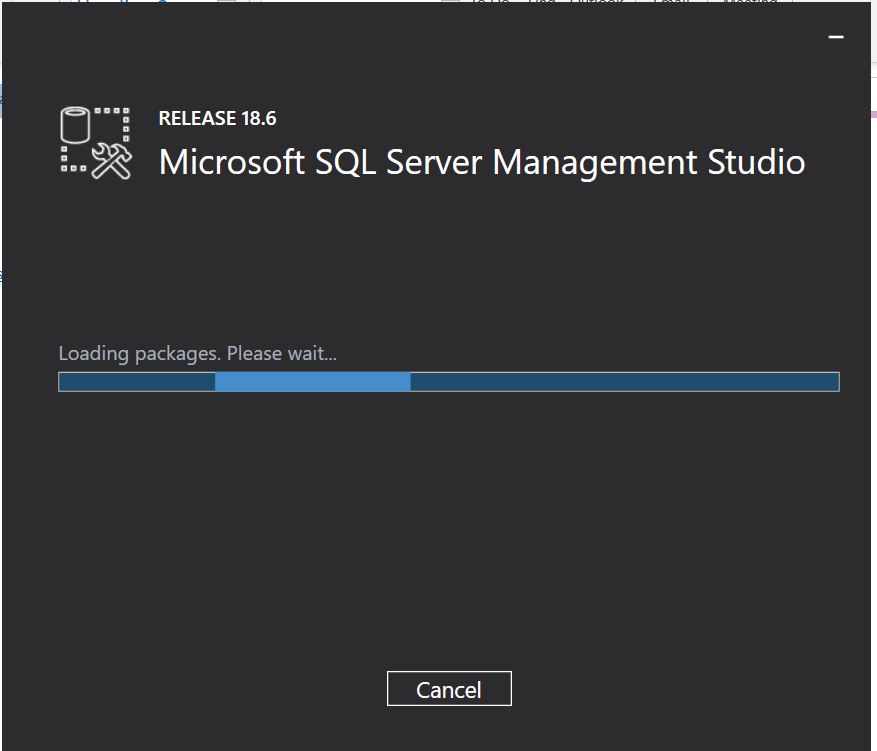
Quick fix: SQL Server Management Studio 18.0 not installing

 My installation of SQL Server Management Studio 18.0 last week always got stuck on the initial "Loading packages. Please wait..." screen. The solution which worked for me was deleting the registry key underneath "HKLM\SOFTWARE\WOW6432Node\Microsoft\Microsoft SQL Server Management Studio" as outlined in Installing SSMS 18 won't go past loading packages phase.


Wednesday, October 14, 2020

Project Oakdale - the product formerly known as DataFlex

Project Oakdale (at that point Dataflex) was first announced by @clamanna at Microsoft Inspire as a low-code data platform built-into Microsoft Teams and it immediately drew a lot of attention in the community. The idea behind it - as articulated quite aptly by @Jukkan in his post Dataflex is more (and less) than CDS - is to deliver an application platform for the masses. But to be honest, Microsoft only lifted the tip of the veil at that point in time. 


Fast forward, to Microsoft Ignite only two weeks ago with  a number of big announcements with regards to Project Oakdale:


References:

Old articles (Released in July after initial announcement on July 21th):

Wednesday, September 23, 2020

Dynamics 365 and Power Platform monthly reading list August 2020

Technical topics (Configuration, customization and extensibility) 

Topics for Dynamics 365 Business Application Platform consultants, project managers and power users