Monday, June 21, 2021

Quick tip: don't forget to unblock downloaded source code files when using Visual Studio

A couple of weeks ago, I suddenly received below exceptions when trying to build a VS2019 solution that I downloaded from Github. 


The solution is indicated in the exception - you need to right click the file and uncheck the "Unblock tickbox" at the bottom of the dialog. But when you have a lot of files, this is quite tedious. Luckily there is a PowerShell cmdlet Unblock-File to help you solve this. Navigate to the folder where you sourcecode is located and just run "dir -recurse | Unblock-File".


Friday, June 18, 2021

Quick tip: submitting web forms to Dataverse using Power Automate Cloud Flows

You can quite easily integrate data coming from forms on your web site with Dataverse using some simple  Javascript and Power Automate Cloud Flows. 

First step is to create a Power Automate Flow with a "When a HTTP request is received" trigger and add the form fields that you want to capture as JSON payload.  Remember to start creating your flow from within a solution so that you can leverage the ALM capabilities of Dataverse and use the new Dataverse connector (current environment)

The request body JSON schema should contain all the web form fields that you want to sent to Dataverse/Dynamics 365 - below is the JSON schema that I generated from a sample payload. 

{
    "type": "object",
    "properties": {
        "firstname": {
            "type": "string"
        },
        "lastname": {
            "type": "string"
        },
        "phone": {
            "type": "string"
        },
        "email": {
            "type": "string"
        },
        "message": {
            "type": "string"
        }
    }
}

After you save the flow - the "HTTP Post URL" will be automatically generated - this is the URL that you will be using in the Javascript code that you embed on your website to sent the web form  to Dataverse. You might want to consider using Azure API management to protect and expose the API indirectly. 


The last step is to  add the Javascript code snippet to your website to submit the changes to the Power Automate cloud flow endpoint or the Azure API management hyperlink.

function submitform()
	  {
		var emailvalue = document.getElementById('emailvalue').value;
		var firstnamevalue = document.getElementById('firstnamevalue').value;
		var lastnamevalue = document.getElementById('lastnamevalue').value;
		var phonevalue = document.getElementById('phonevalue').value;
		var messagevalue = document.getElementById('messagevalue').value;
		var xmlhttp = new XMLHttpRequest();
		xmlhttp.open("POST","yourcloudflowurl");
		xmlhttp.setRequestHeader("Content-Type","application/json;charset=UTF-8");
		xmlhttp.send(JSON.stringify(
			{
				firstname: firstnamevalue,
				lastname: lastnamevalue,
				phone: phonevalue,
				email: emailvalue,
				message: messagevalue
			}
		));
		alert("Thank you");
	  }

Wednesday, June 16, 2021

Introduction to the Dual Write framework for Dynamics 365

Summary: The Dynamics 365 Business Applications Platform consists out of a number of different first party apps with CRM (Dynamics 365 Sales & Customer Service) and ERP (Dynamics 365 Supply Chain Management) being core components which typically are used cross industries and sectors in a large number of sectors. The Dual write framework allows for deep integration of Dynamics CRM and F&O.


In most application architectures at companies we have this classical divide between CRM software on the one hand and ERP software on the other hand. Different vendors, technology stacks make it difficult to bridge the divide between the processes and the data models in these core applications.


But from a customer perspective, they don't care about how your application architecture looks like and whether your processes need to cross application boundaries (see simplified schema below)


The Dual Write framework in Dynamics 365 is just one of the different integration mechanisms available in the platform but it probably is the one which provides the deepest level of integration. Dual-write is an out-of-the-box infrastructure that provides near real-time and bi-directional integration between model-driven apps in Dynamics 365 CE (and Dataverse) and Dynamics 365 Finance and Operations. Dual-write provides tightly coupled, bi-directional integration which offers a number of interesting functionalities (but is not necessarily a fit for your scenarios so it is important to do an assessment first of the impact both on sales and customer service processes and financial processes). Changes in CE  causes writes to FinOps and changes FinOps causes writes to CE, this automated data flow provides an integrated user experience across the apps. (See Dual write overview in Microsoft docs for more detailed information)

Dual-write was made general available (GA) in March 2020 and has been evolving at a rapid pace with monthly updates - see What's new or changed in dual-write.  It consists out of a number of entity maps which are provided out of the box by Microsoft but you can adapt or even extend these entity maps in Dynamics 365 FinOps.  In my opinion, the configuration and setup should typically be done by FinOps consultants/architects since the process and data model from ERP is the most complex one but a basic understanding of Dynamics 365 Customer Engagement is quite useful.

Enabling Dual-Write for existing Finance and Operations Apps is quite thoroughly documented but in my personal experience there were still some quirks during the setup that I did not expect (experience from last year):


After installing the Dual Write solution on Dataverse (or Dynamics 365 CE) you will see quite a lot of changes that you need to be aware of as a CE consultant or CE solution architect like:

  • Enhanced currency functions (FinOps and CE need to have the same currency precision - see Currency data-type migration for dual-write)
  • Changes in CRM will be propagated to Dynamics 365 FinOps using a large number of plugins, if a transaction fails in FinOps because of some missing data (or wrong configuration) your changes will not be saved in CRM.
  • Introduction of new concepts like company (legal entity in FinOps) & party
  • As part of the Integrated customer master, account numbers are now required and need to be filled in. There is no global number sequence across CE and FinOps. You need to handle the autonumbering in both apps and use a common pattern. Accountnumber in CR is mapped to Customer Account number in FinOps, it needs to be unique per legal entity and is the primary key of the customer table in FinOps.
  • Exposure to financial and tax data  in Dynamics 365 CE e.g. customer groups which are used in FinOps to share characteristics for companies such as payment terms, number of days until invoices are due etc... This is sometimes also used for intercompany invoicing for internal/external customers.
  • Advanced pricing and on hand inventory functions


References:


Tuesday, May 04, 2021

Thursday, April 15, 2021

Getting started with Azure Data Factory for Dynamics365 CRM consultants

The majority of Dynamics 365 CRM projects typically include some initial data load/migration activities as customers don't start from a blank sheet. Besides initial load of data there might also be a need for data integrations - there are a  number of solutions for data migration or data integration with Dynamics 365 CRM - this post will explain why you should strongly consider Azure Data Factory as a possible option.. 

Besides the obvious writing code as an integration option, you can also consider a third party solution and there are many good solutions on the market to meet integration needs e.g.  Tibco Scribe or the KingswaySoft SSIS Integration toolkit for Dynamics 365 .  But if you are looking for something with minimal initial cost investment (no separate licensing fee), quick start-up time and fully cloud based (no virtual machine/server environments needed) Azure Data Factory is a great fit. 

This is why - in my opinion -  technical Dynamics 365 CRM consultants should be at least aware of the  capabilities of Azure Data Factory and setup simple data pipelines.

Azure Data Factory is a managed cloud service meant for building complex, hybrid ETL/ELT pipelines that integrate data silos and can include big data and machine learning transformations.


Azure Data Factory provides an easy to use drag and drop interface where you use activities/tasks to transformation, move and copy your data from over 100+ supported data sources within the Microsoft stack or non-Microsoft (Salesforce, SAP, etc…). Azure Data Factory also has full support for running existing SSIS packages on its cloud infrastructure and last but not least it has a flexible pricing model with low initial costs. As expected from an enterprise platform it also provides great DevOps integration - something which I will cover in a next blog post (always setup Git integration for Azure Data Factory - it will make the editing experience a lot easier - see below in the Tips & tricks section for more details).

Below is a visualization of the different building blocks in  Azure Data Factory:

  • A data factory can have one or more pipelines which group together activities which define the actions to perform on your data. (See  Pipelines and activities in Azure Data Factory for more details)
  • These activities use datasets as inputs and outputs. A dataset identifies the data in a specific data store. (See Datasets in Azure Data Factory for more details)
  • Before you can create a dataset you need to specify the linked service to link your data store to the data factory. The dataset represents the structure of the data within the linked data store and the linked services defines the connection to the data source. (See Linked services in Azure Data Factory for more details)
  • The pipelines need to run in a compute infrastructure used by Azure Data Factory to allow for the different types of data integration capabilities. There are three types of integration runtime types (Azure, Self-hosted and Azure SSIS) and depending on the required capabilities and network support you will need to use on or the other. (See Integration runtime in Azure Data Factory)


Tips & tricks:

ADF has a connector which supports both Dynamics 365 (cloud version) as well the legacy on-premise versions of Dynamics CRM (version 2015 and higher) -   See Copy data from and to Dynamics 365 (CDS/Dataverse) or Dynamics CRM by using Azure Data Factory for more details). To be able to use on-premise versions of Dynamics CRM, the environment needs to be setup with  Internet-facing deployment (IFD) - info on the ADF connector information to on premise CRM see Dynamics 365 and Dynamics CRM on-premises with IFD is found on the same documentation page
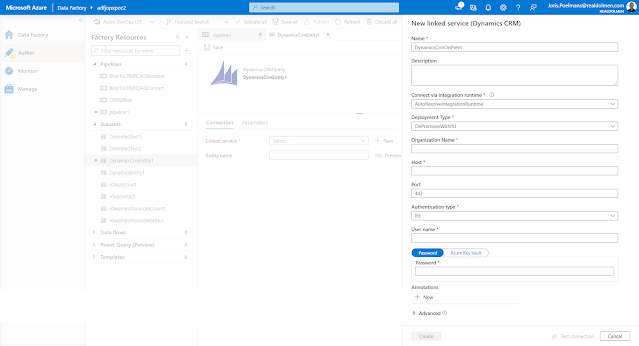
  • Setup Git integration for Azure Data Factory - by default, the Azure Data Factory user interface experience (UX) authors directly against the data factory service (live mode). Even when you are not deploying Azure Data Factory artifacts from source control you will benefit from the better developer experience when git integration is enabled.
  • For the copy activity, you are required to set the Write Behavior to Upsert when  you use Dynamics 365 CRM as a destination (sink). You will need to provide an alternate key or you  can  leave the alternate key blank when you use the internal ID of CRM within your mapping (See Azure Data Factory: Update an existing record using Dynamics 365 Internal Guid for more details)

References:

Monday, April 12, 2021

Dynamics 365 and Power Platform quarterly reading List Q1 2021

Technical topics (Configuration, customization and extensibility)
Topics for Dynamics 365  Business Application Platform consultants, project managers and power users

Friday, February 12, 2021

How to disable multi factor authentication (MFA) for a Dynamics 365 trial environment

 You might have noticed that if you now setup a new Dynamics 365 trial environment, users who login are greeted with "Help us protect your account" which requires to setup multi factor authentication (MFA) even for accounts in trial/demo tenants. This is part of the Azure Active Directory security defaults. 


To get rid of this setting you need to login to https://portal.azure.com and change this setting for the Azure Active Directory used by your demo/trial tenant. Navigate to Azure Active Directory in your subscription and select Properties in the left navigation pane. At the bottom of this screen, you will find the Access Management for Azure resources section.


Click the link Manage Security Default in this section and change the setting to Enable security defaults No.


Wednesday, February 10, 2021

Power Platform and Dynamics 365 API request entitlements

Based on the number and the different types of licenses that you have within your Office 365 tenant you are granted a specific number of API request entitlements in a 24 hour window. For more details take a look at Request limits and allocations (Microsoft documentation)

It is important to keep in mind that these entitlement limits are different from the service protection limits  which are already enforced today.


It is time to start reviewing your architecture and consumption of API requests on Power Platform and Dynamics 365 as Microsoft announced that they will start enforcing these limits once the transition period ends (no date available yet in the official documentation - last updated February 2d 2021) - see Power Platform > Licensing > Request limits and allocations for more details.


Saturday, February 06, 2021

Quick tip: changing the access for a Teams recording in Microsoft Stream

 Up until now a Microsoft Teams recording is published in Microsoft Stream (this will change in early 2021) and  the Microsoft Teams recording is only accessible to a limited set of people. 


If you are the meeting owner, you can change permissions and allow people without access to view a meeting recording. Open the meeting in Stream and select   More options button > Update Video Details. 

This will open a new screen, in which you can tick either "allow everyone in your company to view this video" or you can share the recording with specific persons.


Wednesday, February 03, 2021

Quick tip : how to do a poll during a Microsoft Teams meeting

 A colleague showed me last week how to do a poll during Microsoft Teams meeting - check out the video below on how to set this up yourself and add some interactivity to meetings


Friday, January 22, 2021

Getting started with Azure Synapse Analytics on demand webinars

 Mid December 2020, Microsoft organized some webinars to get Microsoft partners up to speed with Azure Synapse Analytics. All these webinars are now available on demand on the Microsoft events page - just search for synapse and add the filters "category: on demand" and "events for: Partners"


On demand webinars for Microsoft Partners - Introduction to Azure Synapse Analytics

  • Session1: Introduction to Azure Synapse Analytics: Studio and orchestration
  • Session 2: Introduction to Azure Synapse Analytics: Azure Synapse Analytics - Synapse and SQL Serverless
  • Session 3: Introduction to Azure Synapse Analytics: Apache Spark and Synapse Workspace security
  • Session4: Introduction to Azure Synapse Analytics: Azure Synapse Analytics Security, Metastore and Synapse link for Cosmos DB
  • Session 5: Introduction to Azure Synapse Analytics: Azure Synapse Analytics -  Power BI and Azure Synapse Analytics Integration


Thursday, January 14, 2021

MB-600 Dynamics 365 and Power Platform solution architect exam prep and beyond

The last couple of weeks of 2020 I have been prepping for Exam  MB-600: Microsoft Dynamics 365 + Power Platform Solution Architect which I passed end of December 2020. In this blog post I will share some resources I used to study for the exam. I will also share some thoughts on what you can expect on the exam (without breaching the confidentiality - so I can't give specific questions). 

It was the first time I took a Microsoft exam online  due to the exam centers being closed in Belgium due to Covid.  The online proctored exam went quite smoothly but it did make me a little more nervous  especially given some of the horror stories I had heart about these type of exams.

For any Microsoft exam you start by looking at the detailed skills outline document. The MB-600 exam skills outline document  contains an overview of the different topics, you can find this document on the exam details page. Make sure to always look for the latest version since the exam requirements might get updated a couple of times every year - which is logical given the rapid evolution of the platform.


As part of the preparation I started with the MB-600: Microsoft Power Apps + Dynamics 365 Solution Architect Virtual Training Series (May 2020) for Microsoft partners - a 3 part on-demand webinar series  of about 2 hours per topic:

There is an overlap of this training with the Microsoft Learn learning paths which are also outlined on the MB-600 exam details page - Architect solutions for Dynamics 365 and Power Platform

I also started following a number of sessions from the MB-600 virtual study group initiative where a number of consultants share their thoughts on the exam - they will cover all content in 10 different sessions/webinar sessions. The content of the study group is largely based MB 600: Microsoft Dynamics 365 + Power Platform Solution Architect - Revision Guide (Recording are only accessible for CRMUG members)

In hindsight (after passing the exam) all of these resources provide a lot of information about the role of solution architect, the type of activities he/she engages in during the different phases of a customer engagement (Initiate & design, Implement, Support and evolve) but they are not enough for passing the exam. The exam contains quite a few technical questions that you should be prepared for on some of the topics on integration patterns using Azure, Dynamics 365 security model, ALM for Power Platform and Dynamics 365, basic understanding of the capabilities of all of the different products in both Power Platform (Canvas and model driven apps, Power BI, Power Automate Flow, Power Virtual Agents, PowerApps Portals) and Dynamics 365 (Sales, Customer Service, Field Service, etc...), ALM for Power Platform and Dynamics 365, ... 

There are the standard multiple choice questions which you also encounter but what was new for me in this exam was the use of fictional customers case studies which will serve as input for a set of questions afterwards. Normally the MB-600 exam is the culmination in a series of exams for attaining the title of but I only took this last exam up until now. So probably there is an overlap in the technical content covered as part of the other exams.

Alternatives to Azure Notebooks preview

Azure Notebooks Preview will be retired on January 15th, 2021 and all user data will be destroyed - don't forget to download your user data before then.  Microsoft alternatives to use are listed on Quickstart: Export a Jupyter Notebook project in Azure Notebooks Preview 


Friday, December 18, 2020

Team member license enforcement coming up - deadline 31th of January 2021

Technical enforcement for Dynamics 365 Team Members licenses purchased or transitioned after October 1, 2018 will come into effect on January 31, 2021 (extended from the original date of April 1, 2020) for customers with online environments.

This means that user with Team member license will not be able to access custom model-driven apps or some of the standard first party modules they now have access such as the Customer Service Hub or Sales Hub. (for more details check out  Dynamics 365 Team member licenses (Microsoft Docs).


Team member users will only be able to use specific designated app modules:

You can extend the existing apps and add  both CDS core entities or your own custom entities into the app but you are restricted to 15 entities. There is a Team Member conformance report available for download in the Power Platform Admin Center. Go to the Common Data Service area in the Analytics section, and then select Download to access the report,  use the Change filters link to filter the report by Environment and Date.


References:


Wednesday, December 16, 2020

Dynamics 365 and Power Platform Wave 2 2020 updates - learn to surf the waves

All Dataverse (the new name for Common Data Service) and Dynamics 365 online environments hosted in EMEA region recently received over 200 new updates and features as part of the wave 2 2020 release. This release cadence is a part of Microsoft's one version vision for the  Dynamics 365 platform (take a look at Dynamics 365 Customer Engagement release version transparency for more details)

Update: Just noticed that Microsoft announced the dates for the next release wave 1 for 2021 - release plan will be available on January 27 and early access will be available on February 2021


It is quite challenge to keep track of the fast pace of innovation/change on both Power Platform and Dynamics 365 so I just made this small recap of things I want to check out in the coming weeks. Luckily there are bloggers like Nishant Rana who do a lot of the hard work for you and already dive into the new releases quite early  - he delivered a whole set of blog posts on Dynamics 365 Release 2020 Wave 2
The new/updated relevance search feature is definitely something I will look into as I think it will provide a lot of value for customers:
Covid-19 has turned B2B sales into an overwhelming digital experience, so the new sales accelerator, relationship intelligence and the advanced forecasting functionality - all part of the Dynamics 365 Sales Insights module -  are  capabilities to take a look at as they will support the new reality of B2B buyers preferring a digital buying experience.

Other blog posts and pages:

Welcome to Azure PowerShell Az module, goodbye to AzureRM

As outlined on Overview of Azure PowerShell (AzureRM) - Microsoft new recommends you to use the Az PowerShell module (released in October 2018) to interact with Azure.

The Azure Az PowerShell module  introduces a number of benefits such as shorter commands, cross-platform support and increased stability.  From a supportability perspective, the AzureRM module is still officially maintained and will receive critical fixes through February 2021. I recommend keeping tabs on the supportability section of the Azure Az PowerShell module documentation page as this date has already shifted.

When you first start to use the connect-AzAccount - you might receive a warning that you still have the old AzureRm modules installed. If you have installed the AzureRM PowerShell modules using a MSI package, you must uninstall it through the Windows system rather than using PowerShell


A nice enhancement is the warning around having multiple Azure subscription linked to the account that you use to login  (something quite common for cloud consultants)  - as outlined in the warning  you can use  Set-AzContext to select another subscription.


References:

Tuesday, December 15, 2020

Provisioning Azure Automation using Az.Automation module

Azure automation is a cloud based service which allows you to automate, configure and install updates across hybrid environments. Azure Automation focuses on an infrastructure perspective and allows you to  build/deploy resources, handling updates and configuring all type of resources (not only in Azure but also on premise). 

Coming from a development background and using mostly Azure PAAS components (Azure Functions, Web Apps, Web Jobs, etc..) I had not used it until recently when I got a request from the DBA team for setting up jobs to resolve index fragmentation by reorganizing and rebuilding index for which they suggested to use Azure Automation.


The core component in Azure Automation are runbooks which contain the automation code that you want to use to perform the automation task at hand.  There are a number of runbook types:  (textual) PowerShell runbook, graphical runbook, PowerShell workflow runbook and Python runbook

You can use the Azure Az PowerShell module to create an Azure runbook using the following steps:

References:


Wednesday, December 02, 2020

Notes on getting started with GraphQL - working with Eurex data

Although I had heard the term GraphQL (www.graphql.org) before I never took a look at it. As outlined on https://graphql.org/ , GraphQL is a query language and specification for your APIs which was initially developed by Facebook as a more flexible and efficient alternative to REST (See GraphQL: a data query language for some background). 

I started looking at the GraphQL to explore the Eurex T7 Reference Data APIEurex is the largest European futures and options market and primary deals in Europe-based derivatives (interest-rate derivatives, equity index and equity derivatives and even more exotic derivatives like volatility derivatives, FX derivatives, etc...)

To learn which queries are supported you can use GraphQL introspection to get information about all available requests, filters and response - below is an example of a Postman request


Another easy way to explore the API which is also outlined on the Eurex Reference data API start page is using the GraphQL Playground for Chrome extension


You can also use graphql-voyager to visually explore GraphQL API as an interactive graph - a live demo environment is available as well where you add your own APIs - GraphQL Voyager (apis.guru)

Friday, November 20, 2020

Reminder: quickly format XML files with Notepad++

Notepad++ is one of my favorite tools but it is not always easy to remember which plugin you need to install again after moving to a new laptop. So quick reminder: if you want to format XML files in Notepad++ the easiest thing to do is installing XML Tools using the Notepad++ plugins manager. Next you can use the Plugins>XML Tools>Pretty  print


Related posts: