Monday, July 25, 2022

Quick tip: finding the Azure data center for your Dynamics 365/CRM online environment

Dynamics 365 (CRM) is being hosted in a number of different Azure datacenters - on Administer Power Platform  - Data center regions you will see an overview of the different regions. If your region is EUR (so url is crm4.dynamics.com), then the linked Azure datacenters can be in Amsterdam (West Europe) or Dublin (North Europe). There is a interesting visualization available on Azure Global Infrastructure


If you need to know whether a CRM instance is hosted in Amsterdam or Dublin (for example when you are setting up Azure Synapse Link for Dataverse), you can simply ping the url of your CRM instance (it will time-out but that is no problem) - if the response url starts with ams it is hosted in Amsterdam, if it is hosted in Dublin, the response will start with dub.


If you want to change the primary datacenter from North Europe (Dublin) to West Europe (Amsterdam)  or vice versa, you can open a Microsoft support ticket. This seems to be a quite common operation and the support request is usually treated quite quickly.


Friday, July 22, 2022

Quick tip: download links for icons of Azure, Power Platform and Dynamics 365 products

If you are looking for the official collection of icons for Power Platform, Azure or Dynamics 365 that you can use in architectural diagrams or diagrams - here they are:

Thursday, July 21, 2022

Using the yFinance Python package to download financial data from Yahoo Finance

In a previous post I explained how you can retrieve data from Yahoo Finance using Python and Pandas Datareader - an alternative Python library for retrieving data from Yahoo Finance is yFinance maintained by Ran Aroussi

If you are using conda package manager, you will notice that you can not install yfinance using conda so you will need to revert to pip install yfinance. All documentation is available on yFinance  as well as on https://github.com/ranaroussi/yfinance but I also uploaded a  Jupyter notebook code sample on my Github - https://github.com/jorisp/tradingnotebooks/blob/master/yfinance_sample.ipynb


Wednesday, June 22, 2022

ActivityParty not supported in Azure Data Factory copy activity for Dynamics 365

I must admit that I am not a frequent user of Azure Data Factory but now and then I give it a try again ( see Getting started with Azure Data Factory for Dynamics 365 CRM consultants for my previous post on the topic) when I need to import data into Dataverse/Dynamics 365 CE or export data from Dataverse/Dynamics 365. Usually I do this when I hit a snag with the out-of-the box tooling or when I need to connect to a legacy on-premise Dynamics CRM environment.

Last week I tried doing a bulk export of incoming e-mails in Dynamics 365 CE to Azure Blob Storage using the copy activity. I quickly created setup a sink and source, created by my  FetchXML query and then run the data pipeline. It immediately blew up with an exception message "ErrorCode=DataTypeNotSupported,'Type=Microsoft.DataTransfer.Common.Shared.HybridDeliveryException,Message=Column: from,The data type Microsoft.Xrm.Sdk.EntityCollection is not supported.,Source=,'

When looking at the mapping, I found the exception so I thought let's take a look at the blog posts of @Joejgriffin - Sink limitations with the Dynamics 365 Customer Engagement/CDS connector for Azure Data Factory seemed to be provide some good pointers but unfortunately did not get my any further so I just decided to write a console app ...


Monday, June 20, 2022

Analyze model-driven apps and Microsoft Dataverse telemetry with Application Insights

Beginning of May 2022, Microsoft announced that the ability to configure an Azure Application Insights resource to receive telemetry on diagnostics and performance of Dynamics 365/Dataverse model driven apps was generally available. 

Integration of Dynamics 365/Dataverse with Application Insights enables new monitoring strategies for Dynamics 365/Dataverse. Application Insights will allow you to detect and resolve issues before the end user notices it.  I also think this is very useful for following up on performance impact during big data loads/migrations (see screenshot below where Dataverse processed 6.1 million requests). Application Insights integration is a nice addition to the already extensive toolkit as outlined in the Monitoring the Power Platform blog series by @pfedynamics


The logs in Application Insights allow you to build queries to troubleshoot and monitor your solutions and answer questions like:

If you want to learn more and see some examples - definitely take a look at the blog post from @decastroallan on Analyzing your Dataverse environment using Application Insights 

The performance insights (preview) for model-driven apps is probably leveraging the same telemetry but since you now have access to the raw data in the underlying logs it will be easier to pin point potential issues or discover ways to improve the performance and/or user experience. 

KQL (Kusto Query Language) can be used to query the logs in Application Insights in a scalable fashion  - KQL can be used to also query other Azure components like Azure Log Analytics, Microsoft Defender and Azure Data Explorer. KQL is a SQL-like query language which is powered by the Kusto Engine that allows you to query, filter, sort and aggregate data. It was built specifically built for the cloud and scales quite well. Unlike SQL, KQL can not create, update or delete data - it is purely meant to be used for query operations.

References:


Sunday, June 12, 2022

Using Python and Pandas Datareader to retrieve financial data - part 3: Yahoo Finance

Yahoo Finance is one of the most popular sources of free financial data. It does not only contain historical data but also financial statements, dividend information and calculated metrics like e.g. 50 and 200 day moving average, beta, etc ... Yahoo Finance does not have an officially supported API anymore but pandas-datareader  still allows you to access the data from Yahoo Finance in Python (other alternatives are yfinance and yahoo_fin).

This post is part of a series on using Pandas datareader to retrieve financial data:

In this post I have used version 0.10.0 of pandas-datareader  (released July 13, 2021) which is currently working with Yahoo Finance - previous versions of pandas-datareader had to be updated after Yahoo made some changes on the underlying API.

Warning: Accessing Yahoo Finance using Python libraries is quite brittle so don't try to built production trading systems using this data source.


Accessing the Yahoo Finance API using pandas-datareader is very simple as shown in the screenshot below but I would also recommend implementing a cache mechanism for your queries using the requests-cache Python library to avoid having your IP address being banned. The full source of this Jupyter notebook is available at https://github.com/jorisp/tradingnotebooks/blob/master/YahooFinancesingle.ipynb


References:

Thursday, June 09, 2022

Optionset support in the Power BI Dataverse connector

One of the gotchas of using Power BI to build reports for Dynamics 365 CE (or Dataverse) has been how to easily handle optionset columns (or choice columns as they are now called in the new Dataverse terminology). You had to use work arounds to display the optionset labels as explained in Using Power BI Desktop to build Dynamics CRM Online reports part 4 (article dating back to 2015).

As outlined in Create a Power BI report using data from Dataverse - choice columns are now handled out of the box e.g. in the account table you have a choice (optionset) column called "industrycode" - in Power BI you will now see two columns - "industrycode" (the integer value) and "industrycodename" (the friendly display name of the item)


Also consider the warnings outlined on the official Microsoft documentation though - filtering by choice value can have a performance impact and you also need to make sure that all customizations in Dataverse have been published.

Related links:


Wednesday, June 01, 2022

Dynamics 365 and Power Platform monthly reading list May 2022


Technical topics (Configuration, customization and extensibility)


Topics for Dynamics 365 Business Applications Platform consultants, project managers and power users

Monday, May 23, 2022

The answer to every licensing question is 42

The answer to life, the universe and everything else is 42 (check out The Hitchhiker's Guide to the Galaxy if you want to know where this comes from), so when a customer asks a question about Dynamics 365 and Power Platform licensing, I would also like to just be able to answer 42.


Having worked with Microsoft products for over 20 years now,  the single constant seems to be that Microsoft licensing is in a continuous state of flux. This is especially true for cloud platforms so  make sure that you involve the necessary experts  to help you in making the correct decisions and keep you up to date. 

In this blog post I am trying to shed some light on some interesting licensing updates for Microsoft Dynamics 365 and the Power Platform. I will also provide  some links to excellent posts/videos from other community members - this is by no means an exhaustive list.

Power Platform and Dynamics 365 request limits and allocations

I recently wrote a blog post about the Update to Power Platform and Dynamics 365 request limits and allocations . Microsoft has finally released a preview of the Power Platform requests reporting in May 2022. 


As noted in the official docs - What are the timelines for Power Platform Request limits? - enforcement of these limits will be activated at least 6 months after reports have been made GA.  In my opinion, things like requests limits and allocations are quite hard for customers to understand and also difficult to design for.


Pay as you go licensing for Power Platform

In March 2022, pay-as-you-go licensing for Power Platform reached general availability. With apay-as-you-go plan, customers can use an Azure subscription to pay for Power Apps based on active usage of the apps instead of purchasing and allocating licenses in advance. If you compare the unit pricing you will see that for similar workloads - the pay-as-you-go licensing price per unit is higher. So this will make an interesting balancing act for customers.


Scenarios combining Microsoft Teams and Dynamics 365

Don't get me wrong; I am really excited about the integration scenarios between Microsoft Teams and Dynamics 365 but announcements like Bring Dynamics 365 into the flow of work with Teams - at no additional cost generate a lot of excitement with customers but once you try to implement it you will notice that users do need a Dynamics 365 team member license. Be cautious and take big announcements with a grain of salt and always validate them yourself. When a user has a valid Dynamics 365 license, you are now able to view and edit Dynamics 365 records inside Microsoft Teams. 

Integration scenarios with Microsoft Teams are a great feature but the obscurity of Microsoft licensing around this, makes the discussion for consultants harder than needed. 

References:


Thursday, May 19, 2022

Using Python and Pandas Datareader to retrieve financial data - part 2: Fama & French data library

This post is part of a series on using Pandas datareader to retrieve financial data:

In this post we will look at the datasets made available by Eugene Fama and Kenneth FrenchEugene Fama and Kenneth French did a lot of research on which factors drive security returns. In 1993, they published the Three Factor Model (see article "Common risk factors in returns of stocks and bonds", Journal of Financial Economics 33, 1993), which showed that their factors (size of the firm, book-to-market values and excess return) capture a statistically significant fraction of the variation of stock returns. In 2014, Fama and French adapted their model to include five factors.  Fama won the Nobel Prize for Economics in 2013 for his research. Fama also published a number of papers on the Efficient Market Hypothesis and random walk theory.


Fama and French still publish the returns of various investment factors analyzed by them on their homepage on a regular basis.  You can download this data using the pandas_datareader library - you can take a look at the official documentation,  Fama-French Data (Ken French's Data library) to get started or take a look at the Jupyter notebook that I shared on Github https://github.com/jorisp/tradingnotebooks/blob/master/FAMA.ipynb


References:


Monday, May 16, 2022

Large AsyncOperationBase increase in Dataverse/Dynamics 365 CE: the canary in the coalmine

In normal circumstances, you probably rarely look at the System Job views in your  Dynamics 365 environment. But if you see a sudden and unexpected (large) increase in the storage used by the AsyncOperationBase table or AsyncOperation in File storage is like a canary in the coalmine - something is wrong in your Dynamics365/Dataverse environment.


System jobs (or Async Operations) are tasks that Dynamics performs in the background that don't have to be completed straight away. When such an asynchronous task is being setup, Dynamics creates a row in the AsyncOperationBase table and puts in all the details about when to run, what function/plugin/cloud flow to call, parameters to pass etc... 

All of this information used to be stored in columns of the AsyncOperationBase table but a row could  get really large (KB or MBs) depending on the actual task being scheduled.  Part of this payload has now been moved out of the database and stored into files on Azure Blob Storage and the database row now has a reference to the blob file.  You can follow up on the numbers in the capacity details for an instance in the Power Platform Admin Center (PPAC) - where you will now also see AsyncOperation in the file section after this architectural change from Microsoft. (Also see Storage capacity management for Dynamics 365/Dataverse - how to track storage evolution with Power BI and New Microsoft Dataverse storage capacity (Microsoft docs))


Dynamics 365 has a recurring system job to delete successfully completed system jobs  - see screenshot below - when an asyncoperation record is cleared from the database, the linked file storage is also cleared up.


One of the reasons you might see a large increase in storage consumed is because of a large amount of failed or cancelled system jobs.  The system jobs status (internal name statecode, possible values = ready, suspended, locked and completed)  and status reason ( internal name statuscode, possible values for completed jobs = succeeded, cancelled and failed)  can be used to identify possible issues.

I really like the SQL 4 CDS XrmToolBox add-in to troubleshoot issues with system jobs - it allows you to write simple SQL queries to identify system jobs causing issues. 

I also use  SQL4CDS for further analysis when troubleshooting async plugins using SQL queries e.g. select top 100 * from plugintracelog where typename like 'JOPX.CRM.Plugins.Notification%' but there are also other tools in XrmToolBox which you can use


Wednesday, May 04, 2022

Using Python and Pandas Datareader to retrieve financial data - part 1: Federal Reserve Data (FRED)

The pandas-datareader Python library covers a number of APIs with global fundamental macro- and industry data sources including the following (for a full list see  Pandas Datareader - data sources ):

  • St. Louis FED (FRED): Federal Reserve data on the U.S. economy and financial markets
  • Fama/French data library : market data on portfolios capturing returns on key risk factors like size, value, and momentum by industry
  • Yahoo Finance : retrieve daily stock prices, historical corporate actions (dividends and stock splits) from Yahoo Finance 
  • World Bank: global database with economic/social indicators and demographics.

This post is part of a series on using Pandas datareader to retrieve financial data:

In this post I will focus on retrieving data from FRED using pandas-datareader.  Federal Reserve Economic Data (FRED) - https://fred.stlouisfed.org/  is a database maintained by the Federal Reserve Bank of St. Louis. It has more than 800.000 data time series covering categories such as Economic growth & employment, monetary & fiscal policy, demographics, industries, commodity prices at different frequencies (daily, monthly, annual).  One of the interesting time series you can find here are 3-month Treasury Bill Secondary Market rate (TB3MS) or 1-year US Treasury bills which are used a proxy for the risk free rate in financial modeling. 


There is however some missing data on the TB1YR - so I will be using the TB3MS (3 Month) in my next example. You will notice that all time series are identified by a short abbreviation that you can find by searching on the FRED website.


References:

Monday, May 02, 2022

Documenting Power Automate Flows with Flow to Visio XrmToolBox Add-on

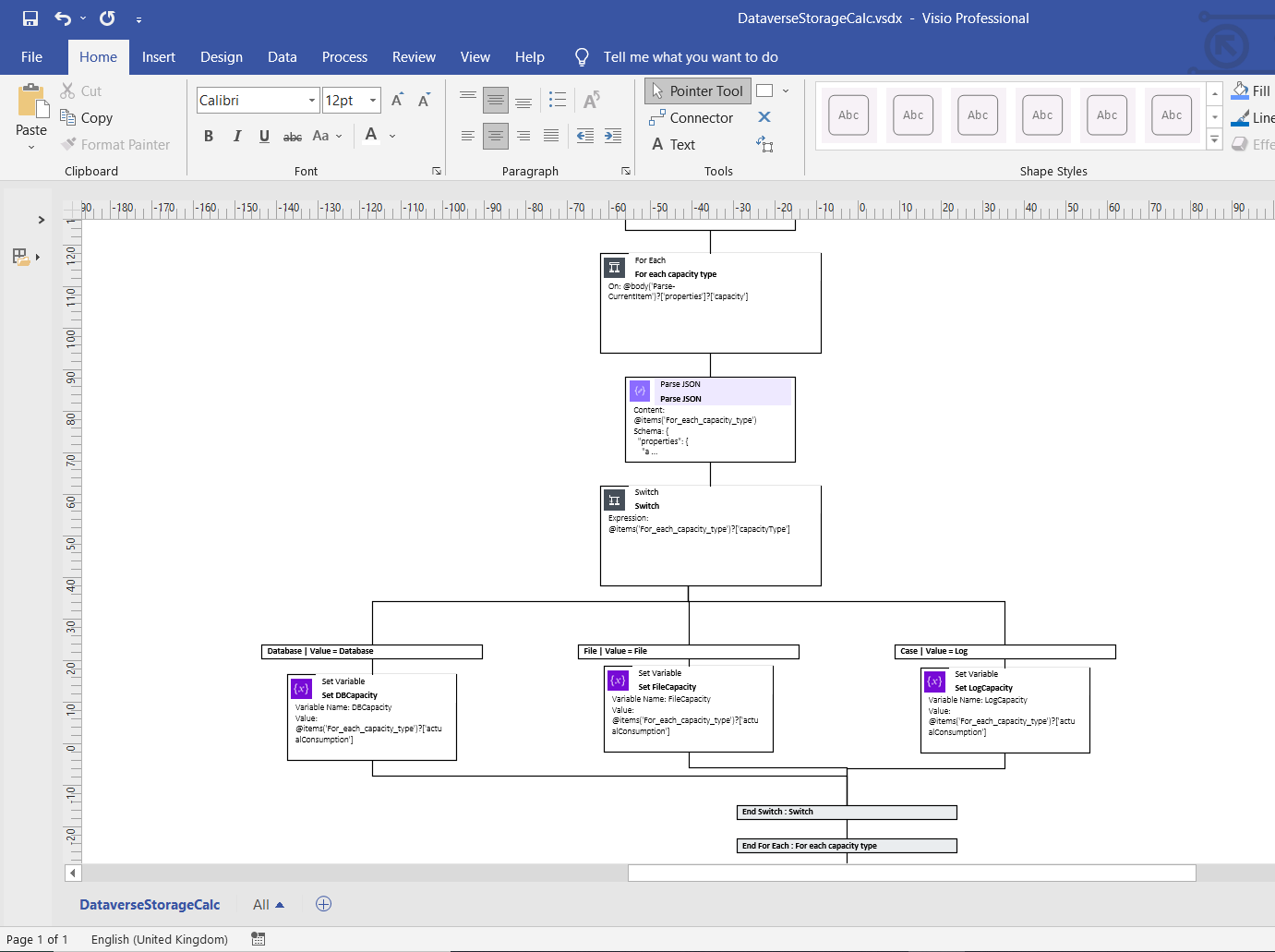
Last year I needed to document some rather complex Power Automate cloud flows and that's when I stumbled upon this great tool from Carl Cookson (aka @LinkeD365): the Flow to Visio XrmToolBox add-on. This XrmToolBox addon - XrmToolBox is the Swiss army knife for CRM  and Power Platform) consultants, check out https://www.xrmtoolbox.com/ for more info -  allows you to generate a Visio diagram for Power Automate Flows and Azure Logic Apps. Being able to generate Visio documents for Power Automate Flows is a great way to automatically generate a starting point for documentation. 

When you connect to a Dataverse instance, it will show you all of the different cloud flows. You can select one or more flows and simply click "Create Visio".


What I especially like about this tool that since the documentation is generated in Visio you can still clean up the output or remove parts of the flow in the Visio document which don't require explanation.


Note: You also might want to take a look at PowerDocu which contains 2 console apps you can use to document Power Automate Flows as well as Power Apps Canvas Apps

References:


Friday, April 29, 2022

Dynamics 365 and Power Platform monthly reading list April 2022


2022 Release Wave 1

Technical topics (Configuration, customization and extensibility)
Topics for Dynamics 365 Business Applications Platform consultants, project managers and power users

Friday, April 08, 2022

Reading and writing files in Azure Blob Storage with Python

Azure Blob storage is Microsoft's object storage solution for the cloud and allows you to store massive amounts of unstructured data, such as text or binary data at low cost for every scale. If you are not familiar with it, I can recommend taking a look at the Store data in Azure learning path on Microsoft Learn

Using Python in combination with Azure Blob Storage is quite easy using the azure-storage-blob client library for Python . You can set up a container with private access meaning that you will need to provide credentials to access the containers and the blobs contained within. The easiest way to do this is using a shared access signature (SAS) token. You can generate a SAS token from the Azure Portal.


To interact with the different parts of Azure  Blob Storage you will typically use the BlobServiceClient to work with the Azure storage account itself, the ContainerClient to work with a specific container and the BlobClient to work with a specific blob.  Below is the sample code which uses these different clients in a Jupyter notebook (based on Quickstart: Manage blobs with Python v12 SDK)   - you can find the full Jupyter notebook at tradingnotebooks/AzureBlobStorage.ipynb at master · jorisp/tradingnotebooks (github.com) 


 References:

Wednesday, March 23, 2022

Recreating an Azure Synapse Link for Dataverse connection

If you encounter an exception during the initial setup of Azure Synapse Link for Dataverse, it is best that you check in Azure Synapse workspace whether the lake database was only partially created. When you want to retry the configuration, you will first need to remove the lake database. 

Previously you had to manually write a script but Microsoft has now added a handy delete button which will generate an Azure Synapse Analytics notebook for you. To be able to run the script you will however need to setup a serverless Apache Spark pool


The smallest default configuration (4vCores/32GB) is sufficient to run this notebook - double check the pause settings of the Spark pool after the initial setup or just delete the pool if you don't to expect to need it anymore afterwards to save costs. 


Other blog posts on Azure Synapse and Dataverse:

Thursday, March 17, 2022

Storage capacity management for Dynamics 365/Dataverse - how to track storage evolution with Power BI

After the introduction of the new storage management model in Dataverse in April 2019, both Dataverse and Dynamics CRM Online are using a tiered storage model (separation between database capacity, file capacity and log capacity). 

Based on the number of licenses acquired, every customer has a specific storage capacity entitlement - you can find an overview of storage consumption within the Power Platform Admin Center - section 1 shows an overview of all storage types consumed across all environments (support and trial instances are excluded), section 2 shows the allocated capacity based on number of licenses or purchased additional capacity and section 3 shows the biggest environments. 


To see where Dataverse storage is being used across your environments, you need to click on the second tab. From this page you are also able to download a CSV file with storage allocations for all environments to which you have access. The information on this page is updated every 24 hours and unfortunately no historical data is available so it is quite hard to track storage evolution.


I currently track the evolution of storage by downloading this CSV file and storing the exported file on SharePoint - then it is quite easy to use Power BI to combine the CSV files and create your own Power BI report and dashboard based on the storage details. I added a screenshot of one of the report pages below, for those of you interested in this Power BI report send me a DM on @jopxtwits 


References:

Wednesday, March 09, 2022

Dynamics 365 and Power Platform monthly reading list February 2022

2022 Release Wave 1

Technical topics (Configuration, customization and extensibility)

Topics for Dynamics 365 Business Applications Platform consultants, project managers and power users

Thursday, February 03, 2022

Dataverse environmentid vs organizationid

Coming from a Dynamics CRM background, I mainly used the organizationid in the past (the organizationid is the unique identifier associated to a CRM instance). So having to use both organizationids and enviromentids isn't always easy,  and sometimes I still mix the two  - readability isn't a trait of GUIDS ... 


First some background on why we have two identifiers. With the July 2018 update of Dynamics CRM (version 9.0) Microsoft separated out the core platform features and the various business modules (Sales, Customer Service, etc...)  and this was also the point in time where CRM consultants where suddenly faced with a second identifier for a Dynamics CRM instance - the environmentid.

To find both the environmentid and organizationid of an instance, you open up the maker portal and select the developer resources link in the settings menu for an instance.


From this page you can find both the environmentid and organizationid - the Microsoft documentation still points to the legacy interface - Determine your environment's organization ID and name which starting from the maker portal requires quite a few additional steps ...

Tuesday, February 01, 2022

Quick note - refer to previous row in Power BI

 A number of good tips in this video on how to refer to a previous row in Power BI - I am not a Power BI expert but it got the job done - I just wanted to visualize Dataverse storage growth from one day to the next.


The grey area shows the forecast for the storage increase/decrease - for more info see Use the analytics pane in Power BI and  Introducing new forecasting capabilities in Power BI for Office 365 (dated but still relevant).