A great starting point if you are new to Azure Synapse Link for Dataverse is Scott Sewell's YouTube playlist on Azure Synapse Link for Dataverse

A great starting point if you are new to Azure Synapse Link for Dataverse is Scott Sewell's YouTube playlist on Azure Synapse Link for Dataverse
Microsoft is (finally) retiring SharePoint workflows - the end of an era of workflows built on top of Microsoft Workflow Foundation (Workflow Foundation got introduced in 2005 - and yes I did play around with the beta of this back then - since I though it was the greatest thing since sliced bread )

Starting April 2d 2024 all SharePoint 2013 workflows will be turned off for newly created tenants. April 2d 2026 all SharePoint 2013 workflows will stop working for existing tenants.

Helpful links:
You might already have seen below graph taken from a study by JP Morgan Asset Management, but what if you would like to look at historical returns without going through the hassle of having to collect all the data yourself?

There is an interesting Excel sheet shared by Aswath Damodaran (@AswathDamodaran) that you can download from Historical Returns on Stocks, Bonds and Bills: 1928-2022 which looks at returns of different asset classes (stocks, bonds, bills, real estate and gold) over a longer time period.
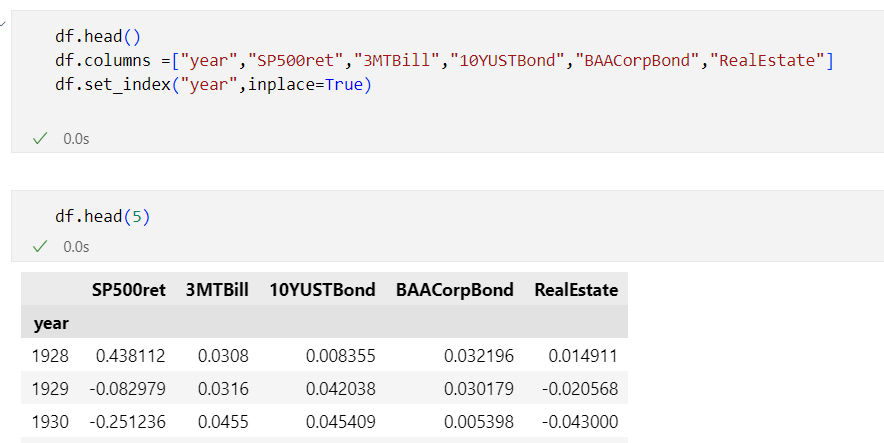
In this post I will share some tips on how you can use this data in Power BI, Python and Jupyter notebooks.
This Historical Returns on Stocks, Bonds and Bills: 1928-2023 - Excel file file is updated in the first two weeks of every year and it is being maintained by Aswath Damodaran, who is a professor of Finance at the Stern School of Business at NYU, he is also known as the "Dean of Valuation" due to his experience in this area.



Even though the Azure Functions runtime 2.0 and 3.0 were retired on December 13th, 2022 , I recently still found some Azure Functions using these older runtimes. See Azure Functions runtime versions overview which outlines the support for the different version.

Azure Functions that use runtime version 2.x or 3.x will continue to run but Microsoft is no longer providing updates or support for applications that use these versions. There a number of reasons why you should upgrade:
What is the Azure Functions runtime?
For those not so familiar with Azure Functions, the Azure Functions runtime is the engine that powers Azure Functions to execute user-defined code (written in . It is responsible for loading the user's code, executing it in response to specific triggers, and scaling the execution as needed to handle the workload. The runtime is a key component of the Azure Functions service, and it allows developers to focus on writing and deploying their code, rather than worrying about the underlying infrastructure.
How to find the Azure Functions runtime version?
When you log in to the Azure Portal and go to the Function runtime settings tab on the configuration page of an Azure function, you will see which runtime version is in use. Instead of having to look at every individual function, you might also take a look at the Azure Resource Graph


The new release planner for Dynamics 365 and Power Platform is awesome - check it out at https://aka.ms/releaseplanner . It allows you to track the features that are planned, coming soon or already available for trial. You have visibility across active release waves in a portal (built with Power pages) and you can personalize, filter and sort release plans when you sign in.

I recently setup a new free Azure DevOps organization but when I tried running my first pipeline - I got an exception "##[error]No hosted parallelism has been purchased or granted. To request a free parallelism grant, please fill out the following form https://aka.ms/azpipelines-parallelism-request".

It seems that Microsoft has made some changes in Azure Pipeline Grants for Private projects to prevent abuse as also outlined here Configure and pay for parallel jobs.

To be able to use the free Microsoft-hosted built agent, you will now need to fill in the form which was mentioned in the exception message - https://aka.ms/azpipelines-parallelism-request. Microsoft completed this request in 3 business days for me - which was in line with
Great update from Microsoft on the Dataverse developer plan - check out the new video from Power CAT team on Dataverse Environments for everyone - New Developer Plan - Power CAT Live on YouTube.
Interesting updates in the new developer plan:

Power Platform and Dynamics 365 release 2023 wave 1
Technical topics (Configuration, customization and extensibility)
Topics for Dynamics 365 Business Applications Platform consultants, project managers and power users
The 2023 release wave 1 announcements are now available:
Technical debt is an important concept to understand as a solution architect. As outlined in Thoughts about the Dynamics 365 solution architect role, a solution architect has to keep the long-term use of the solution in mind and implement scalability and adaptability into the solution for the future. This is where you will need to understand the concept of technical debt. Software design and development is full of metaphors to help non-technical people understand specific concepts - technical debt is one of them.

What is technical debt?
Technical debt is created by (un)conscious actions to take shortcuts in development or design of a software solution. These shortcuts are taken due to some short-term benefits such as faster delivery time, easier implement etc. ... but they have an impact on the longer term.
Having technical debt is like having financial debt, where time spent on this "not-quite-right implementation" counts as interest on the debt and paying the interest on the loan (the debt) might slow down the project/program in the long term.
You will see 3 types of technical debt in projects:It is important to grasp that technical debt is not always an indicator of low quality (but it might be). Technical debt happens because even though we do the best we can - given what we know - we subsequently learn better ways to solve a problem or better ways appear due to technical improvements in the underlying platform or technology stack. You probably heard the phrase "Ignorance is bliss" - well for technical debt this is not the case. The fact that nobody in a team has heard of technical debt should be treated as a red flag for software quality.
How to repay technical debt?
Regardless of the type of technical debt you accumulated, in the end you will always need to repay the technical debt to make sure that you don’t jeopardize your product evolution. If the cost to implement a certain change (be it a bug fix or adding an additional feature) keeps increasing over time, it might be an indicator that you have incurred technical debt on your project.

The first step is however making business aware of the existence of technical debt and the impact of it. I really like the ideas suggested in The Wall of Technical Debt on how to make technical debt visible. Building a regular habit of identifying technical debt and learning on how to negotiate with business on technical debt payoff is a good approach.
Keeping technical debt to a minimal is a team effort - make sure that delivering quality is engrained in the culture and way of working of the team.How to identify technical debt in your Dynamics 365 solution architecture?
As mentioned previously technical debt is automatically accumulated as changes are happening on the technical platform underpinning your solution. So I highly recommend to follow up on the important changes (deprecations) in Power Apps and Power Automate page and also on the Deprecation of Dynamics 365 apps page.
By writing code, you are automatically accumulating some amount of technical debt but there is tooling available to help you identify technical debt in your code and solutions:
References:
A couple of months ago, I stumbled upon this interesting presentation Jupyter Notebooks: interactive visualization approaches. The presentation showed how you can use bqplot to build interactive visualizations.
Bqplot contains a set of 2D plotting widgets built on top of the ipywidgets framework for Jupyter notebooks. The bqplot package aims to bring d3.js visualizations to Python while retaining the flexibility and ease of use of ipywidgets and was developed by the quantitative research team at Bloomberg. You can install bqplot using conda or pip.

One of the examples built by the team that you can find on Github is a Jupyter notebook which shows US equity market performance (using the S&P 500 index) where you can select an interval on a time series chart - for the selected area you get the total return as well as a histogram of the daily returns.
References:
A couple of weeks ago I got the question why I write a blog since it would be better to do a podcast or publish videos on technical content. In this post, I will explain why it is still a good idea to start blogging. I wrote my first blog post almost 18 years ago and got inspired by Robert Scoble (Scobleizer) who worked as a technical evangelist at Microsoft at that time and had a very popular blog. 1483 blog posts and almost 2 million views of these blogs I still consider it a good idea, since I think that a lot of good things have happened to me in my professional live because I decided to start my blog and share my thoughts on technology.

Starting a blog is an easy starting point for you to be active in the technical community. Sharing is caring might sound lame but it is a good credo to live by as an IT professional/consultant. In a professional context, most persons only know the people that they directly work with - colleagues or customers.
Blogging (but also Twitter and technical communities) allows you to expand that and suddenly there are people all over the world that you can learn from and they can learn from you. Suddenly you will realize there are others who face similar challenges. By sharing your experiences and offering advice to support, you can build a community of readers who value your experience. By writing good high-quality content on a regular basis, you can establish yourself as an expert in your field which in turn will help you build your personal brand and increase your visibility. Starting a blog is a lot easier than creating a video on YouTube or doing a podcast.
The most underrated skill to have in IT is the ability to communicate efficiently. Blogging is levelling that skill up. In an era where people mostly rely on PowerPoints slides for presenting a plan or a vision, it is quite refreshing to see them back it up with a well-written, solid document afterwards. I usually cringe when seeing poorly written documents or e-mails so I think that good writing skills will set you apart.
I think of a blog as a way to write notes to myself and you should too. Throughout your daily job, you are continuously solving problems: write about how you approached solving these problems and where you found helpful information. By writing your approach down, you will remember it better and it will be easier for you to find it later (and others will benefit of this as well).

The more you explain a concept or a topic to other people, the better you will get at understanding it yourself. This might sound strange but it is true, teach to learn. When you need to teach something, you are required to understand it in a deep and comprehensive way. The process of writing, will help your own understanding and requires you to think critically and find creative ways to present the topic which further enhances your understanding and retention of the information.
Even when you are learning something new, you are probably taking notes. Blog these notes, taking these notes. Rewriting them will help you understand the content much better, while it helps others too. If you think that everything is already written, do it for your own reference. If you find it useful yourself to go back to your blog, then it is OK. Don't fuzz to much about getting little visitors to your blog in the beginning.
References:
First post of 2023 - so let's close with last month's suggested reading list. If you want to catch up on previous reading lists for 2022 - here is the list:
Technical topics (Configuration, customization and extensibility)
Topics for Dynamics 365 Business Applications Platform consultants, project managers and power users


I am not a regular Power BI user, but every couple of months I will create some Power BI reports (e.g., Storage capacity management for Dynamics 365/Dataverse ) because Power BI is simply great to visualize and analyze data.

Unfortunately, I tend to forget - maybe very obvious things to frequent Power BI users - how to perform specific tasks in Power BI.
So here it goes - my list of reminders for the occasional Power BI creator.

In Explore and analyze stock ticker data in Azure data lake with Azure Synapse serverless SQL Pool, I showed you can download stock ticker data from Yahoo Finance, stored it in Azure Data Lake and retrieve the data using standard T-SQL in Azure Synapse Studio. In this post, I will show how easy it is to consume the data from Synapse SQL Serverless using Power BI.

For the standard visual with the evolution of the S&P 500 closing price, I connected directly on SP500 external table in the Synapse SQL. You can connect to Synapse SQL Serverless using either the Azure SQL Database or Azure Synapse Analytics SQL connector and you will need to enter the Serverless SQL endpoint which looks something like this <yoursynapse>-ondemand.sql.azuresynapse.net

With the second reported I want to visualize the S&P 500 yearly return and the average return since December 1927. To make it easier, I created a separate view on top of the external table which calculates the yearly returns


You can download the synapsestockdemo.pbix file and the benchmark.csv file from my Power BI repo on GitHub
References:
In this post, we'll learn what Azure Functions are, and how you can use VS Code to write your first Azure Function in Python code.
I will show how you can create a simple Azure Function which retrieves data from Yahoo Finance (See Using Python and Pandas Datareader to retrieve financial data - part 3: Yahoo Finance) and saves the retrieved data in a CSV file in Azure blob storage. I will be using the Python v1 programming model for Azure Functions since v2 is still in preview.
Introduction to Serverless and Azure Functions
More traditional forms of cloud usage require you to provision virtual machines in the cloud, deploy your code to these VMs, manage resource usage and scaling, keep the OS up to date and the underlying stack, setup monitoring, perform backups, etc...
But if you just want to deploy some piece of code which needs to handle some kind of event, serverless compute might be the right choice for you. With serverless compute, you can develop your applications, deploy it to the serverless service like Azure Functions and you don't need to worry about the underlying hosting architecture. Serverless compute is most of the time cheaper than PAAS or IAAS hosting models.

Several versions of the Azure Functions runtime are available - see Languages by runtime version for an overview which languages are supported in each runtime version. Python 3.7, 3.8 and 3.9 are supported by Azure Functions v2, v3 and v4.
How to create an Azure Function using Azure Portal
You can deploy an Azure Function from your local machine to Azure without leaving VS Code, but I would recommend doing it first using the Azure Portal to understand what VS Code is doing behind the scenes.
To create your Azure Function, click the Create a resource link on the Azure Portal home page and next select Function App.
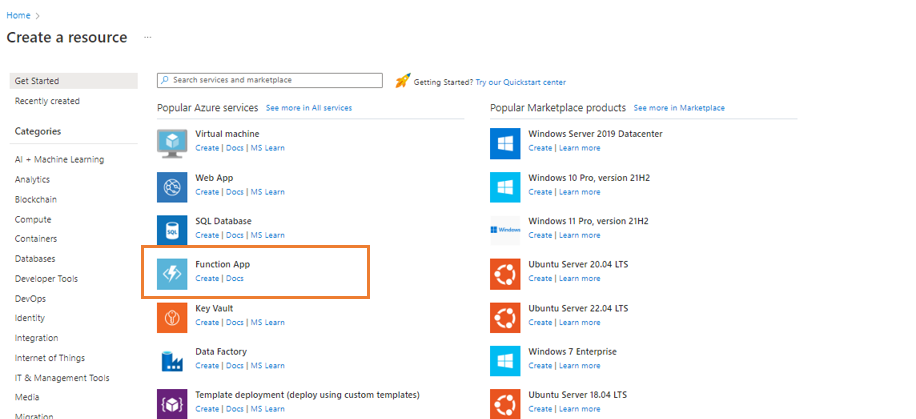
This brings us to the function creation screen, where we have to provide some configuration details before our function is created:


References:

