Lijst van ondersteunende video's bij het boek Procreate 5 Handleiding - tekenen op de ipad (Stefan de Groot, 2020)
Sunday, January 14, 2024


Tuesday, December 26, 2023
Running SSIS packages in Azure Data Factory - scaling and monitoring
Lifting and shifting SSIS packages to Azure Data Factory (ADF) can provide several benefits. By moving your on-premises SSIS workloads to Azure, you can reduce operational costs and the burden of managing infrastructure that you have when you run SSIS on-premises or on Azure virtual machines.
You can also increase high availability with the ability to specify multiple nodes per cluster, as well as the high availability features of Azure and of Azure SQL Database. You can also increase scalability with the ability to specify multiple cores per node (scale up) and multiple nodes per cluster (scale out) - see Lift and shift SQL Server Integration Services workloads to the cloud
To lift and shift SSIS packages to ADF, you can use the SSIS Integration Runtime (IR) in ADF. The Azure SSIS-IR is a cluster of virtual machines for executing SSIS packages. You can define the number of cores and compute capacity during the initial configuration (Lift and shift SSIS packages using Azure Data Factory on SQLHack)
Even though there is Microsoft article which explains how to Configure the Azure-SSIS integration runtime for high performance, there is not a lot of guidance of how to run it at the lowest possible cost but still being able to complete the jobs. So would you recommend a higher sizing running on a single node or running a lower sizing on multiple nodes? Based on experience, it seems perfectly possible to run most jobs on a single node and up until now we have been running all of them on a D4_v3, 4 cores, 16GB Standard. If you decide to run it on a lower configuration, it would recommend monitoring failures, capacity usage and throughput. (See Monitor integration runtime in Azure Data Factory for more details)

Reference:
- Configure the Azure-SSIS integration runtime for high performance
- Comparing SSIS and Azure Data Factory
Wednesday, November 29, 2023
Dynamics 365 and Power Platform monthly reading list November 2023
2023 Release Wave 2
- Dynamics 365 Customer Service: new dialer experience (preview) by @D365Goddess
- New sales capabilities in 2023 release wave 2 - helping sellers work smarter
- Dynamics 365 CRM Wave 2 Release: enhance categorization of knowledge search articles
- Configure sales Copilot for Dynamics 365 Sales (Preview) by @DianaBirkelbach
Technical topics (Configuration, customization and extensibility)
- Dataverse - use bulk operation messages (MS Learn) - CreateMultiple and UpdateMultiple are now GA! Read the small print to see when to use it
- Dataverse let's try elastic tables (preview) - by @temmy_raharjo
- Ways to deal with missing Power Platform environments by @inogic
- Edit subgrids side by side with Power Apps Grid or editable grid by @DianaBirkelbach
- Announcing monthly channel for model-driven apps
- Announcing general availability of custom connectors in solutions as well as environment variable secrets
- Announcing SharePoint Embedded Public Preview at ESPC23 - will be interesting to explore whether it is possible to combine this with Dynamics 365 data as an alternative for Power Pages. Head over to http://aka.ms/start-spe/ to start building your first SharePoint Embedded app.
- Dataverse + Azure Service Bus queue + Azure function for processing long operations
- Workflow automation in Dynamics 365 CRM: triggering actions on email send and receive events by @inogic
- August 2023 updates for modernization and theming in Power Apps
- Connecting to Dataverse from Function App using Managed Identity - using azd
- Power BI - Mastering sales calculations: a comprehensive guide to departmental analysis
- How to enable the enhanced email template editor in model-driven apps (Dynamics 365/Dataverse)
Copilots, AI and machine learning
- Write an email with Copilot in Dynamics 365 Customer Service by @nishantranacrm
- Getting your enterprise ready for Microsoft 365 Copilot (Ignite 2023 recording)
- Learn live: prepare, implement and secure Microsoft 365 Copilot (Ignite 2023 recording)
- New study validates the business value and opportunity of AI
- Architecture and deployment diagrams for Microsoft 365 Copilot
- Analyse the impact of AI-enhanced customer service with Copilot analytics
- What is prompt engineering? (McKinsey)
- Anti-hype LLM reading list
- Microsoft Chat Copilot vs Azure ChatGPT - which generative AI capability to choose for the enterprise
- Measuring the productivity impact of Generative AI (NBER digest)
- The power of prompting (Microsoft Research)
- Get started with Microsoft Copilot Studio: how to create your first Copilot by @lisacrosbie
- Use Copilot to summarize cases - Dynamics 365 Customer Service
Topics for Dynamics 365 Business Applications Platform consultants, project managers and power users
- Microsoft to make Dynamics 365 Marketing a part of D365 Customer Insights
- Customer Service in the age of AI
- Refresh the sales experience with Dynamics 365 Sales modern update
Sunday, November 26, 2023
Implementing Azure Synapse Link for Dataverse: gotchas and tips
Azure Synapse Link for Dataverse allows you to easily export data from a Dataverse (or Dynamics 365) instance to Azure Data Lake Storage Gen2 (ADLS) and/or Azure Synapse. Azure Synapse Link for Dataverse provides a continuous replication of standard and custom entities/tables to Azure Synapse and Azure Data Lake.
I highly recommend you to view the awesome YouTube playlist Azure Synapse Link and Dataverse - better together from Scott Sewell (@Scottsewell) as an introduction.

This blog post provides a number of tips & tricks but is not an exhaustive list - it is highly recommended to go through the links in the Microsoft documentation listed in the reference section below. You can also take a look at the presentation I delivered at Techorama in May 2023 which is available on Github - Azure Synapse Link for Dataverse from 0 to 100
1. Check the region of your Dataverse/Dynamics 365 instance
The configuration of Azure Synapse Link for Dataverse is done through the Power Platform maker portal but before you can get started you should first setup Azure Data Lake Storage Gen2 and Azure Synapse in your Azure subscription.
It is however best that you first check in the configuration screen in which region your instance is located since the storage account and Synapse Workspace must be created in the same region as the Power Apps environment for which you want to enable Azure Synapse Link. From the PPAC user interface it is currently not possible to create a Dataverse/Dynamics 365 instance in a specific region but this is possible with the PowerShell - see Creating a Dataverse instance in a specific Azure region using Power Apps Admin PowerShell module.
If you need to move a Dataverse or Dynamics 365 instance to a different Azure region, you can open a Microsoft support tickets. Based on recent experience this specific type of Microsoft support request is handled fairly quickly (within 1-2 business days).
Azure Data Lake Storage is a set of capabilities, built on Azure Blob Storage. When you create a storage account and check the "enable hierarchical namespace" checkbox on the advanced tab, you create an Azure Data Lake Storage Gen2.

2. Make sure all prerequisites are in place before enabling Azure Synapse Link
Definitely make sure that all security configuration outlined on Create an Azure Synapse Link for Dataverse with your Azure Synapse Workspace (Microsoft docs) are correctly setup. The exception messages which are shown in the Azure Synapse Link configuration pages aren't always very helpful.
3. Azure Synapse Link for Dataverse is a Lake Database
In the documentation from Microsoft (Understand lake database concepts) a lake database is defined as:
A lake database provides a relational metadata layer over one or more files in a data lake. You can create a lake database that includes definitions for tables, including column names and data types as well as relationships between primary and foreign key columns. The tables reference files in the data lake, enabling you to apply relational semantics to working with the data and querying it using SQL. However, the storage of the data files is decoupled from the database schema; enabling more flexibility than a relational database system typically offers.

The data is stored ADLS Gen2 in accordance with the Common Data Model (CDM) -the folders used conform to well-defined and standardized metadata structures (mapped 1:1 with Dataverse tables/entities). At the root you will see a metadata file (called model.json) which contains semantic information about all of the entity/table records, attributes and relationships between the tables/entities.
The way the files are being written depends on the Azure Synapse Link for Dataverse configuration - both the partitioning mode and in place vs append only mode can be configured - see Advanced Configuration Options in Azure Synapse Link
4. Synapse Link for Dataverse uses passthrough authentication using ACLs in Azure Data Lake - no support for SQL authentication
Since all the the data for the tables in Azure Synapse Link for Dataverse are CSV files which are stored in Azure Data Lake Storage, this also means that security needs to be set at the level of the files in Azure Data Lake Storage Gen2. There is no support for SQL authentication in the Lake DB which is created by Azure Synapse Link for Dataverse.
References:
- Use the Common Data Model to optimize Azure Data Lake Storage Gen2 (Microsoft docs)
- Create an Azure Synapse Link for Dataverse with your Azure Synapse Workspace (Microsoft docs)
- Azure Synapse Link for Dataverse - understanding advanced configuration settings (Microsoft docs)
- Do more with data - from Data Export Service to Azure Synapse Link for Dataverse (Microsoft docs)
- Use Power BI to analyze the CDS data in Azure Data Lake Storage Gen2
- Synapse Link for Dataverse - Option Sets
- Dataverse metadata in Synapse
- Setting up Azure Synapse Link for Dynamics 365/Dataverse
- Power BI modeling guidance for Power Platform
- Azure Synapse Serverless SQL Pools cheat sheet
- Controlling cost with Azure Synapse Serverless Pools
Wednesday, November 22, 2023
Near real-time and snapshots in Azure Synapse Link for Dataverse
The Azure Synapse Link for Dataverse documentation contains a section about Access near real-time data and read-only snapshot data but it does not really explain why you want to use one or the other.
When you open an Azure Synapse SQL Serverless LakeDB in SQL Server Management Studio you see a clear distinction between the two versions of the table data - whereas in Azure Synapse Studio there is no obvious distinction besides the name you will see the "account" table the "account_partitioned" view:
- Near real time data: external table for all the underlying CSV files exported by the Azure Synapse Lin for Dataverse sync engine. There is a soft SLA for the data to be present in these tables within 15 minutes
- Snapshot data/partitioned views: views on top of the near-real time data which are updated on an hourly interval.

In most scenarios, it best to do queries against these partitioned views since you will avoid read conflicts and you are sure that a full transaction has been written on the CSV files in Azure Data Lake storage.
A typical exception that you might receive when doing queries directly against the "tables" is "https://`[datalakestoragegen2name].dfs.core.windows.net$$/[lakedbname]/[tablename/Snapshot/2023-05_1684234580/2023-05.csv" does not exist or you don't have file access rights)" but this also depends on your specific context. If you have a lot of create, updates or deletes on Dataverse tables this might happen more regularly. Even though, the partitioned views are update on an hourly basis - it might be that the Synapse Link engine is just refreshing the views at the same point that you perform a query, which will give you a similar exception but the changes that this occurs are more rare.
You can check the last sync timestamp and sync status in the Power Platform maker portal (see screenshot below)

For the moment, you will also have to manually check the monitoring page (which can be quite tedious if you have a lot of environments) but there is an item in the Microsoft release planner "Receive notifications about the state of Azure Synapse Link for Dataverse" which is apparently in public preview but I haven't seen it in for environments (not in the https://make.powerapps.com and also not in https://make.preview.powerapps.com/) I have access to.

It is also not easy to see if something went wrong with the refresh of the partitioned views - up until now the easiest way to find out is running a SQL query - select name,create_date from sys.views order by create_date desc against the LakeDB.
Monday, November 20, 2023
Procreate video series
Procreate Beginners video series
The Beginners Series is a four-part guide to Procreate, the award-winning digital art app for iPad. Ideal for people new to Procreate, and with plenty of extra tips for advanced artists.
Friday, November 17, 2023
Quick tip: SQL Server Management Studio 19 supports AAD service principal authentication
SQL Server Management Studio 19.x and higher now allows you to login to SQL using Azure Active Directory application ids and secrets - nice improvement and a reason for me to upgrade.

Thursday, October 12, 2023
Quick tip: prevent automatic deletion of an inactive Microsoft Dataverse environment
A couple of months ago Microsoft activated Automatic deletion of inactive Microsoft Dataverse environments. To avoid that an environment gets deleted, sign in to the Power Platform Admin Center (PPAC) and select the environment. On the environment page, select Trigger environment activity.

Thursday, September 14, 2023
We don't talk about storage
When designing a solution using Dataverse or Dynamics 365 CE - Dataverse storage is rarely one of the hot topics and probably most of the times overlooked. In this post I will dive a little deeper into Dataverse storage architecture and why it is important to discuss this during a Dynamics 365 CE or Dataverse implementation

Fundamentals of Dataverse storage architecture
Since April 2019, both Dataverse and Dynamics 365 CE (Online) use a tiered storage model. This means that different data types in Dataverse are stored in the most optimal storage type. Azure files and blobs are used for attachments, relational data (tables) is stored in Azure SQL, audit logs are stored in Azure Cosmos DB, search is powered by Azure Cognitive Services, etc ....
From an end user perspective, this is completely transparent and administrators don't need to manage all of these underlying Azure components since Microsoft takes care of all of this.
Microsoft has however different pricing schema's for these underlying storage types and the price difference is quite significant. You can follow up on the storage capacity in the Power Platform Admin Center. Based on the number of licenses inside your tenant, you will get a specific capacity entitlement for database, file and logs. (See New Microsoft Dataverse storage capacity > verifying your new storage model for more details)
Understanding the cost impact
Database storage in Dataverse comes at a premium price tag. Usually you don't notice this unless you will need to buy additional storage (see What Dataverse capacity is included with the Power Apps and Power Automate plans? for how much additional storage you get with additional licenses).

(1) Pricing based on the list price shown in my personal tenant - August 2023. Prices may vary depending on your licensing agreement. If you buy additional eligible licenses you will also get additional storage allocated, it is also possible to use Power Platform Pay-as-you-go plans instead of buying license but the capacity pricing using PAYG is even higher.
You need to buy additional storage capacity if you are over the allocated storage capacity since storage capacity is being enforced - if you exceed storage capacity you will not be able to create a new environment (requires a minimum of 1 GB capacity) but also copy, restore and recovery operations will be blocked.
Archiving and data retention policies
Besides the impact on your budget of retaining all data in Dataverse (or Dynamics 365) forever - you however also need to consider the potential security and legal risk. Best practices dictate that data should only be kept as long as it is useful or as long as you are legally allowed to retain it - GDPR mandates to define specific data retention period's for personal data.
Defining a data retention policy helps businesses reduce legal risks, security threats and also reduce costs. Data retention policies contain the data retention period and the required actions to take when this period lapses. You should have a data retention period defined for each of entities/tables in use for your Dataverse environment.
In July 2023 finally released Dataverse long term data retention overview in public preview. This feature allows you to create a view on Dataverse tables/entities for data that you need to retain for a longer period. The view is used as a selection criteria to define which data is moved to long term archive storage in a Microsoft managed data lake. With this feature, you might be able to use out of the box functionality instead of having to built your own custom solution.. This functionality is still in preview and should not be used on production - also keep in mind that no pricing details are available yet (they will be announced around the GA timeframe). In a upcoming post I will delve a little deeper into the archive/long term data retention functionality but you can already take a look at Early dive into Dataverse Long Term Retention

Related posts and references:
- Storage capacity management for Dynamics 365/Dataverse - how to track storage evolution with Power BI
- Inside Dataverse Data Storage -Power CAT Live YouTube video
- Cost optimization: older mails in Dataverse now stored in Dataverse file storage
- Storage capacity management for Dynamics 365/Dataverse - how to track storage evolution with Power BI
Monday, August 07, 2023
Reducing size of the SubscriptionTrackingDeletedObject in Dynamics 365 CE or Dataverse
When you delete a large amount of data from Dynamics 365 CE or Dataverse, you will notice that the total storage consumed does not decrease. This is because the SubscriptionTrackingDeletedObject table stores deleted records from the Dynamics 365 database. This table is used to track deleted records for replication and synchronization purposes and records are being kept by default for quite a large amount of time.
When recently encountering this problem, Microsoft support suggested us to reduce the number of days the records are kept in the table from the default 90 to 15 days - to do this take the following steps:
- Install the latest version of the OrganizationSettingsEditor solution which you can download from https://github.com/seanmcne/OrgDbOrgSettings/releases (The OrgDBOrgSettingsTool dates back to Dynamics CRM 2011 but is being maintained by Sean McNellis and is still quite relevant)

- Change the ExpireChangeTrackingInDays and ExpireSubscriptionsInDays from the default setting of 90 days to 15 days. In sandbox environments, you might be able to change this value to 0 but for production environments Microsoft recommended to keep it on a minimum of 15 days. The OrgDBSettings utility utilizes the solution configuration page to provide access to the editor (in classic mode) - see OrgDBOrgSettings - where to find it after installing? for details.

Afterwards - just keep patient until the lapsed number of days have been passed and then you should see a size in reduction for the SubscriptionTrackingDeletedObject
Friday, July 21, 2023
Dynamics 365 and Power Platform monthly reading list July 2023
2023 Release Wave 2
- Dynamics 365, Viva Sales (aka Microsoft Sales Copilot) and supply chain platform: 2023 release wave 2 plan - early access will be available on July 31th
- Microsoft Power Platform: 2023 release wave 2 plan
- Power Platform 2023 Release Wave 2 Highlights (YouTube)
- Dynamics 365 and Power Platform 2023 Release Wave 2 highlights (YouTube)
- Dynamics 365 Customer Service 2023 Release Wave 2 highlights (YouTube)
Technical topics (Configuration, customization and extensibility)
- ALM for Power Platform (March 2023 Washington user group recording)
- Analyse your solution dependencies in Dataverse with VSCode "PowerApps Helper" extension built by @MMe2K (Michael Megel)
- Power Apps Copilot (preview) feature ... Friend or Foe? (YouTube) by @dchristian19
- Azure Cost Management Power BI report (Github)
- Codename Project Bose: Calculate Azure Cost of an enterprise by cost centers, divisions and projects
- KQL Visualizations (YouTube)
- How to use invitation id of Customer Voice Survey invitation in Power Automate Flow by @inogic
- Use the Customer 360 component in Dynamics 365 Customer Service by @D365Goddess
- Additional capabilities in timeline view with Dynamics CRM
- Optimize performance for Create and Update operations (Microsoft Docs) - interesting update for data migration scenario using CreateMultiple and UpdateMultiple operations
- Dataverse long term data retention is finally available in preview - no info available yet on whether retained Dataverse records (offloaded to Data Lake) will still be billed at the same price as Dataverse storage.
- The Dataverse Accelerator is live on AppSource: https://aka.ms/dvaccelerator
- Discover the biggest Power Platform Announcements from Microsoft Build 2023 (YouTube) by @LisaCrosbie
- Azure Synapse Link for Dataverse : exporting to Delta Lake
- Kusto Detective Agency - learn KQL by playing a detective game
- Power Apps Data Sources Ranked! Which is best? YouTube video by Shane Young (@ShanesCows)
- New card visual in Power BI and Create a sparkline in the new card visual
- Take Customer Service to new heights with cross-geo support for Copilot
- Announcing monthly (release) channel for model-driven apps - release channels provide more choice for adopting new features. It seems that Dynamics 365 and Power Platform will allow to get features activated on a monthly basis
- Announcing public preview of IP firewall in Dataverse - only available for managed environments
- Microsoft Copilot readiness hub
- The importance of Orderby when retrieving more than 50K records from Dataverse
- Start using Azure Cost Management
Topics for Dynamics 365 Business Applications Platform consultants, project managers and power users
- Introducing Microsoft Dynamics 365 copilot
- Copilot in Viva Sales
- Dynamics 365 Implementation Portal now available
- A report on Global State of Customer Service sophistication
- Reshaping the future of business with Microsoft Sales Copilot, Dynamics 365 Customer Insights and a new cloud migration program
- Introducing AIM from Microsoft: Future-proof your business in the cloud
Wednesday, June 28, 2023
Cost optimization: older mails in Dataverse now stored in Dataverse File Storage
Back in April 2019, Microsoft introduced a tiered storage architecture. This tiered storage architecture allows Microsoft to use the most appropriate storage type for different types of data used in Dynamics 365 and Dataverse. Last month, Microsoft started moving the storage contents of the e-mail body (email.description) from more expensive Dataverse Database storage to cheaper Dataverse File Storage - for the official documentation check out Dataverse - Email activity tables -Email storage.

Based on the list prices I see in my personal tenant (see screenshot below) - this cuts the unit cost for additional capacity required for e-mails down from 37,4 €/GB/month to 1,87€/GB/month (Quite interesting how they still use the older name Common Data Service :-) )
Your pricing might defer based on the type of licensing agreement that you have. If you had to buy additional storage capacity in the past, you might want to revise your storage usage and the required storage capacity add-ons.

You can check out the storage capacity in the Power Platform Admin Center - I added an example from a specific instance were Dataverse storage for e-mails (see ActivityPointerBase table) from 63 GB to 30GB.

A the same time, we saw a new storage file type appearing called Email which grew to 3,8 GB. This is a lot less than the storage saved in the database since the data in file storage (Azure Blob Storage behind the scenes) is actually compressed.

All in all, a great job from Microsoft which might save you a lot of money. Don't hesitate to add a comments sharing your experience with this....
Friday, June 02, 2023
Microsoft Fabric Firehose
Microsoft Fabric generated quite a buzz after the announcements at Microsoft Build last week but it feels a lot like drinking from a firehose. (If you can't get enough check out the Microsoft Build 2023 - Book of News)

Microsoft documentation:
Besides the official announcements from Microsoft (which have a certain marketing fluffiness) it might make sense to check out the list of unofficial resources below.
Link collection:
- Ask me Anything about Microsoft Fabric (Reddit)
- Getting started with Data Pipelines in Fabric Data Factory by radacad
- Microsoft Tutorial: Fabric for Power BI users
- What is Microsoft Fabric my point of view by PaulAndrew
- Why Microsoft is combining all its data analytics products into Fabric by @Infoworld
- What is Microsoft Fabric (Public Preview) on YouTube by @guyinacube
- Microsoft Fabric Launch Event (Day1) recording on YouTube (3h:20m) and Microsoft Fabric Launch Event Day 2 on YouTube ( 2h:25m)
- Azure Synapse Analytics versus Microsoft Fabric: a side by side comparison
- Killing me softly has Microsoft Fabric just overwritten Synapse Analytics?
- Eliminate data siloes with Fabric and Dynamics 365 (Dataverse announcements)
- Advancing Fabric - What is Microsoft Fabric? on YouTube (19m)
- Microsoft Fabric introduction blog post by by Advancing Analytics (@AdvAnalyticsUK) / Twitter
- Overcoming the Fear: exploring Microsoft Fabric from a Power BI angle
- Microsoft Fabric - Power BI announcements a visual overview
- Microsoft Fabric YouTube series
- How Microsoft Fabric aims to beat Amazon and Google in the cloud war by @Venturebeat
- How Lakehouse architecture is revolutionizing Business Intelligence
- Microsoft Fabric introduction video by @jameserra
- What is Microsoft Fabric and why should I care? by @NickyvV
- Unleashing the power of Microsoft Fabric for data engineers (YouTube) - great demo by Justyna Lucznik of the data engineering capabilities in under 10 minutes
- Microsoft Fabric Licensing: an ultimate guide by @RADACAD_COM
- Create your first Lakehouse in Microsoft Fabric (YouTube) by guyinacube
- Microsoft Fabric Notes - simple drawings illustrating the main concepts of Microsoft Fabric
- Microsoft Fabric in production - placeholder blog with list of features that @MrAndyCutler considers needed before using Microsoft Fabric in production.
- Lakehouse vs Warehouse vs Datamart - the difference between the three Fabric objects by @RADACAD_COM
- Fabric end-to-end use case: overview and architecture
- How to pause or start Microsoft Fabric Capacity automatically
Friday, April 28, 2023
Azure Synapse Link for Dataverse playlist by Scott Sewell
A great starting point if you are new to Azure Synapse Link for Dataverse is Scott Sewell's YouTube playlist on Azure Synapse Link for Dataverse

Friday, April 21, 2023
SharePoint 2013 workflow retirement - the end of an era
Microsoft is (finally) retiring SharePoint workflows - the end of an era of workflows built on top of Microsoft Workflow Foundation (Workflow Foundation got introduced in 2005 - and yes I did play around with the beta of this back then - since I though it was the greatest thing since sliced bread )

Starting April 2d 2024 all SharePoint 2013 workflows will be turned off for newly created tenants. April 2d 2026 all SharePoint 2013 workflows will stop working for existing tenants.

Helpful links:
Tuesday, April 18, 2023
Looking at historical returns of stocks and bonds with Power BI and Python
You might already have seen below graph taken from a study by JP Morgan Asset Management, but what if you would like to look at historical returns without going through the hassle of having to collect all the data yourself?

There is an interesting Excel sheet shared by Aswath Damodaran (@AswathDamodaran) that you can download from Historical Returns on Stocks, Bonds and Bills: 1928-2022 which looks at returns of different asset classes (stocks, bonds, bills, real estate and gold) over a longer time period.
In this post I will share some tips on how you can use this data in Power BI, Python and Jupyter notebooks.
This Historical Returns on Stocks, Bonds and Bills: 1928-2023 - Excel file file is updated in the first two weeks of every year and it is being maintained by Aswath Damodaran, who is a professor of Finance at the Stern School of Business at NYU, he is also known as the "Dean of Valuation" due to his experience in this area.
Visualizing S&P 500 and US Treasury bond returns using Power BI
I first converted the Excel from xls to xlsx format and afterwards it is quite easy to import the data from an Excel workbook files in Power BI . It is quite easy to visualize the returns of both stocks and US treasury bonds using a clustered column chart - I also added a minimum line for both stock and bond returns.
Expected risk and expected return should go hand in hand: the higher the expected return, the higher the expected risk. Risk means means that the future actual return may vary from the expected return (and the ultimate risk is loosing all of your assets). The first visual showed a 20-year annualized return between 1999 and 2018 for the S&P 500 of 5.8%. Average returns hide however the big swings in yearly returns - e.g. in 2008 (the Great Financial Crisis), the S&P 500 had a -36.5% yearly return. Bonds on average have a lower return but also have a lower risk profile.
The basic rule of thumb is to keep your “safe money” (i.e., money you don’t want to risk in stocks) in high-quality bonds. While this doesn’t give you 100% protection against losses at all times, it does provide you some peace of mind. I really like this quote: "If you can't sleep at night because of your stock market position, then you have gone too far. If this is the case, then sell your positions down to the sleeping level. (Jesse Livermoore)"
As you can see in the visualization below, in most years with a negative return for the S&P 500, the return for bonds is positive - with two notable exceptions 1969 and 2022. A common saying is to have your age in bonds. Using that general rule, a 45-year-old might have 45% of the total portfolio in bonds. If you want to more aggressive, you would have less than your age in bonds. The last decade with interest rates very low (or even negative) this probably wasn't a very profitable asset allocation but
things might have shifted.

The US Treasury Bond used in the Excel file is the 10-year US treasury bond for which you can download the data from FRED . The yearly return has been calculated by taking the yield and the price change for a par bond with that specific yield.
In the long run (see example below for different rolling windows from a 1-year to a 20 year period) stocks will outperform bonds but this again works with averages and it ignores the tail risk which might wreak havoc in your portfolio.

Reading data from Excel using Python
Now let's take a look at how you can read and manipulate the data in this Excel sheet using Python. To read an excel file as a DataFrame, I will use the pandas read_excel() method. Internally, Pandas. .read_excel uses a library called xlrd which you also need to install but I used the openpyxl library as an alternative which also works. So before you can read an excel file in pandas, you will need to install
the openpyxl library.

The above code reads only the table with data from the Excel file (which I downloaded in a subdirectory data from the Jupyter notebook) - see pandas.read_excel in the Pandas referencel documentation for full details:
- sheet_name: can be an integer (for the index of a worksheet in an Excel file, default to 0, the first sheet) or the name of the worksheet you want to load
- nrows: number of rows to read
- skiprows: number of rows to skip
- usecols: by default all columns will be read but also possible to pass in a list of columns to read into the dataframe like in the example
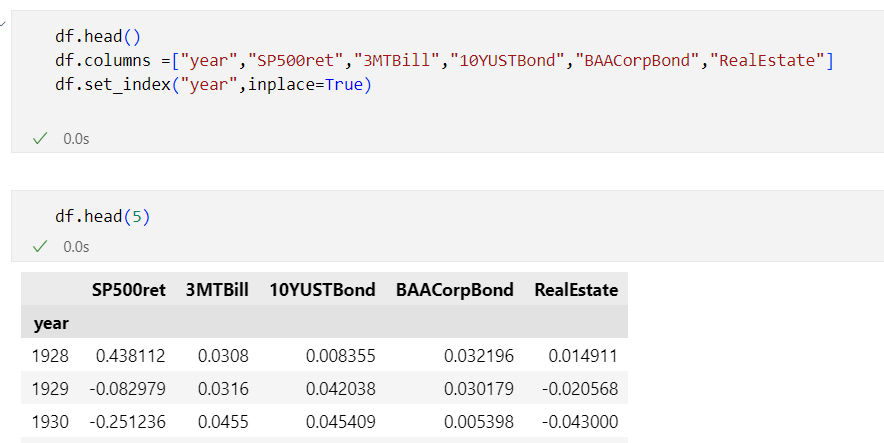
I just started exploring some data around stock-bond correlations and will be updating the Juypyter notebook on Github - https://github.com/jorisp/tradingnotebooks/blob/master/HistoricalReturns.ipynb
A couple of weeks ago I noticed this interesting tweet on rolling one-year-stock-bond correlations for six regimes from @WifeyAlpha - I think it would make an interesting exercise to see how to rebuild this using Python.

References:
- Pandas – read_excel() – How to read Excel file in python
- Musings on markets: a return to teaching - the Spring 2023 Edition
- Guide to the Markets | JP Morgan Asset Management
Related posts:
- Interactive chart visualizations using Python and bqplot: visualizing S&P500 returns
- Using the yFinance Python package to download financial data from Yahoo Finance - part 2
- Using the yFinance Python package to download financial data from Yahoo Finance
- Using Python and Pandas Datareader to retrieve financial data - part 2: Fama & French data library
- Using Python and Pandas Datareader to retrieve financial data - part 1: Federal Reserve Data (FRED)
Wednesday, March 22, 2023
Upgrade to Azure Functions runtime v 4.x
Even though the Azure Functions runtime 2.0 and 3.0 were retired on December 13th, 2022 , I recently still found some Azure Functions using these older runtimes. See Azure Functions runtime versions overview which outlines the support for the different version.

Azure Functions that use runtime version 2.x or 3.x will continue to run but Microsoft is no longer providing updates or support for applications that use these versions. There a number of reasons why you should upgrade:
- Leverage the support for the latest programming languages such as .NET 6 and Node 16. Take the opportunity to upgrade your code to .NET 6 since .NET 6 includes a lot of performance improvements
- To make sure that you keep getting security updates
- Be future proof and keep technical debt to a minimum (See Technical debt and Dynamics 365 solution architecture for my view on this)
What is the Azure Functions runtime?
For those not so familiar with Azure Functions, the Azure Functions runtime is the engine that powers Azure Functions to execute user-defined code (written in . It is responsible for loading the user's code, executing it in response to specific triggers, and scaling the execution as needed to handle the workload. The runtime is a key component of the Azure Functions service, and it allows developers to focus on writing and deploying their code, rather than worrying about the underlying infrastructure.
How to find the Azure Functions runtime version?
When you log in to the Azure Portal and go to the Function runtime settings tab on the configuration page of an Azure function, you will see which runtime version is in use. Instead of having to look at every individual function, you might also take a look at the Azure Resource Graph

Monday, March 20, 2023
Notes and links for the DP-900 Microsoft Azure Data Fundamentals
As providing reporting and analytics capabilities in a Dynamics 365 solution is becoming increasingly important I decided to brush up my knowledge about available technologies and patterns in the data area. I think that taking a certification exam is a good way to get started on such a broad topic and it also allows you to set a clear goal. So end of last year, I finally took the DP-900: Microsoft Azure Data Fundamentals exam.

Whenever you want to attain a Microsoft certification, the first place to start is always the study guide which you can find on the certification home page. Another interesting addition from Microsoft is the ability to take a practice assessment for DP-900 (link is listed on the certification home page - there is also a full list of all practice assessments for Microsoft Certifications. Listed below are some of the links and resources that I used - mainly on topics where I had less hands-on experience - so this is definitely not an exhaustive list.
YouTube videos playlists
Describe core data concepts
Describe capabilities of Azure storage
Describe capabilities and features of Azure Cosmos DB
Describe relational Azure Data services
- Features comparison: Azure SQL Database and Azure SQL Managed Instance
- Azure SQL Database security features
- Aggregate functions (Transact-SQL)
- SQL Tools overview: Azure Data Studio, SQL Server Management Studio (SSMS), SQL Server Data Tools (SSDT) and mssql extension for VS Code and command line tools
- What is Azure Data Studio?
- Clustered and non-clustered indexes described
Describe common elements of large-scale analytics
Describe data visualization in Microsoft Power BI
Friday, March 17, 2023
Quick tip: use the new release planner for Dynamics 365 and Power Platform to track and planning upcoming changes
The new release planner for Dynamics 365 and Power Platform is awesome - check it out at https://aka.ms/releaseplanner . It allows you to track the features that are planned, coming soon or already available for trial. You have visibility across active release waves in a portal (built with Power pages) and you can personalize, filter and sort release plans when you sign in.

Thursday, March 16, 2023
Quick tip: resolving no hosted parallelism has been purchased or granted in Azure DevOps
I recently setup a new free Azure DevOps organization but when I tried running my first pipeline - I got an exception "##[error]No hosted parallelism has been purchased or granted. To request a free parallelism grant, please fill out the following form https://aka.ms/azpipelines-parallelism-request".

It seems that Microsoft has made some changes in Azure Pipeline Grants for Private projects to prevent abuse as also outlined here Configure and pay for parallel jobs.

To be able to use the free Microsoft-hosted built agent, you will now need to fill in the form which was mentioned in the exception message - https://aka.ms/azpipelines-parallelism-request. Microsoft completed this request in 3 business days for me - which was in line with
Subscribe to:
Posts (Atom)